AudioThing The Orb
Precio€55.12
Incl. IVA
Descarga instantánea
Este anuncio ha terminado
Ver equipos similares de otros vendedores de Reverb
Publicado:hace más de un mes
Visitas:4.773
Guardados:31
Ofertas:7

Chicago, IL, Estados Unidos
Nuestros usuarios valoran Reverb
Formant Filter - Manipulate your tracks like never before with this highly capable vowel-izer.
What it is:
A formant filter plugin simulating the human voice.
How we use it:
From guitar, vocals, and beyond, The Orb has infinite uses.
Why it’s cool:
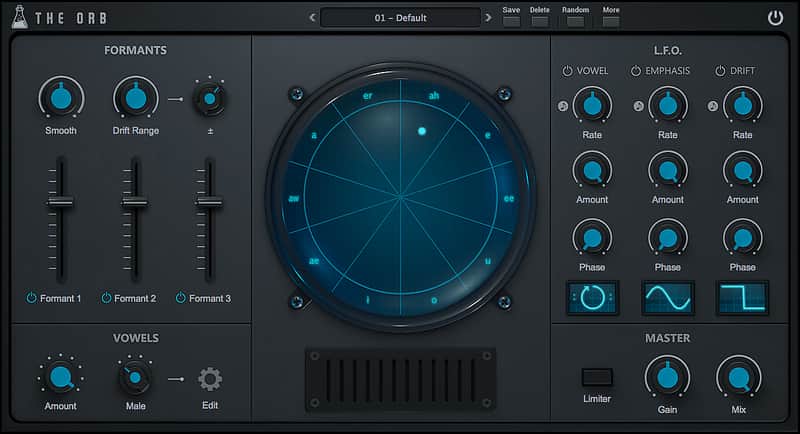
The ability to ‘create your own set of vowels’ makes for a recipe of originality.The Orb is a formant filter plugin which simulates the characteristics of the human voice. Featuring a set of three band pass filters, The Orb can transform any sound into a vowel-like formant-filtered sound. With the three LFOs you can modulate the Vowel, the Emphasis/Resonance of the formants, and the Drift, which can shift up or down the frequencies of each formant. You can also create your own set of vowels by changing name and frequency for each vowel/formant.
The Orb
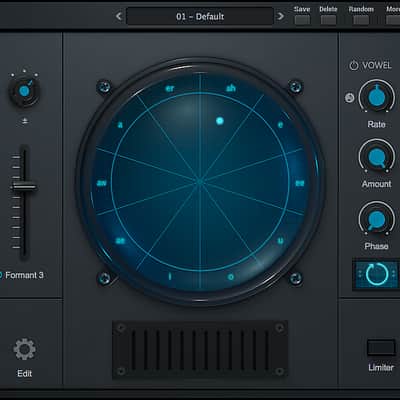
Each sector of the orb represents a Vowel. It’s possible to change the vowel for each sector by clicking on the vowel name.
The distance from the center of the orb to the dot represent the amount of Emphasis (resonance) for each formant filter.
The angle inside each sector represent the amount of Drift, which is an amount in Hz that will be added or subtracted from each vowel formant.
Custom Vowels
Clicking on the Edit button in the Vowels section, you can access the Custom Vowels window.
It’s possible to change each vowel name and frequency for the three formants.
Each custom vowels set will be saved in a preset (or DAW session), so you can create as many as you want by saving to a new preset.
The default set is the same as the Male genre settings.
Specifications:
Compatibility
Minimal Requirements:
Installation Instructions
Instructions:
- Register your account here: https://www.audiothing.net/account/signup/
- Confirm your email address and log in here: https://www.audiothing.net/account/
- Click on the "Redeem code" page to get the installers and license
How to use installed plugins in Ableton Live: https://www.youtube.com/watch?v=N2VjFjUhlR4
What it is:
A formant filter plugin simulating the human voice.
How we use it:
From guitar, vocals, and beyond, The Orb has infinite uses.
Why it’s cool:
The ability to ‘create your own set of vowels’ makes for a recipe of originality.The Orb is a formant filter plugin which simulates the characteristics of the human voice. Featuring a set of three band pass filters, The Orb can transform any sound into a vowel-like formant-filtered sound. With the three LFOs you can modulate the Vowel, the Emphasis/Resonance of the formants, and the Drift, which can shift up or down the frequencies of each formant. You can also create your own set of vowels by changing name and frequency for each vowel/formant.
The Orb
Each sector of the orb represents a Vowel. It’s possible to change the vowel for each sector by clicking on the vowel name.
The distance from the center of the orb to the dot represent the amount of Emphasis (resonance) for each formant filter.
The angle inside each sector represent the amount of Drift, which is an amount in Hz that will be added or subtracted from each vowel formant.
Custom Vowels
Clicking on the Edit button in the Vowels section, you can access the Custom Vowels window.
It’s possible to change each vowel name and frequency for the three formants.
Each custom vowels set will be saved in a preset (or DAW session), so you can create as many as you want by saving to a new preset.
The default set is the same as the Male genre settings.
Specifications:
- Three Band Pass Filters (ZDF design)
- Vowel Sets: Male, Female, Child and Custom
- 3 LFOs (destinations: Vowel, Emphasis and Drift)
- Lightweight on CPU
- Preset system with randomizer
- Formats: VST, AU, and AAX (32/64bit)
- Platforms: OSX, Windows
Compatibility
Minimal Requirements:
- Windows: XP SP2 / OSX 10.7
- Mac: Intel Core 2 Duo 2GHz or equivalent
- 2 GB RAM / 500 MB HD
- Screen resolution: 1024×768
- VST2, AU, or AAX 32-bit or 64-bit host
Installation Instructions
Instructions:
- Register your account here: https://www.audiothing.net/account/signup/
- Confirm your email address and log in here: https://www.audiothing.net/account/
- Click on the "Redeem code" page to get the installers and license
How to use installed plugins in Ableton Live: https://www.youtube.com/watch?v=N2VjFjUhlR4
- If Ableton Live is closed, open it and skip to #5.
- If Ableton Live is already open, go to Preferences.
- Go to Files & Folder.
- Click "Rescan plugins".
- Find the plugin in the Ableton plugins folder in the sidebar.
- Drag-and-drop the plugin onto your track at the bottom of the screen.
- Open Logic Pro X. Newly installed plugins should be detected automatically every time Logic is opened.
- If you've downloaded an effect or utility plugin, these can be used on an insert for any track in the mixer.
- Create a software instrument track if you downloaded a virtual instrument plugin.
- Under Default Patch, go to AU Instruments and choose the plugin you just installed.
- Open Pro Tools. Newly installed plugins should be detected automatically every time Pro Tools is opened.
- If you've downloaded an effect or utility plugin, these can be used on an insert for many types of tracks (Audio, Aux, Instrument, Master Fader...)
- If you’ve downloaded a software instrument, create a new Instrument track.
- Navigate to the Mixer and locate the newly created Instrument track.
- Select the desired instrument plugin by clicking on any of the Inserts on the Instrument track.
- Go to the Reverb SYNC Software and plugin Collection.
- Choose your desired plugin.
- Reverb will auto-detect your platform, so simply click the download button.
- Continue the installation process by following the prompt.
- Hover your mouse over the smart control button.
- Click Show Inspector icon.
- Click on plugins and choose your desired plugin.
- To register your plug-in, you should have a valid license file (*.atl).
- Go to https://www.audiothing.net/account/signup/ to register your license.
- Inside the plug-in window, click on the More button and then choose Registration.
- A popup window will open, click on “Load License File…” and locate your license file.
| Marca | |
|---|---|
| Modelo |
|
| Categorías |
La información de seguridad del producto se encuentra disponible aquí.