


Line 6 POD Go Wireless Guitar Multi-Effects Processor
Il venditore non ha impostato il costo di spedizione per Canada. Per favore contatta e chiedigli il costo della spedizione.
Prezzo originaleC$888.98
Riduzione di prezzo del 20%
Nuovo prezzoC$717.33
+ spedizione
Pubblicato:più di un mese fa
Visualizzazioni:218
Salvataggi:8

Hicksville, NY, Stati Uniti

Politica per i resi entro 30 giorni
Concediti il massimo della tranquillità con il tuo nuovo strumento
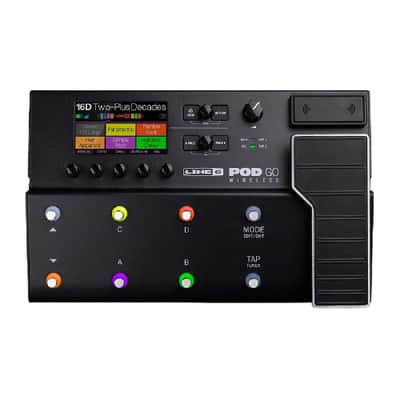
LINE 6 POD GO WIRELESS GUITAR MULTI-EFFECTS PROCESSOR Thanks to their intuitive plug-and-play interface, lightweight and ultra-portable design, rugged multifunction expression pedal, and pro-level amp, cab, and effect models drawn from the HX family of amp and effects processors - with POD Go and the Relay wireless-equipped POD Go Wireless, you won t just take the stage, you ll own it. The POD Go Wireless processor shares all the features of the POD Go processor, with the addition of an onboard Relay wireless receiver and Relay G10TII transmitter included in the box. The POD Go Wireless chassis offers G10T transmitter charging by docking into the Guitar In when powered, and a G10T storage well on the rear panel when the G10T transmitter is not in use. Turn to select presets; press to open preset list. Turn to select blocks; press to bypass selected block. Action, Volume, Page Press to open Action panel for selected block or menu. Press HOME + ACTION to save preset. Turn to control level from Main and Headphone outputs. Press to view more parameters for the selected block or item. Press ?Ç?PAGE and PAGE?Ç? together to open menu with advanced functions and settings. Lower Knob & Expression Pedal Turn to change model. Press to open Model List. Move the expression pedal to control volume, wah, or any combination of amp and effects parameters. Activate toe switch to toggle between Wah (EXP 1) and Volume (EXP 2). Tap/Tuner Step on TAP to set tempo. Hold to open the Tuner. Mode Step on MODE to toggle between PRESET and STOMP footswitch modes Preset Footswitches Step on footswitch A, B, C, or D to select a preset. Step on Up/Down to select the next/previous bank of presets. Press both Up and Down to enter Snapshot footswitch mode. Hold both Up and Down to cycle through Bank, Preset, and Snapshot Up and Down Stomp Footswitches Step on a footswitch to toggle its block on and off. Press and hold footswitch to assign the selected block. Press and hold two footswitches to swap assignments. Knobs 1-5 Turn to adjust parameters for the selected block. Press to reset value. Press to toggle between Hz or ms and note values. Press and hold jump to the Bypass/Control page for that parameter. Press and turn to assign the parameter to snapshot control. Hold ACTION and press knob to unassign any controller. Antennas Keep clear; never cover with tape, cables, pedals, etc Features: 86 amp models, 206 effect models 256 presets (2 setlists x 32 banks x 4 presets) Up to 10 simultaneous processing blocks (semi-fixed, DSP permitting) 4 snapshots per preset 128x 1024 point IRs 3 fully parametric EQ bands + variable low & high cut 4.3" color display 8 footswitches with RGB rings + EXP toe switch + 2 x external Stomp, Preset, Snapshot, Looper footswitches Latching looper mode 6 Switch loopers, 1 Switch looper, Shuffling looper 40 sec mono/20 sec stereo looper memory (full speed) 80 sec mono/40 sec stereo looper memory (1/2 speed) 1/4" Inputs (Guitar, Stereo Return) 1/4" Outputs (Main L/R, Amp Out, Stereo Send) Effects loop: 1 x mono/stereo Send, 1 x mono/stereo Return 1/4" stereo headphone out MIDI via USB USB audio interface: 4-in, 4-out w/ re-amping 1/4" expression pedal inputs (EXP 2 (shared with Footswitch 7/8) ) Cast aluminum chassis G10TII wireless transmitter Included Internal relay wireless receiver (100'/30m Line-of-sight) Power supply included Thanks to their intuitive plug-and-play interface, lightweight and ultra-portable design, rugged multifunction expression pedal, and pro-level amp, cab, and effect models drawn from the HX family of amp and effects processors - with POD Go and the Relay wireless-equipped POD Go Wireless, you won t just take the stage, you ll own it. The POD Go Wireless processor shares all the features of the POD Go processor, with the addition of an onboard Relay wireless receiver and Relay G10TII transmitter included in the box. The POD Go Wireless chassis offers G10T transmitter charging by docking into the Guitar In when powered, and a G10T storage well on the rear panel when the G10T transmitter is not in use. Home/View Press to toggle between Play view and Edit view. Upper Knob Play View Turn to select presets; press to open preset list. Upper Knob Edit View Turn to select blocks; press to bypass selected block. Action Press to open Action panel for selected block or menu. Press HOME + ACTION to save preset. Volume Turn to control level from Main and Headphone outputs. Page Press to view more parameters for the selected block or item. Press ?Ç?PAGE and PAGE?Ç? together to open menu with advanced functions and settings. Lower Knob Turn to change model. Press to open Model List. Expression Pedal Move the expression pedal to control volume, wah, or any combination of amp and effects parameters. Activate toe switch to toggle between Wah (EXP 1) and Volume (EXP 2). Tap/Tuner Step on TAP to set tempo. Hold to open the Tuner. Mode Step on MODE to toggle between PRESET and STOMP footswitch modes Preset Footswitches Step on footswitch A, B, C, or D to select a preset. Step on Up/Down to select the next/previous bank of presets. Press both Up and Down to enter Snapshot footswitch mode. Hold both Up and Down to cycle through Bank, Preset, and Snapshot Up and Down Stomp Footswitches Step on a footswitch to toggle its block on and off. Press and hold footswitch to assign the selected block. Press and hold two footswitches to swap assignments. Knobs 1-5 Turn to adjust parameters for the selected block. Press to reset value. Press to toggle between Hz or ms and note values. Press and hold jump to the Bypass/Control page for that parameter. Press and turn to assign the parameter to snapshot control. Hold ACTION and press knob to unassign any controller. Antennas Keep clear; never cover with tape, cables, pedals, etc.. Features: 86 amp models, 206 effect models 256 presets (2 setlists x 32 banks x 4 presets) Up to 10 simultaneous processing blocks (semi-fixed, DSP permitting) 4 snapshots per preset 128x 1024 point IRs 3 fully parametric EQ bands + variable low & high cut 4.3" color display 8 footswitches with RGB rings + EXP toe switch + 2 x external Stomp, Preset, Snapshot, Looper footswitches Latching looper mode 6 Switch loopers, 1 Switch looper, Shuffling looper 40 sec mono/20 sec stereo looper memory (full speed) 80 sec mono/40 sec stereo looper memory (1/2 speed) 1/4" Inputs (Guitar, Stereo Return) 1/4" Outputs (Main L/R, Amp Out, Stereo Send) Effects loop: 1 x mono/stereo Send, 1 x mono/stereo Return 1/4" stereo headphone out MIDI via USB USB audio interface: 4-in, 4-out w/ re-amping 1/4" expression pedal inputs (EXP 2 (shared with Footswitch 7/8) ) Cast aluminum chassis G10TII wireless transmitter Included Internal relay wireless receiver (100'/30m Line-of-sight) Power supply included
| Condizione | Mint (Usato) Gli articoli Mint sono essenzialmente nella loro condizione originale, ma sono stati aperti o utilizzati.Scopri di più |
|---|---|
| Marchio | |
| Modello |
|
| Categorie | |
| Formato pedale |
|
| Famiglia colore |
|
Le informazioni sulla sicurezza del prodotto sono disponibili qui.

Protezione di Reverb
Resi semplici, transazioni sicure, assistenza di persone in carne e ossa
Scopri di più