Pioneer DJ DDJ-REV1 Scratch-Style 2-Channel DJ Controller for Serato DJ Lite with Battle-Style Layout (Black)

Pioneer DJ DDJ-REV1 Scratch-Style 2-Channel DJ Controller for Serato DJ Lite with Battle-Style Layout (Black)

Expédition gratuite
depuis North Brunswick, NJ


Politique de retour de 30 jours
Profitez de votre nouveau matériel en toute sérénité
Nos utilisateurs évaluent Reverb
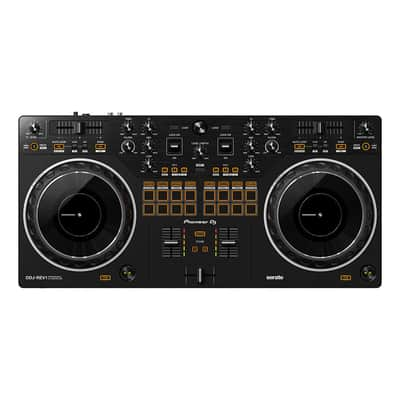
The Pioneer DJ DDJ-REV1 matches perfectly with the free
Serato DJ Lite software, boasting a brand-new battle-style layout that’s easy
to use and perfect for playing like a pro. The design of this 2-channel DJ
controller emulates a professional DJM-S mixer plus PLX turntable setup,
including specialized features for open-format and scratch DJs.
Brand-New Battle-Style Layout
Get hands-on with an interface designed to emulate 2 x PLX turntables and a
DJM-S series mixer - the kind of setup used by pro battle DJs.
There’s plenty of space to perform mixing and scratching techniques thanks to
the new arrangement of the controls on the DDJ-REV1. The tempo sliders are 60mm
- longer than those on the DDJ-SB3 to give you finer control - and they run
horizontally above the decks while the Performance Pads have been
moved into the mixer section so you can intuitively combine effects, trigger
samples, and scratch your tracks.
Bigger Jog Wheels
The bigger the jog wheels, the better for scratching. The jogs on the DDJ-REV1
are the same size as the ones on the DDJ-SR2.
Lever FX
Dynamically add texture to the music with Lever FX. Pull the levers down and
hold them to apply effects from Serato DJ Lite in short
bursts or push them up to lock on effects and free up your hands for
scratching or track browsing.
Tracking Scratch: Get a Helping Hand with Scratching
The Tracking Scratch feature silently takes the music back to the cue point the
moment you move the jog wheel from backward to forward or lift your hand away -
saving you from closing the fader and finding the right place in the music to
start the scratch again. All you need to do is select the Tracking Scratch Pad
mode, press a Performance Pad to choose the Scratch Crossfader Cuts pattern you
want to use, and then start moving the jog.
Mixed Microphone Audio: Easily Add Your Voice While You’re Streaming
For the first time in a Pioneer DJ controller at this level, the output of the
master audio is mixed with the sound from the microphone if you have one
plugged in. This means you don’t need any external
equipment such as a soundcard or separate mixer if you
want to add speech or vocals to your performance and route it through your
computer. All sounds are sent to Serato DJ Lite so you can stream
from there.
Serato DJ Lite Integration: Enjoy Full Use of the Free Software
As soon as you’ve downloaded Serato DJ Lite to your PC or Mac for free, you
can simply connect the DDJ-REV1 via the supplied USB cable and start
DJing. Enjoy tactile control of various features and effects in the software by
manipulating the buttons, knobs, faders, and jog wheels on the controller. With
the Scratch Bank pad mode, you can instantly load scratch samples from 4
banks that you’ve assigned in Serato DJ Lite or Pro by simply tapping
the dedicated Scratch Bank button.
Other Features
Play tracks and sounds loaded on any of the 4 decks in Serato DJ
Lite. Plug your DDJ-REV1 into your PC or Mac and start DJing
- there’s no need to install an audio driver. You’ll be
automatically notified when firmware updates become available with
the downloadable Firmware Update Manager.
| État | Neuf (neuf) Le matériel en état « Neuf » n'est vendu que par un vendeur autorisé ou un fabricant et inclut l'emballage d'origine.En savoir plus |
|---|---|
| Marque | |
| Modèle |
|
| Catégories |
Des informations concernant la sécurité des produits peuvent être disponibles ici.

