


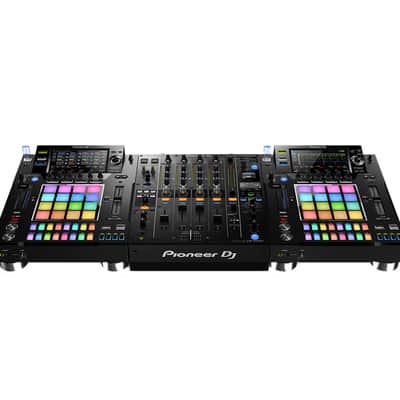
Pioneer DJ DJS-1000 Standalone DJ Sampler

Free Shipping
from North Brunswick, NJ

Only 1 left
Grab it before it's gone


30-Day Return Policy
Enjoy peace of mind with your new gear
Our users rate Reverb
Add the Pioneer DJ DJS-1000 to your DJ set-up to
intuitively create unique sounds and phrases in advance
of your set, or on the fly. Use the DJ-friendly interface to
sequence and loop your samples as you wish. With a 7-inch full-color touch
screen, 16 multicolored step input keys, multicolored Performance Pads, a host
of inputs and outputs, Live Sampling, and various other performance features,
having the DJS-1000 in the booth will propel your sets to the next level.
Key Features
Easily create a new groove by tapping the 16 large, multicolored step input
keys. Thanks to the keys’ changing colors, you can keep an eye on sequence
information on each track, at all times. Load up to 16 samples to the
large rubber pads, then finger drum freely to layer sounds on the fly. The
multicolor LEDs show what samples are in play, while Velocity Mode lets you
control the sample volume with the amount of pressure you
apply. Simply touch the strip to change the
pitch while using the Pitch Bend feature, or play a drum roll by
hitting the Note Repeat option. Customize parameters for even more creative
possibilities. Tap the 7-inch LCD display to instantly access one of three
screens. Use the Home screen for an overview of assigned samples, the Sequence
screen to view the currently playing sequence pattern, and the Mixer screen to
adjust each track’s volume. Sync up your DJS-1000 to a CDJ or
XDJ set-up using Pro DJ Link. Thanks to the Beat Sync function,
a tempo slider, and a Nudge button, you’ll adjust tempo and beat
position manually, just like you would on a turntable. Sample input
sounds and instantly use them as individual tracks. Your sampled sounds are
automatically synchronized with the current sequence. Play them in a loop and
drop them straight into a live remix.
Additional Features
Add flair to your set and be inspired by the moment, using various FX to boost
your tracks with ease, changing the tone of the track on the fly. The
DJS-1000 pad player will fit right in next to your NXS2 setup in the
booth. Manage your projects and samples easily with the USB input, allowing you
to browse your tracks at a glance and have your whole library at your
fingertips. Start performing with the DJS-1000 straight out of the box by using
the on-board Loopmaster samples and enriching your tracks. Create projects and
scenes on a PC or Mac using the DJS-TSP Project Creator
software that’s compatible with the DJS-1000. If you want to play
files created using TORAIZ SP-16, count on the DJS-1000 to play your
creations as it would any other track. Your DJS-1000 integrates with
Splice’s extensive sample library. Prepare and manage sound kits and sequences
in the cloud and load them into the sampler for your next performance.
| Condition | Brand New (New) Brand New items are sold by an authorized dealer or original builder and include all original packaging.Learn more |
|---|---|
| Brand | |
| Model |
|
| Categories |
Product safety information may be available here.

