



Tracktion MOK Waverazor
New Price$15
Instant Download
This gear has sold
See similar gear from other Reverb sellers
Listed:over a month ago
Views:1,158
Saves:9
Offers:3

Chicago, IL, United States
Our users rate Reverb
Step over to the dark side.
What it is:
A futuristic take on the virtual synthesizer.
How we use it:
Craft angular, jagged, and in-your-face synth stabs, leads, and percussion.
Why it's cool:
MOK Waverazor takes a stab at something new instead of simply recreating an old classic. Unleash your dark side with Waverazor — a futuristic synth that gives you the power to splice waveforms into aggressive new sounds. The patent-pending oscillator design utilizes a new form of synthesis to produce biting leads, glitched-out basses, cinematic pads and everything in between.
FUTURISTIC VIRTUAL SYNTH
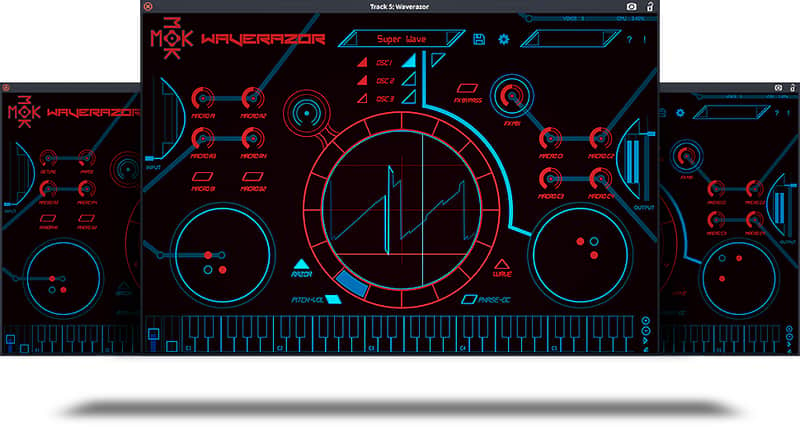
Twist and torture every parameter of sound using a central oscilloscope for precise waveform creation. Morph multiple parameters at once using an array of performance controllers. The collection of included presets provides a launchpad into endless sonic exploration.
A NEW ANGLE ON SYNTHESIS
Waverazor’s patent-pending oscillator technology slices familiar waveforms and recombines them to create tormented futuristic sounds. Start with a radical multi-shape waveform, then mangle the sound beyond recognition by tweaking an array of parameters including tuning, level, phase and DC offset per segment.
MUTANT AM: RING MOD ON STEROIDS
Each waveform segment can have different harmonic content, with individual harmonics subject to amplitude modulation at a rate and level determined by the contents of each fraction. Instead of simply modulating the entire waveform on and off like traditional ring mod, the oscillator modulates harmonics to different levels in a sequenced pattern.
MULTI-SYNC: EVEN MORE OF A GOOD THING
Since each wave cycle is divided into fractional splices, and phase reset is controlled per segment, multiple simultaneous hard sync points can be set up per cycle and even beyond a single cycle. With Multi-Sync engaged, modulating individual wave fractions to different frequencies creates a complex new harmonically rich version of a classic synthesis technique.
SLICE IT, DICE IT, TWEAK IT, PLAY IT
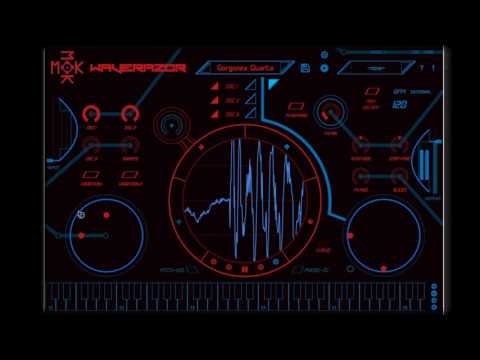
The Waverazor interface offers a unique approach to sound design, with a central oscilloscope that enables precise waveform creation. Two X/Y performance controllers modulate a combination of slice parameters, while additional knobs and buttons make it possible to morph multiple parameters at once.
Features:
Compatibility
Mac:
Installation Instructions
General Instructions:
What it is:
A futuristic take on the virtual synthesizer.
How we use it:
Craft angular, jagged, and in-your-face synth stabs, leads, and percussion.
Why it's cool:
MOK Waverazor takes a stab at something new instead of simply recreating an old classic. Unleash your dark side with Waverazor — a futuristic synth that gives you the power to splice waveforms into aggressive new sounds. The patent-pending oscillator design utilizes a new form of synthesis to produce biting leads, glitched-out basses, cinematic pads and everything in between.
FUTURISTIC VIRTUAL SYNTH
Twist and torture every parameter of sound using a central oscilloscope for precise waveform creation. Morph multiple parameters at once using an array of performance controllers. The collection of included presets provides a launchpad into endless sonic exploration.
A NEW ANGLE ON SYNTHESIS
Waverazor’s patent-pending oscillator technology slices familiar waveforms and recombines them to create tormented futuristic sounds. Start with a radical multi-shape waveform, then mangle the sound beyond recognition by tweaking an array of parameters including tuning, level, phase and DC offset per segment.
MUTANT AM: RING MOD ON STEROIDS
Each waveform segment can have different harmonic content, with individual harmonics subject to amplitude modulation at a rate and level determined by the contents of each fraction. Instead of simply modulating the entire waveform on and off like traditional ring mod, the oscillator modulates harmonics to different levels in a sequenced pattern.
MULTI-SYNC: EVEN MORE OF A GOOD THING
Since each wave cycle is divided into fractional splices, and phase reset is controlled per segment, multiple simultaneous hard sync points can be set up per cycle and even beyond a single cycle. With Multi-Sync engaged, modulating individual wave fractions to different frequencies creates a complex new harmonically rich version of a classic synthesis technique.
SLICE IT, DICE IT, TWEAK IT, PLAY IT
The Waverazor interface offers a unique approach to sound design, with a central oscilloscope that enables precise waveform creation. Two X/Y performance controllers modulate a combination of slice parameters, while additional knobs and buttons make it possible to morph multiple parameters at once.
Features:
- Patent-pending oscillator design dynamically slices and recombines waveforms
- Up to three oscillators and three filters per voice
- Built-in oscilloscope enables precise waveform creation
- Two X/Y performance controllers and one X/Y wave segment control
- Nine performance knobs and 3 performance buttons
- Compatible with AU/VST/AAX on Mac and PC
- Support for 21 languages
Compatibility
Mac:
- macOS 10.8 or Later
- 32-bit and 64-bit
- Intel Core 2 Duo 2GHz Processor
- 2GB RAM (4GB Recommended)
- Windows 7,8,10
- 32-bit and 64-bit
- Intel Core 2 Duo 2GHz Processor
- 2GB RAM (4GB Recommended)
- Tested on Ubuntu 16.04
- 64-bit
- Intel Core 2 Duo 2GHz Processor
- 2GB RAM (4GB Recommended)
Installation Instructions
General Instructions:
- We auto-detect your computer operating system, so just click the download button above.
- Find the downloaded plugin (it's in your computer's download folder, or wherever you've chosen to save it) and double click the installer.
- A plugin installer window will open. Simply go through the installation process.
- We will also send you an email with a link to re-download in case you need it.
- If Ableton Live is closed, open it and skip to #5.
- If Ableton Live is already open, go to Preferences.
- Go to Files & Folder.
- Click "Rescan plugins".
- Find the plugin in the Ableton plugins folder in the sidebar.
- Drag-and-drop the plugin onto your track at the bottom of the screen.
- Open Logic Pro X. Newly installed plugins should be detected automatically every time Logic is opened.
- If you've downloaded an effect or utility plugin, these can be used on an insert for any track in the mixer.
- Create a software instrument track if you downloaded a virtual instrument plugin.
- Under Default Patch, go to AU Instruments and choose the plugin you just installed.
- Open Pro Tools. Newly installed plugins should be detected automatically every time Pro Tools is opened.
- If you've downloaded an effect or utility plugin, these can be used on an insert for many types of tracks (Audio, Aux, Instrument, Master Fader...)
- If you’ve downloaded a software instrument, create a new Instrument track.
- Navigate to the Mixer and locate the newly created Instrument track.
- Select the desired instrument plugin by clicking on any of the Inserts on the Instrument track.
- Go to the Reverb SYNC Software and plugin Collection.
- Choose your desired plugin.
- Reverb will auto-detect your platform, so simply click the download button.
- Continue the installation process by following the prompt.
- Hover your mouse over the smart control button.
- Click Show Inspector icon.
- Click on plugins and choose your desired plugin.
| Brand | |
|---|---|
| Model |
|
| Categories |
Product safety information may be available here.