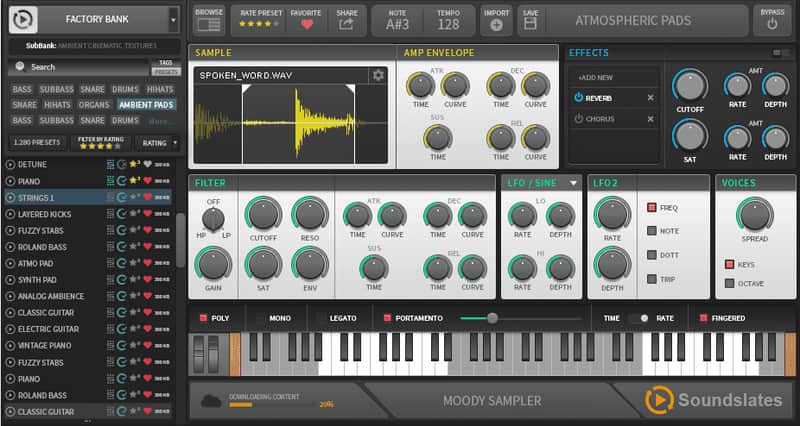

Soundslates Moody Sampler
PriceFREE
Incl. VAT
Instant Download
This listing has ended
See similar gear from other Reverb sellers
Listed:over a month ago
Views:6,859
Saves:67
Downloads:2,969

Chicago, IL, United States
Our users rate Reverb
Shape any audio to perfectly fit your track with this cloud-based sampler.
What it is:
A multi-purpose sampler which seamlessly integrates with cloud collaboration software Soundslates.
How we use it:
Whether we're chopping up drum beats or vocal samples, Moody Sampler fits any audio neatly into the track.
Why it's cool:
Moody Sampler's versatility and ease of use make it a key desktop sampler. An incredibly versatile sampler with a vast sound library hosted in the cloud, integrated with Soundslates' innovative online collaboration platform.
Compatibility
Moody Sampler is compatible with Mac OS X 10.9 + and Windows 8+.
Installation Instructions
General Instructions:
What it is:
A multi-purpose sampler which seamlessly integrates with cloud collaboration software Soundslates.
How we use it:
Whether we're chopping up drum beats or vocal samples, Moody Sampler fits any audio neatly into the track.
Why it's cool:
Moody Sampler's versatility and ease of use make it a key desktop sampler. An incredibly versatile sampler with a vast sound library hosted in the cloud, integrated with Soundslates' innovative online collaboration platform.
Sample manipulation:
- Soundfont import: sfz.
- Audio files import: .wav; mp3, ogg, flac.
- Import via drag and drop.
- Adjustable Sample start & end points.
- Sample looping (zero crossing).
- Full-screen sample display.
- Amp ADSR controls.
- Audio file slicing.
Articulations & modes:
- Polyphonic portamento.
- Adjustable portamento attack and release time and curves.
- Legato.
Effects & routings:
- Per voice analog modeled filter (HP & LP).
- Filter’s ADSR controls.
- Filter’s cutoff routing to LFO’s.
- Pitch & Volume LFO’s.
- Tempo sync for LFO’s.
- Voices spread.
- Fx container with built-in: EQ /Delay /reverb/ compressor/ saturator/ flanger.
- Modulation wheel routings.
Cloud-based Sound library & collaboration:
- Offline mode: plugin can be used in offline mode, initial connection to server is not required.
- Access to cloud-based Sound library via Soundslates MPA client.
- Upload of personal instruments.
- Browsing and download of instruments.
- Instruments sharing with personal contacts or community.
- Community ratings of instruments.
- Tagging of instruments with meta-datas.
- 1000+ instruments accessible via the Soundslates cloud library.
- Auto-download of missing instruments, for personal and collaborative projects.
Note:
- the plugin doesn’t connect directly to the web server.
- connection to the web server is done via the Soundslates MPA client, as well as all upload/download operations.
- By closing the login popup, and/or removing the Soundslates MPA client, the Sampler plugin will always stay offline.
- In offline mode, you will not be able to download sounds, and will be limited to use your own sounds only (sfz, wav ect).
- When being online, the Client is connecting only to our storage server, in order to download and upload sounds, the connection is secured via https.
Compatibility
Moody Sampler is compatible with Mac OS X 10.9 + and Windows 8+.
Installation Instructions
General Instructions:
- We auto-detect your computer operating system, so just click the download button above.
- Find the downloaded plugin (it's in your computer's download folder, or wherever you've chosen to save it) and double click the installer.
- A plugin installer window will open. Simply go through the installation process.
- We will also send you an email with a link to re-download in case you need it.
- If Ableton Live is closed, open it and skip to #5.
- If Ableton Live is already open, go to Preferences.
- Go to Files & Folder.
- Click "Rescan plugins".
- Find the plugin in the Ableton plugins folder in the sidebar.
- Drag-and-drop the plugin onto your track at the bottom of the screen.
- Open Logic Pro X. Newly installed plugins should be detected automatically every time Logic is opened.
- If you've downloaded an effect or utility plugin, these can be used on an insert for any track in the mixer.
- Create a software instrument track if you downloaded a virtual instrument plugin.
- Under Default Patch, go to AU Instruments and choose the plugin you just installed.
- Go to the Reverb SYNC Software and plugin Collection.
- Choose your desired plugin.
- Reverb will auto-detect your platform, so simply click the download button.
- Continue the installation process by following the prompt.
- Hover your mouse over the smart control button.
- Click Show Inspector icon.
- Click on plugins and choose your desired plugin.
| Brand | |
|---|---|
| Model |
|
| Categories |
Product safety information may be available here.