Sinevibes Drift Modulation

Sinevibes Drift Modulation
This listing has ended
See similar gear from other Reverb sellers

Our users rate Reverb
What it is
A modulation effect with a personality of its own.
How we use it
On a return track to transform instruments and colorize your mix.
Why it's cool
Drift's X and Y depths challenge the way you think about a modulator.
Updated to include 13 exclusive, SYNC-designed presets:
- Big Sine Mover
- Bottom Feeder
- Deep House Phase
- Low_Slow II
- Low_Slow
- Low Frequency Bubble
- Low Pass Panner
- Phase Distortion
- Resonant Peaks
- Reverse Slapback
- Sonic Meltdown
- Squelcher
- Telephone Line
- Trem Pan
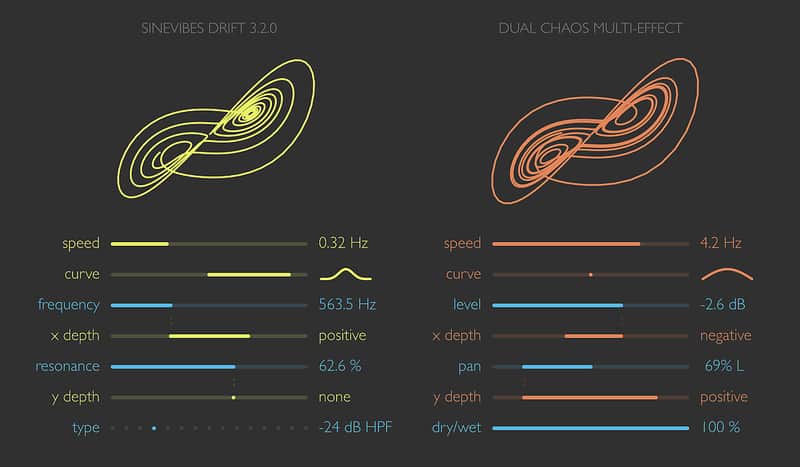
Drift is a unique effects processor based on two independent Lorenz chaos systems. These are three-dimensional oscillators widely used by scientists and engineers to model convection in liquids and gases. Here, these random but smooth signals are used to modulate spectral effects, sound level and stereo pan, giving them the dynamic characteristics of wind gusts, air turbulence or rising water bubbles.
All of Drift’s functionality is neatly presented by an intuitive interface wholly built with colour-coded graphics. It features two- dimensional representations of the chaos systems as well as subtle animations for all controls, adding up to a pleasant, organic experience. Together with precise parameter calibration, this makes Drift a musical, productive and always enjoyable tool.
Specifications:- Two separate Lorenz chaos systems with adjustable speed and output curve.
- Filter/phaser effect featuring 13 different variations.
Compatibility
Drift works with Logic, GarageBand, Live, MainStage, ReNoise, Reaper, Studio One, Digital Performer, Tracktion and other software that supports Audio Unit effect plugins.
It comes in 32/64 bit format for Intel Macs running OS X 10.6 or later, and supports Retina screen resolution.
Installation Instructions
General Instructions:
- We auto-detect your computer operating system, so just click the download button above
- Find the downloaded plugin (it’s in your computer’s download folder) and double click it
- A plugin installer window will open, so go through the installation process
- We will also send you an email with a link to re-download in case you need it
How to install plugins in Ableton Live:
- If Ableton is closed, open it and skip to #5
- If Ableton is already open, go to Preferences
- Go to Files & Folder
- Click “Rescan plugins”
- Find the plugin in the Ableton plugins folder in the sidebar
- Drag-and-drop the plugin onto your track at the bottom of the screen
- Open Logic Pro X
- Create a software instrument track if you downloaded a virtual instrument plugin
- Under Default Patch, go to AU Instruments and choose the plugin you just installed
- If you downloaded an effect or utility plugin, you can insert them on the mixer
What's new?
Update 3.2.0
- Improved design with multiple visual tweaks.
- Revised animation time for a faster response feel.
- New parameter and modulation smoothing algorithms with higher precision and efficiency.
- Improved efficiency in the audio output stage.
- Double-click any control to reset it to its default value.
- Completely new user manual.
- New factory presets.