Sinevibes Corrosion
Price€32.60
Incl. VAT
Instant Download
This listing has ended
See similar gear from other Reverb sellers
Listed:over a month ago
Views:374
Saves:6
Offers:0

Chicago, IL, United States
Our users rate Reverb
Multi-Algorithmic Distortion - A creative way to add custom distortion sound to any tone.
What it is:
A Sinevibes version of distortion with multiple presets and algorithms to choose from.
How we use it:
Use Corrosion on guitar tracks to achieve a unique character distortion, use on synth lines to really get some grit to repeating patterns.
Why it's cool:
A built in crossover allowing you to only distort low frequencies while keeping the high band untouched makes for very creative processing.Corrosion is a multi-purpose, multi-algorithm distortion processor. It features 7 distortion curves – from well-known classics to unique Sinevibes-developed "triangle clip" – all of which are 4x oversampled for a bright but clean sound. Corrosion also includes a pre-distortion filter for shaping the effect's tone, plus a crossover filter that allows to distort only the low frequency band while keeping the high band untouched - making this seemingly simple effect very versatile.
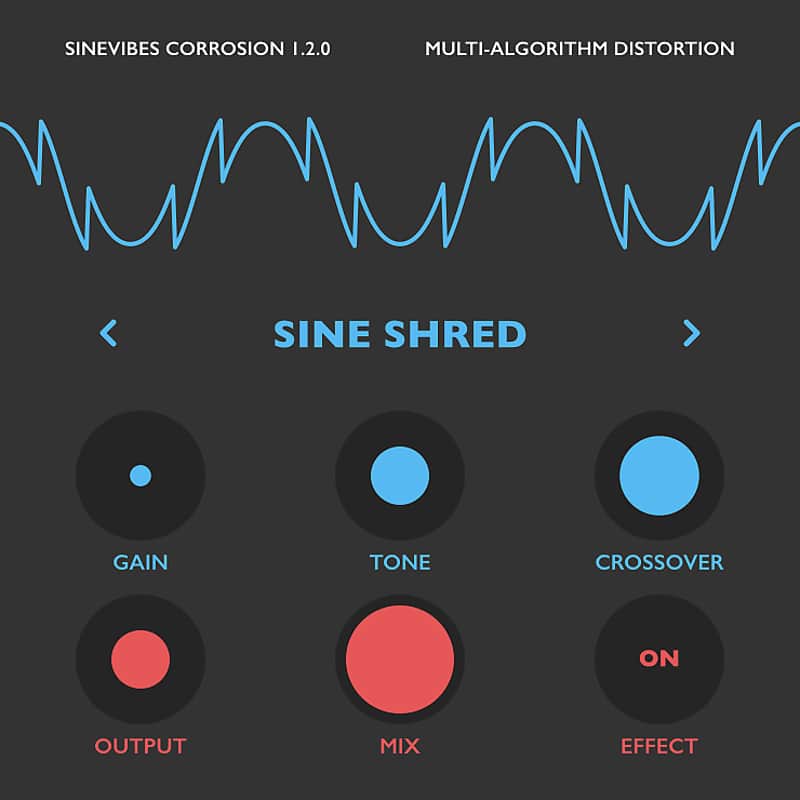
As always in a Sinevibes product, Corrosion includes a color-coded user interface with a clean and simple layout. It has good contrast and highly legible typography that work well in both studio and outdoor lighting. Plus, thanks to its animated elements, Corrosion always brings a touch of fun and enjoyment to your workflow.
Sound Engine
Compatibility
System Requirements
Installation Instructions
General Instructions:
What's new?
Corrosion 1.2.0
What it is:
A Sinevibes version of distortion with multiple presets and algorithms to choose from.
How we use it:
Use Corrosion on guitar tracks to achieve a unique character distortion, use on synth lines to really get some grit to repeating patterns.
Why it's cool:
A built in crossover allowing you to only distort low frequencies while keeping the high band untouched makes for very creative processing.Corrosion is a multi-purpose, multi-algorithm distortion processor. It features 7 distortion curves – from well-known classics to unique Sinevibes-developed "triangle clip" – all of which are 4x oversampled for a bright but clean sound. Corrosion also includes a pre-distortion filter for shaping the effect's tone, plus a crossover filter that allows to distort only the low frequency band while keeping the high band untouched - making this seemingly simple effect very versatile.
As always in a Sinevibes product, Corrosion includes a color-coded user interface with a clean and simple layout. It has good contrast and highly legible typography that work well in both studio and outdoor lighting. Plus, thanks to its animated elements, Corrosion always brings a touch of fun and enjoyment to your workflow.
Sound Engine
- 9 distortion algorithms: exponential, soft clip, hard clip, triangle clip, triangle foldback, single foldback, multi foldback, sine foldback, sine shred.
- 4x oversampling with polyphase sinc filter for aliasing suppression.
- Two-band -24 dB/octave Linkwitz-Riley crossover filter.
- Pre-distortion -12 dB/octave Butterworth low-pass or high-pass filter.
- Soft bypass switch with 20 ms crossfade between states.
- Color-coded control elements with animated transitions between settings.
- Fully hardware-accelerated rendering with support for Retina screen resolution.
Compatibility
System Requirements
- Works with any application that supports Audio Unit instrument plugins.
- Supports OS X 10.6 or later running on 32 or 64 bit Intel Macs.
Installation Instructions
General Instructions:
- We auto-detect your computer operating system, so just click the download button above.
- Find the downloaded plugin (it's in your computer's download folder, or wherever you've chosen to save it) and double click the installer.
- A plugin installer window will open. Simply go through the installation process.
- We will also send you an email with a link to re-download in case you need it.
- If Ableton Live is closed, open it and skip to #5.
- If Ableton Live is already open, go to Preferences.
- Go to Files & Folder.
- Click "Rescan plugins".
- Find the plugin in the Ableton plugins folder in the sidebar.
- Drag-and-drop the plugin onto your track at the bottom of the screen.
- Open Logic Pro X. Newly installed plugins should be detected automatically every time Logic is opened.
- If you've downloaded an effect or utility plugin, these can be used on an insert for any track in the mixer.
- Create a software instrument track if you downloaded a virtual instrument plugin.
- Under Default Patch, go to AU Instruments and choose the plugin you just installed.
- Go to the Reverb SYNC Software and plugin Collection.
- Choose your desired plugin.
- Reverb will auto-detect your platform, so simply click the download button.
- Continue the installation process by following the prompt.
- Hover your mouse over the smart control button.
- Click Show Inspector icon.
- Click on plugins and choose your desired plugin.
What's new?
Corrosion 1.2.0
- – Added new "binary shred" and "s-curve" distortion algorithms.
- – Multiple minor user interface tweaks and enhancements.
- – Added new presets.
- – Updated and improved user manual.
- – Less obtrusive noise algorithm for plugin’s demo version
- New "sine foldback" and "sine shred" algorithms.
- Reduced processor load thanks to new parameter smoothing algorithm.
- Minor improvements in user interface color scheme.