Sinevibes Droplet

Sinevibes Droplet
Price€31.87
Incl. VAT
Instant Download
This listing has ended
See similar gear from other Reverb sellers
Listed:over a month ago
Views:250
Saves:5
Offers:0

Chicago, IL, United States
Our users rate Reverb
Granular clouds, dreamy spaces, and lush, chorused reverbs.
What it is:
24 randomized delay lines designed to model 'raindrop delay' effects.
How we use it:
Add the ethereal sound of rain and randomized delay to a track.
Why it's cool:
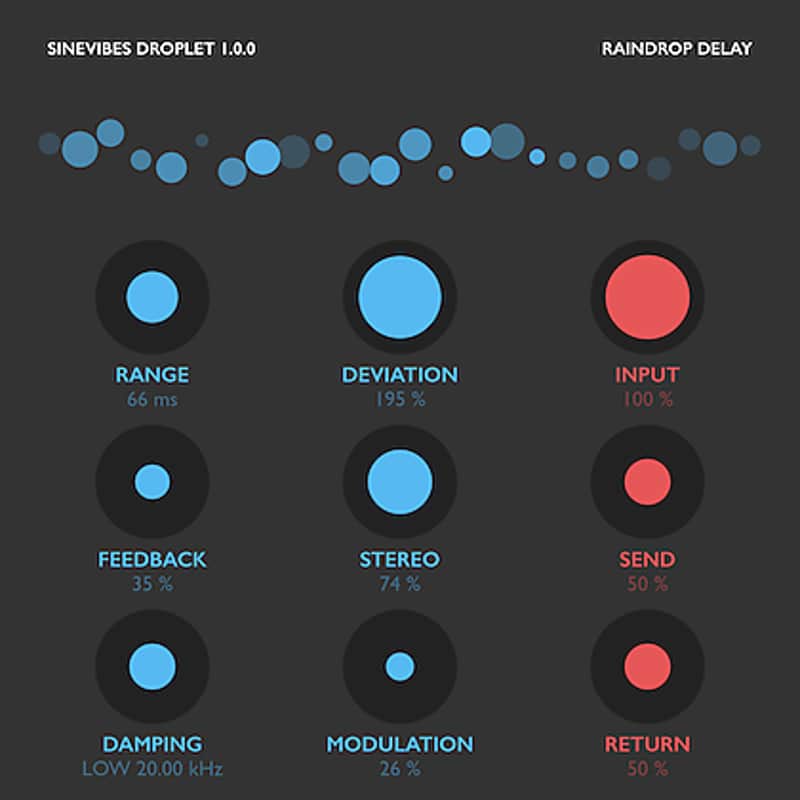
Like all Sinevibes products, an intuitive interface and idiosyncratic sound is sure to make this one of your favorite delays. Droplet is a plugin for modeling “raindrop delay” effects. It is based on a chain of 24 randomized delay lines, specially configured to produce a sound similar to drops of rain or small particles falling onto a surface. This delay chain features variable frequency damping, time modulation with original phase-flipped routing, as well as chaotic stereo panning, all of which lets Droplet go much beyond the actual raindrop delay – and into granular clouds, dreamy spaces and lush chorused reverbs. Since the parameters are randomized each time a Droplet instance is created, just as any natural process it will never sound exactly the same - even the same preset on two different tracks in the same project will sound different.
Sound engine
Compatibility
Installation Instructions
General Instructions:
What's new?
Droplet 1.0.3
• Fixed validation issue in Logic on macOS 10.14.
• Less obtrusive noise algorithm for plugin’s demo version.
Droplet 1.0.2
What it is:
24 randomized delay lines designed to model 'raindrop delay' effects.
How we use it:
Add the ethereal sound of rain and randomized delay to a track.
Why it's cool:
Like all Sinevibes products, an intuitive interface and idiosyncratic sound is sure to make this one of your favorite delays. Droplet is a plugin for modeling “raindrop delay” effects. It is based on a chain of 24 randomized delay lines, specially configured to produce a sound similar to drops of rain or small particles falling onto a surface. This delay chain features variable frequency damping, time modulation with original phase-flipped routing, as well as chaotic stereo panning, all of which lets Droplet go much beyond the actual raindrop delay – and into granular clouds, dreamy spaces and lush chorused reverbs. Since the parameters are randomized each time a Droplet instance is created, just as any natural process it will never sound exactly the same - even the same preset on two different tracks in the same project will sound different.
Sound engine
- Chain of feedback delay lines with 24 “drops” and high-quality spline interpolation.
- Variable delay time and stereo pan randomization per drop.
- Feedback damping filter with low-pass and high-pass modes.
- Sine oscillator for delay time modulation with unique phase-flipped routing.
- Color-coded graphics with subtle animations.
- Fully hardware-accelerated rendering with support for retina screen resolution.
Compatibility
- Works with any application that supports Audio Unit effect plugins.
- Supports OS X 10.6 or later running on 32 or 64 bit Intel Macs.
Installation Instructions
General Instructions:
- We auto-detect your computer operating system, so just click the download button above
- Find the downloaded plugin (it’s in your computer’s download folder) and double click it
- A plugin installer window will open, so go through the installation process
- We will also send you an email with a link to re-download in case you need it
- If Ableton is closed, open it and skip to #5
- If Ableton is already open, go to Preferences
- Go to Files & Folder
- Click “Rescan plugins”
- Find the plugin in the Ableton plugins folder in the sidebar
- Drag-and-drop the plugin onto your track at the bottom of the screen
- Open Logic Pro X
- Create a software instrument track if you downloaded a virtual instrument plugin
- Under Default Patch, go to AU Instruments and choose the plugin you just installed
- If you downloaded an effect or utility plugin, you can insert them on the mixer
What's new?
Droplet 1.0.3
• Fixed validation issue in Logic on macOS 10.14.
• Less obtrusive noise algorithm for plugin’s demo version.
Droplet 1.0.2
- Fixed continuous plugin parameters that were incorrectly specified as binary.
- Improved initialization of DSP algorithms to prevent crashes or hangs in certain hosts.
- Improved damping filter tuning to prevent excessive feedback buildup in low frequency range.
- Eliminated clicks when switching presets that have opposing damping filter settings.
- Reduced processor load in the modulation generator.