Sinevibes Dipole
Price€31.63
Incl. VAT
Instant Download
This listing has ended
See similar gear from other Reverb sellers
Listed:over a month ago
Views:180
Saves:4
Offers:0

Chicago, IL, United States
Stand out from the crowd with this charismatic through-zero flanger.
What it is:
Highly musical, through-zero flanger from the creatives at Sinevibes.
How we use it:
Recreate 'that' intense jet flanger sound and beyond.
Why it's cool:
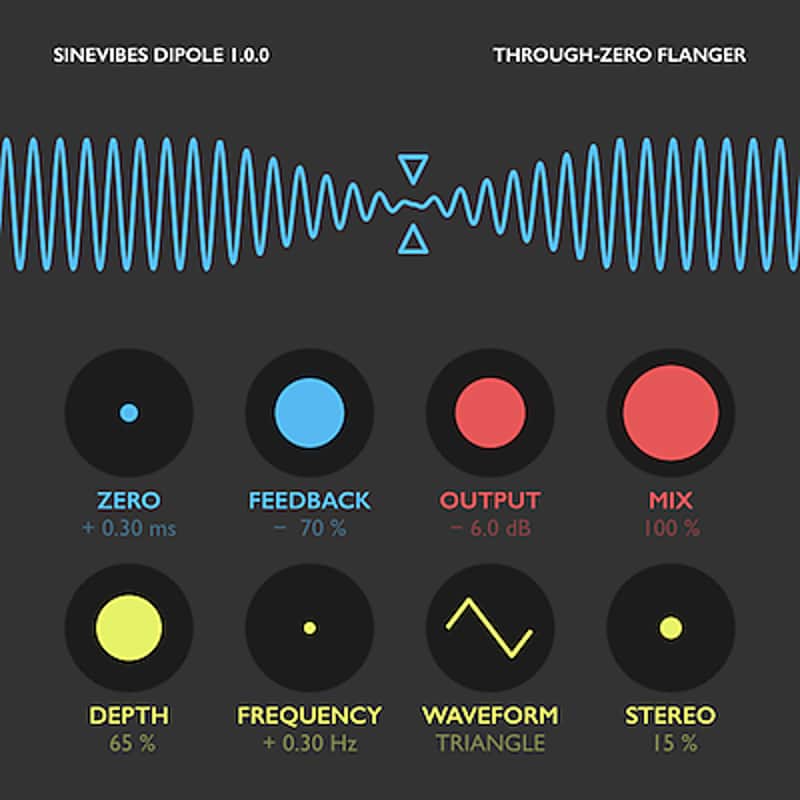
With color coded user interface and top-tier sound, Dipole is sure to be your new go-to flanger. Dipole by Sinevibes is a through-zero flanger effect. It employs two separate playback timelines for input audio, one of them being able to run earlier or later in time in relation to another - plus a trick feedback loop. And the actual magic happens when you adjust this time difference and go through the zero point. With positive feedback, Dipole produces that coveted spectral “swoosh” effect of a jet plane fly-by; and with negative feedback the output warps and eventually cancels itself out. In the old days, such effects were created “offline” using two tape machines - but now Dipole lets you have those charismatic sounds inside your DAW, and with much higher fidelity.
Dipole has an intuitive user interface wholly built with color-coded graphics and subtle animations. Together with carefully tuned parameters, this highly musical effect also gives you an enjoyable and inspiring user experience.
Sound engine
Compatibility
Installation Instructions
General Instructions:
What's new?
Dipole 1.0.2
What it is:
Highly musical, through-zero flanger from the creatives at Sinevibes.
How we use it:
Recreate 'that' intense jet flanger sound and beyond.
Why it's cool:
With color coded user interface and top-tier sound, Dipole is sure to be your new go-to flanger. Dipole by Sinevibes is a through-zero flanger effect. It employs two separate playback timelines for input audio, one of them being able to run earlier or later in time in relation to another - plus a trick feedback loop. And the actual magic happens when you adjust this time difference and go through the zero point. With positive feedback, Dipole produces that coveted spectral “swoosh” effect of a jet plane fly-by; and with negative feedback the output warps and eventually cancels itself out. In the old days, such effects were created “offline” using two tape machines - but now Dipole lets you have those charismatic sounds inside your DAW, and with much higher fidelity.
Dipole has an intuitive user interface wholly built with color-coded graphics and subtle animations. Together with carefully tuned parameters, this highly musical effect also gives you an enjoyable and inspiring user experience.
Sound engine
- Stereo flanger with bipolar feedback and through-zero time capability.
- Low-frequency modulation generator with sine, triangle and trapezoid waveforms.
- Stereo modulation phase shift for variable stereo field widening.
- Color-coded controls with lightly animated transitions.
- Fully hardware-accelerated rendering with support for Retina screen resolution.
Compatibility
- Works with any application that supports Audio Unit effect plugins.
- Supports OS X 10.6 or later running on 32 or 64 bit Intel Macs.
Installation Instructions
General Instructions:
- We auto-detect your computer operating system, so just click the download button above.
- Find the downloaded plugin (it's in your computer's download folder, or wherever you've chosen to save it) and double click the installer.
- A plugin installer window will open. Simply go through the installation process.
- We will also send you an email with a link to re-download in case you need it.
- If Ableton Live is closed, open it and skip to #5.
- If Ableton Live is already open, go to Preferences.
- Go to Files & Folder.
- Click "Rescan plugins".
- Find the plugin in the Ableton plugins folder in the sidebar.
- Drag-and-drop the plugin onto your track at the bottom of the screen.
- Open Logic Pro X. Newly installed plugins should be detected automatically every time Logic is opened.
- If you've downloaded an effect or utility plugin, these can be used on an insert for any track in the mixer.
- Create a software instrument track if you downloaded a virtual instrument plugin.
- Under Default Patch, go to AU Instruments and choose the plugin you just installed.
- Go to the Reverb SYNC Software and plugin Collection.
- Choose your desired plugin.
- Reverb will auto-detect your platform, so simply click the download button.
- Continue the installation process by following the prompt.
- Hover your mouse over the smart control button.
- Click Show Inspector icon.
- Click on plugins and choose your desired plugin.
What's new?
Dipole 1.0.2
- Fixed continuous plugin parameters that were incorrectly specified as binary.
- Flanger buffer and feedback are now cleared when the host resets the plugin.
- Enhancements in the parameter interface.
- Minor improvements in user interface color scheme.