iZotope Neutron Advanced Mix Assistant
This listing has ended
See similar gear from other Reverb sellers

Our users rate Reverb
What it is:
All the offerings of Neutron standard plus an individual EQ, compressor, transient shaper, and exciter plugin. Did we mention Neutron Advanced also supports surround up to 7.1?
How we use it:
Neutron Advanced is the ideal method when decluttering a mix. With the inclusion of individual EQ, compression, transient shaping, and exciting, Neutron Advanced lets you take a mix from start to finish in-house.
Why it's cool:
Neutron Advanced interprets the incoming audio signal, analyzes the instrument, and tailors its presets to better suit your mix. It truly is the smart way to mix.
Achieve unprecedented focus and clarity in your mixes with Neutron. This new mixing plug-in combines the latest innovations in analysis and metering with award-winning audio processing.
Mix with confidence
With powerful new features like Track Assistant and Masking Meter, Neutron helps you quickly reach an optimal starting point, clearly identify perceptual frequency collisions, and fully wield creative control over all your mix decisions.
Meet your new assistant
An industry first, Neutron’s new Track Assistant lets you focus on what’s most important - your creative take on the mix. It’s like having an assistant engineer at your disposal 24/7.
What makes Track Assistant so unique
- Different instrument tracks — like vocals, dialogue, guitar, bass, and drums — are
automatically detected. Neutron then applies the spectral shaping technology
within Neutrino to provide subtle clarity and balance to each of your tracks.
-
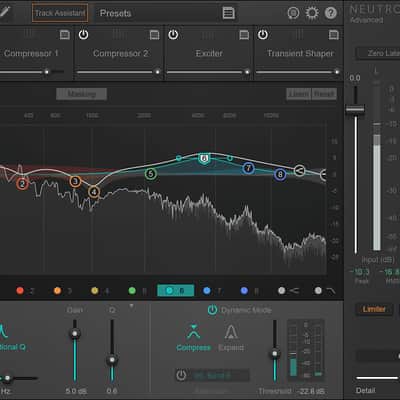
After analyzing the incoming audio signal, EQ nodes are intelligently placed where Track Assistant thinks you need them, speeding up your workflow and eliminating much of the EQ guesswork.
-
Get recommendations for optimal starting points across all of Neutron's modules, including compressor thresholds, saturation types, and single vs. multiband modes (including crossover points) – a huge time saver that can leave you feeling inspired.
-
Typical software presets don't know what audio they're being applied to – until now. By analyzing your track material, Neutron can offer ‘infinite’ presets that are custom tailored to your sound while still allowing full control over all your mix decisions.
Unmask your mix
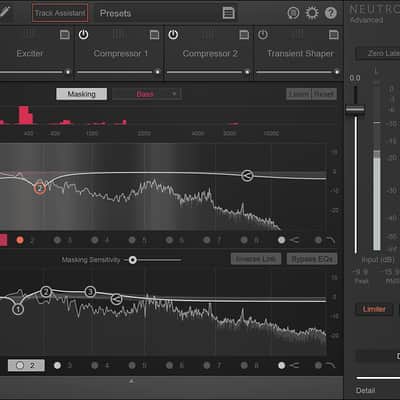
Another industry first, Neutron’s Masking Meter allows you to visually identify perceptual frequency collisions, which can result in guitars masking lead vocals, bass covering up drums, and other issues that can cause a “muddy” or overly crowded mix. Toggle seamlessly between any two tracks to carve out sonic space and ensure that each instrument has its own place to shine.
Our best processing yet
Neutron features some of the best audio processing we’ve ever created allowing you to achieve better sounding mixes inside your digital audio workstation. It includes five industry leading mixing processors, all zero-latency capable, including a static/dynamic Equalizer, two multiband Compressors, a multiband Exciter, and a multiband Transient Shaper, as well as an ultra low-latency BS.1770 True Peak Limiter – perfect for all your mixing needs.
-
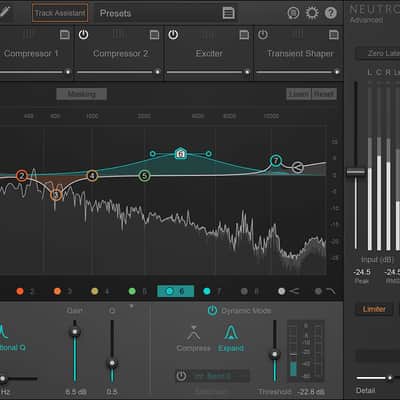
Equalizer : The workhorse EQ features clean yet subtly warm processing and a pristine analog-style signal path. With 12 bands of powerful static and dynamic EQ, a range of new and vintage filter types, and flexible sidechain capabilities, it's your new go-to EQ for all your mixing tasks.
-
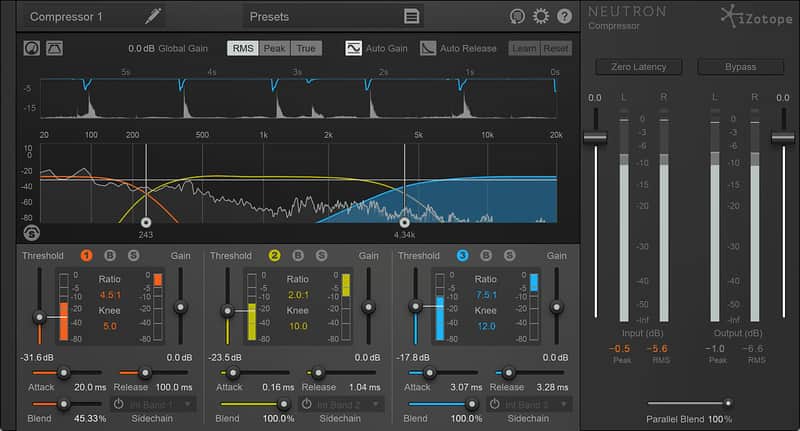
Compressor : A parallel processing powerhouse, the Compressor offers the ultimate sonic versatility: the very best of classically ‘gluey’ character as well as transparent digital compression styles. Adjust to taste with features like Vintage mode, Auto Release, and flexible Analog (zero latency) and Transparent (hybrid) crossovers for the ultimate in multiband control.
-
Transient Shaper : The new multiband Transient Shaper offers clarity, perceptual loudness, and impact enhancement for the most responsive sonic sculpting anywhere. With three musically versatile Contour controls, your drums, guitars, vocals and sound FX have never sounded this punchy.
-
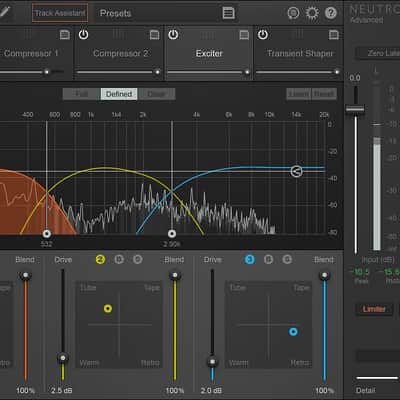
Exciter: The exciter allows you to easily add punch, warmth, brightness, and presence to your track without muddying up the sound. With three powerful Emphasis modes, unique, multiband blend interface featuring Tape, Tube, and two special iZotope algorithms, you can fine tune the color of your saturation to suit the needs of your track.
-
Limiter : With three distinct algorithms to choose from, the Limiter offers huge sonic variety when adjusting levels: from ultra-transparent to clean (low latency) pumping to a crunchy brick wall. Each algorithm has three modes for tailoring the character and intensity of the limiting, and Neutron’s detailed True Peak, RMS and Short-term metering provides the accuracy needed for both broadcast and codec standards.
Perfect for audio post
Neutron Advanced is also a smarter way to mix for audio post production. Neutron’s high-quality, CPU-efficient audio processing offers zero-latency processing across all mixing modules, an award-winning BS.1770 True Peak Limiter, dynamic EQ with sidechaining to sonically balance sub-mixes, an automatic dialogue-polishing Neutrino mode, and surround sound support in all 5 modules and individual plug-ins.
Neutron vs. Neutron Advanced
Neutron comes in two different flavors with Neutron Advanced offering all the modules as individual plug-ins and surround support for professional post production needs.
Neutron Advanced - Perfect for all professional music and audio post production engineers
- Everything in Neutron, plus:
- Individual plug-ins for:
+ EQ
+ Compressor
+ Transient Shaper
+ Exciter
+ Surround support up to 7.1.
- Individual plug-ins for:
+ EQ
+ Compressor
+ Transient Shaper
+ Exciter
+ Surround support up to 7.1.
Compatibility
Supported operating systems
- Windows: 7, 8, and 10
- Mac: OS X 10.9–10.11
Plug-in formats
VST 2 (32-bit and 64-bit), VST 3 (32-bit and 64-bit), Audio Unit (32-bit and 64-bit), AAX (64-bit), RTAS (32-bit), Audiosuite DPM and AAX.
Plug-in host compatibility
The latest versions of the following hosts have been officially qualified as of October 2016: Logic Pro X, Ableton Live 9, Pro Tools 10, 11 & 12, Cubase Pro 8, REAPER 5, FL Studio 12, Studio One 3, Nuendo 7.
Installation Instructions
General Instructions:
- We auto-detect your computer operating system, so just click the download button above.
- Find the downloaded plugin (it's in your computer's download folder, or wherever you've chosen to save it) and double click the installer.
- A plugin installer window will open. Simply go through the installation process.
- We will also send you an email with a link to re-download in case you need it.
- If Ableton Live is closed, open it and skip to #5.
- If Ableton Live is already open, go to Preferences.
- Go to Files & Folder.
- Click "Rescan plugins".
- Find the plugin in the Ableton plugins folder in the sidebar.
- Drag-and-drop the plugin onto your track at the bottom of the screen.
- Open Logic Pro X. Newly installed plugins should be detected automatically every time Logic is opened.
- If you've downloaded an effect or utility plugin, these can be used on an insert for any track in the mixer.
- Create a software instrument track if you downloaded a virtual instrument plugin.
- Under Default Patch, go to AU Instruments and choose the plugin you just installed.
- Open Pro Tools. Newly installed plugins should be detected automatically every time Pro Tools is opened.
- If you've downloaded an effect or utility plugin, these can be used on an insert for many types of tracks (Audio, Aux, Instrument, Master Fader...)
- If you’ve downloaded a software instrument, create a new Instrument track.
- Navigate to the Mixer and locate the newly created Instrument track.
- Select the desired instrument plugin by clicking on any of the Inserts on the Instrument track.
- Go to the Reverb SYNC Software and plugin Collection.
- Choose your desired plugin.
- Reverb will auto-detect your platform, so simply click the download button.
- Continue the installation process by following the prompt.
- Hover your mouse over the smart control button.
- Click Show Inspector icon.
- Click on plugins and choose your desired plugin.