Eventide Instant Phaser Mk II
This listing has ended
See similar gear from other Reverb sellers

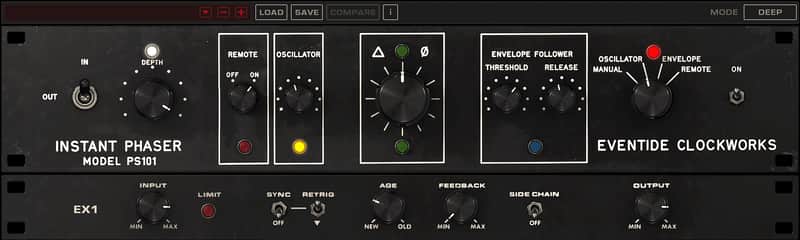
Recording effects and technology pioneers from Eventide are proud to announce the release of the Instant Phaser Mk II plug-in for engineers, producers and musicians using Mac/PC. Crafted from the original analog hardware that Eventide created in 1972, the “Instant Phaser” sound has been captured and fashioned for modern-day versatility. The Instant Phaser Mk II delivers the original sonic character and retains the same look and feel of the the first rackmount electronic effects box to ever hit the studio. Harness the effect that was used on countless iconic recordings – such as Led Zeppelin’s “Kashmir”, and furnish your mixes with this “Instant” classic. For a limited time, the Instant Phaser Mk II plug-in is available for only $37*.
Restoring the 45 year old hardware and developing software that sounds like the original was no walk in the park:
“A true recreation of the Instant Phaser had to satisfy not only our ears but also the ears for the studio owners and the pro audio community who still own and use the original hardware,” said Anthony Agnello, Eventide’s Resident Fossil
“A strict digital simulation of an analog component is precise. Components in the real world are not. A 0.1 uF capacitor in cold precise code will be exact while a real world 0.1 uF cap’s actual value will fall within some range close to, but never exactly, 0.1 uF. We discovered that the imprecision of the values of the analog components are key to the Instant Phaser’s sonic character. The challenge was to write code that captured that imprecision.”
“This isn’t your typical phaser plug-in, this is owning a piece of history. We’re pleased to release an authentic recreation of the world’s first and cherished rackmount electronic effects processor.”
Features:
Phasing Control:
• Manual mode allows for precise automation of the phasing effect
• Oscillator modulates the phasing at a user defined rate
• Envelope follower allows the input signal to drive the phase effect, and can accept input from a sidechain source
• Remote mode maps the phasing control to a modwheel for tactile manipulation of the phasing
Pseudo Stereo:
Like the original hardware, the Instant Phaser Mk II provides a pair of de-correlated outputs offering three different sonic characteristics “Shallow”, “Deep”, and “Wide” for creating a stereo image. Musicians, engineers and producers can use these effects to turn flat-sounding mono guitars into monstrous stereo leads or make a single channel synthesizer fill out the soundscape of the mix.
The Passage of Time:
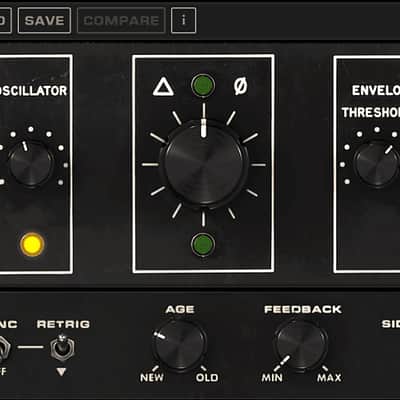
Eventide’s analysis of their 45+ year old Instant Phaser unit revealed that not only is the analog world imprecise, but it is also ever-changing. As components age, their values drift. In order to match the sound of an Instant Phaser that has been sitting in a rack for all those years, they decided to add an “Age” feature. Simply set the “Age” to “0” to mimic a brand new, perfectly tuned Phaser, or dial in the effect of time passing. Crank the age to “100” and hear how the unit will sound long after the last glacier has melted.
Compatibility
Instant Phaser Mk II is available as an AAX/AU/VST plug-in for Mac and PC.
For more in-depth information, including a free and fully-functional 30-day trial, please visit the
dedicated Instant Flanger Mk II webpage here: https://www.eventideaudio.com/instantphaser
Installation Instructions
Registration, Activation, and Installation
Eventide uses PACE’s ilok.com licensing system, with or without an iLok hardware dongle, to license our plug-in products. Each license provides two activations which can reside on either your computer or on an iLok license dongle. Once you’ve purchased your plug-in, you’ll need to register it on Eventide’s website, activate your license, and install the plug-in on to your computer.
Registering Your Plug-in
When you purchase an Eventide Native plug-in, you’ll receive a Serial Number and License Key. The Serial Number will be two letters followed by 6 numbers. If you have an individual Instant Phaser license, the Serial Number will start with IP (i.e. IP-######). If you purchased a group license, the Serial Number will be in the same format, but correspond to that group license (e.g. AX-###### for Anthology X). The License Key will be 3 sets of 4 characters, a letter or a number, each; like XXXXXXXX-XXXX.
Once you’ve received these codes, you can register your plug-in on the Eventide website. To do so, please log in to http://www.eventideaudio.com, navigate to My Account in the top right corner, and select Register a New Product. Then, fill out the form by selecting Native Plug-in (VST, AU, AAX) in the Product Category field, select Instant Phaser or the applicable group license in the Product list, and enter your Serial Number, License Key, and iLok.com account name. If you don’t yet have an ilok.com account, you can create one for free at http://www.ilok.com. Once you’ve done so, press Register.
Once you’ve entered this information and pressed the Register button, Eventide will send the applicable plug-in license to your ilok.com account, which you will need to activate to your computer or iLok dongle.
Activating Your License
To activate and manage your plug-in licenses you’ll need to install PACE’s iLok License Manager software which you can download from http://www.ilok.com. If you don’t have this software installed, please download and install it now.
Once you have installed and launched iLok License Manager you should be able to log in to your account by clicking the large Sign In button in the upper left hand corner of the application.
Once you have, you should be able to see available licenses by choosing the Available tab at the top of the iLok License Manager application. If you have successfully registered your plugin, your Instant Phaser Native license will be available in this list. Please activate this license by dragging it to either your computer or iLok dongle listed on the left. When you do so, you will be asked to confirm the activation, and you will be able to see it by clicking on the location you have chosen. At this point your license is activated.
Installing Your Plug-In
You should have been given a link to the Eventide Native plug-in installer when you purchased your plugin, but if you haven’t, you can find downloads for all of Eventide’s Native Plug-Ins at http://https://www.eventideaudio.com/products/plugins. Please download and launch the correct installer for your system.
Once you’ve launched the plug-in installer, it will take you through several pages of options. We have tried to choose defaults for these options which will best serve the majority of users, but it is worth a minute to make sure you understand these options before clicking through to the next page. Once you have followed through the installer, your plug-ins and presets should be in your chosen locations, and you can hit finish to end the installer application.
At this point, you should be ready to use your Eventide Instant Phaser Plug-In.
Moving or Removing an Activation
If at any point, you decide to move your plug-in activation, you can do so in iLok license manager. To move an activation between an iLok dongle and your computer, simply plug in the iLok, locate the license in its current location, and drag it to its new location. To deactivate a license, find it in its location, right click on it, and choose deactivate.
Remember that each Eventide Native Plug-In License comes with two activations, which can be used on either a computer or iLok dongle, meaning you can use Instant Phaser in two locations at the same time.
https://www.eventideaudio.com/support/product/12401/installers