NEW Walrus Audio Fundamental Delay 2023 - Present - Black / Green

NEW Walrus Audio Fundamental Delay 2023 - Present - Black / Green

Versandkostenfrei
von Powell, TN

Nur 1 übrig
Hol es dir, bevor es weg ist

Unsere Benutzer bewerten Reverb
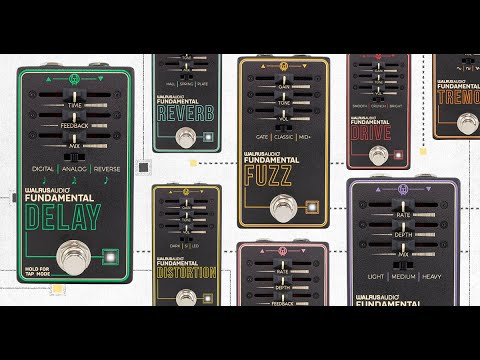
For the Fundamental Series, we challenged ourselves to design a set of pedals with the tonal integrity that’s required to live on a professional’s pedalboard, but with simplified controls friendly enough for even the newest effect pedal users. Each Fundamental pedal has three faders for tweaking the sound and a three-way switch for changing pedal modes. The result is a line of pedals that will keep you covered from your first band practice all the way to a sold-out arena. Designed and assembled at Walrus Audio headquarters in OKC, OK.
Fundamental Delay
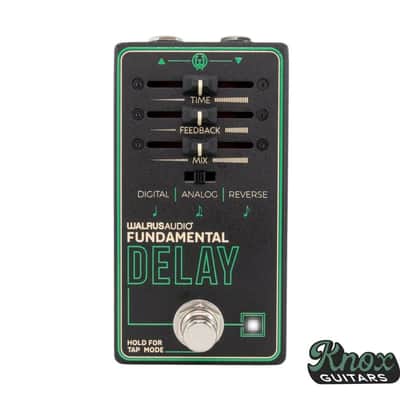
The Fundamental Delay provides you with the core sounds of repeated effects. With three delay algorithms, you can go from clean digital feedback to an analog delay emulation, as well as reversing your trails.
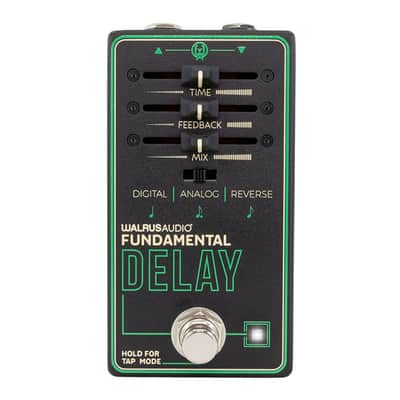
Time: Control the rate of the delayed repeats. Max delay time is one second
Feedback: Control the number of repeats.
Mix: Control the mix of the effect and the original clean signal. All the way to the left outputs a fully clean signal, and all the way to the right outputs only the delay repeats.
Slide Switch – The slide switch allows you to change between three distinct Delay algorithms.
Digital – Add a clean rhythmic delay back into your signal, with transparent repeats. Analog – Add a filtered and slightly distorted delay back into your signal, designed to replicate the characteristics of bucket brigade delay chips. Reverse – Add reversed trails back into your signal, create gentle melodies, or push into reverse feedback overload.Slide Switch Secondary Control: Control the tap division when tap mode is engaged.
- Quarter Note
- Dotted Eighth Note
- Eighth Note
Tap Mode: To enter tap mode, hold down the bypass stompswitch until you see the LED flashing. Once it is flashing, tap mode is engaged and the stomp switch will only work as a tap tempo until tap mode is disengaged. While tap mode is engaged, adjusting the program Slide Switch will only change the division of the tap control, and not the delay program. To disengage tap mode, hold down bypass again until you see the LED turn back to solid white.
The pedal will remember the tempo you have tapped in until adjusted again by either the time control or another tempo is tapped in.
Trails Modes – The Delay comes with trails mode active by default, to disengage trails mode hold down the bypass stomp switch when applying power to the pedal. Once the LED flashes it indicates that trails mode is turned off. To re-engage trails mode, repeat the process, and wait for the LED to turn dark, indicating that trails mode is back on. With trails mode active, your delay repeats will fade off naturally after turning the pedal off. With trails mode inactive, the decay abruptly cuts off when you turn off the pedal.
All items will be shipped with insurance, and most items (typically $100 and up) will require a signature. Please see the photos for exact condition and send us a message with any questions!
Reverb-Käuferschutz
Reverb hilft dir weiter, wenn dein Artikel verloren geht, beschädigt ist oder nicht der Beschreibung entspricht. Melde alle Probleme einfach innerhalb von 7 Tagen und wir verhelfen dir zu einer vollständigen Rückerstattung.Erfahre mehr über den Reverb-Käuferschutz.
| Zustand | Brandneu (Neu) Brandneue Artikel werden von autorisierten Händlern oder Herstellern verkauft und kommen in originaler Verpackung.Weitere Informationen |
|---|---|
| Marke | |
| Modell |
|
| Farbe |
|
| Kategorien | |
| Pedalformat |
|
Möglicherweise sind hier Informationen zur Produktsicherheit verfügbar.

Reverb-Schutz
Einfache Rücksendungen, sichere Transaktionen, Support von Experten
Weitere Informationen