


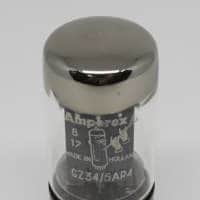
Wampler Dual Fusion Overdrive V1 2010s None SMD component type
Our users rate Reverb
Wampler Pedals Dual Fusion Tom Quayle Signature Overdrive Pedals V1
*This is not SMD component type but old school DIP
When we heard that one of the forerunners of modern Fusion, Tom Quayle, was using our pedals, it made us think – who out there caters for modern Fusion? Sure, you can find blues pedals, country pedals, rock and metal pedals just about any where… But no one has looked at the fastest growing genre of guitar players… Modern Fusion.
So, we talked to Tom and listened to what he had to say about his current choice of gain pedals (The Wampler Pedals Euphoria and the Paisley Drive), from there we discussed how we could make them better, dare I say… Perfect?
After much backwards and forwards of ideas and theories about tone, switching and stacking, we found that we could in fact make a pedal that suited Tom, was perfect for modern Fusion and also for just about everyone else who loves great tone, clarity and versatility.
Modern fusion is a light year away from tradition jazz or fusion. Taking the theoretical approach and knowledge and then adding a healthy amount of rock and shred, modern fusion players need a more “gainy” tone – gain that has to give them the power they need but it also has to leave room for the clarity of expression... especially when working at extremely high intensity.
So, we took the core sounds Tom loves from the Euphoria and the Paisley, modified them so they work together perfectly, gave them a couple of extra special Brian tweeks – especially when stacked – then put them together to make the Dual Fusion, a milestone in tone for modern Fusion, and just about every other style that needs amazing, transparent overdrive.
To get the most out of your new pedal, you'll want to become very familiar with the controls. The Dual Fusion drive features 2 independent channels, each with three adjustment knobs and 1 switch that allows for a great deal of flexibility. With a brighter single coil guitar, you can get anything from fuller cleans to some seriously powerful drive. With a more aggressive instrument, there's enough dirt on tap to get into a fully saturated tone. Regardless of your gain needs, the EQ flexibility and tonal palette of this pedal is stunning! We'll go over each control in detail, and cover some suggestions that will give you a great tone so you don't have to start from scratch (unless you want to that is!)
Controls:
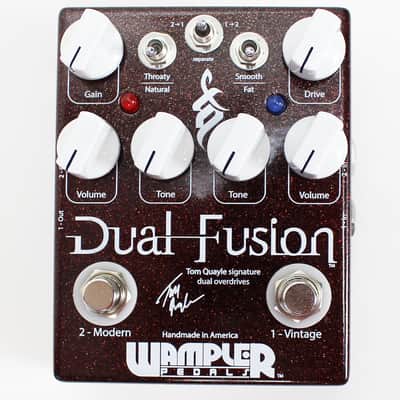
- Bypass Switches – Simple enough, these relay based soft footswitches are wired up for true bypass switching to ensure that you don't have anything in the way when you disable either channel. Stomp on each channel's respective footswitch to turn the pedal on, and the LED indicator light will show that it's active. C1 (Vintage) has a blue LED indicator light, C2 (Modern) has a red LED indicator light. When both channels are on, so are both LEDs.
- Volume – These control the output of the each channel. They work just like the volume knob on your guitar or your amp. As you raise the Gain knob, and depending on how you adjust the Tone control and switches, you may need to raise or lower them to have the same output level. That's perfectly normal. Whether you prefer a boost when you kick your overdrive on or just about the same level as your clean tone, there should be enough range of adjustment to suit all tastes. This isn’t a hugely loud pedal, so if you're using a very high output guitar, you might need to raise the level fairly high – again, that's normal, so long as the pedal can hit unity gain (same level when you kick it on as when it's bypassed) it's behaving as expected.
- Gain – These controls how much dirt you get from the each channel. At lower settings, it will be very nearly clean even if you dig in. Around 9-10 o'clock, it starts to get some crunch when you dig in (or if you have a high output guitar). By noon, it's really starting to cook, and past there you've got the potential for some really sweet overdrive. Again, this control will interact somewhat with the Volume control. As you raise it, you may need to lower the Volume to keep the signal level even. You'll also find that the same Tone settings don't work at all Gain settings.
- Tone – This adjusts between a much darker, bassier sound at the fully counterclockwise position, to a very highs-forward, present sound fully clockwise. As with most tonal adjustments, you're probably going to find the right fit for your gear somewhere between the extremes. It's not a bad idea to start at noon and adjust in small increments from there to let your ears get used to the sound of the pedal as you raise or lower the Tone knobs. The Tone knobs on this pedal don't stand alone, however – there are voicing switches on each channel which contribute strongly to how you'll want to adjust the Tone.
- Channel 1 Switch – Smooth / Fat. Smooth is the most "D"-amp style sound, with a great degree of presence and tremendous touch response. This setting is the one Tom prefers because of its warmth and response. Fat comes with a slight volume boost, and has the most forward tone and has less overdrive, this work particularly well for rhythm playing.
- Channel 2 Switch – Throaty / Natural. Throaty being the louder of the two options, gives you – as the name suggests a more throaty rounded sound. With a little sparkle on the top to give you clarity. Natural is more organic, open and natural. A lovely overdrive designed to let you play with your guitar singing out.
- Choosing “stacked” vs. “separate” channel switching The toggle switch has 3 settings: 2>1, Separate, and 1>2. Looking at the top of the pedal, the input jacks are on the right side (with an arrow pointing towards the knobs) and the output jacks are on the left side (with an arrow pointing away from the knobs). C1 means “channel 1” and C2 means “channel 2” on the jacks. When in 2>1 mode and both channels are “on”, the guitar is routed into channel 2, then channel 1. The input cable from the guitar needs to be moved to the “C2” input jack, and the output cable to the amp needs to be moved to “C1” output jack.
When in 1>2 mode and both channels are “on”, the guitar is routed into channel 1, then channel 2. The input cable from the guitar needs to be moved to the “C1” input jack and the output cable to the amp needs to be moved to the “C2” output jack. When the toggle is in the middle it is in “separate” mode, and the pedal can be used as two individual pedals, both with its respective input and output jack. Please note that if the cables are not in the correct place, the toggle switch and effect will not work properly, but no damage is done
Reverb Buyer Protection
Reverb has your back if your item is lost, damaged, or doesn't match its description. Simply report any issues within 7 days and we'll help you get a full refund.Learn more about Reverb Buyer Protection.
| Condition | Brand New (New) Brand New items are sold by an authorized dealer or original builder and include all original packaging.Learn more |
|---|---|
| Brand | |
| Model |
|
| Finish |
|
| Categories | |
| Year |
|
| Made In |
|
Product safety information may be available here.

