


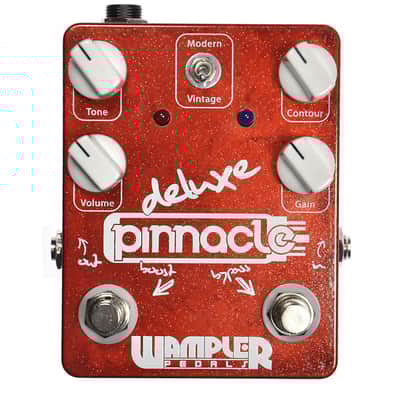
Wampler Pinnacle Deluxe 2010s None SMD component type
Our users rate Reverb
Wampler Pedals Pinnacle Deluxe V1
*This is not SMD component type but old school DIP
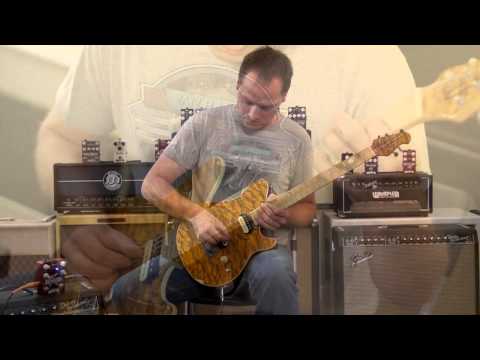
Praised by Zeke Clark (former Van Halen gear tech) as being the pedal which comes the closest to getting the "Brown Sound" of anything he's ever tried, the Pinnacle is aimed squarely at trying to emulate every aspect of that classic tone, from the powerful mids and highs to the low-end sag when you really hit it.
This pedal is for people who want one of two things (or both!). If you're looking for classic, soaring tone inspired by Eddie's sound during the time David Lee Roth was with the band especially, with Brian's typical attention to detail and flexibility fully on board, the Pinnacle will get you where you're going... or, if you're looking for a great sounding, versatile, very responsive Marshall®-in-a-Box type of pedal with lots of high end sizzle available, the Pinnacle or Pinnacle deluxe can do those sounds too, and very well.
It will even do a killer higher gain tone, though it will always retain that more classic voicing.
To get the most out of your new pedal, you'll want to become very familiar with the controls.
The Pinnacle features controls for Gain, Volume, Tone and Contour, as well as a Vintage/Modern switch to change the overall tone from a more classic, darker sound to a brighter, more forward tone, and a Boost switch which changes the internal gain structure between lower and higher gain modes. Flexibility is a key feature, as usual, and the tone controls on the Pinnacle are intentionally very interactive, so experimentation will go far. As with all Wampler Pedals products, the Pinnacle includes a high-quality true-bypass relay soft switch which takes it out of the signal path when bypassed. Experiment and enjoy!
*Pinnacle = Boost "Toggle" VS Pinnacle Delux Boost "Foot Switch"
Contorls:
- Bypass Switch – A true-bypass relay based soft switch ensures solid removal of the circuit when it isn't wanted, meaning you don't lose any tone when the pedal is off.
- Volume – This control adjusts the output level of the Pinnacle. There's plenty of volume on tap in either standard or Boost mode, so whether you want to go farther than your input level or just make sure it can do unity volume (the same level of signal going out as you feed it, when active), you're covered. The Gain, Tone and Contour knobs, and the Boost Toggle all have an impact on total output volume level, so you're probably better off waiting to adjust the Volume until you've dialed in the other controls. Re-adjustment might be necessary if you get it to the desired level and still need to tweak the sound.
- Gain – This control, in conjunction with the Boost Toggle lets you dial in anything from a classic, almost laid back early rock tone all the way to modern high-gain. Our users, from international pros to weekend warriors, all have their own favorite ways of using the pedal, so however you end up liking the Gain setting, that's just fine. The "Brown Sound" is in there, that's the goal after all! But in terms of how much distortion you want, there's a great deal of flexibility and we encourage you to run through the whole gamut to get a good sense of how it works and responds before you settle on how you'll use it.
- Tone – This adjusts the frequency emphasis on the highs. It interacts substantially with the Contour knob and Vint./Modern switch. There are several ways you can approach adjusting the Tone. You could start with it maxed and roll it off until you like the amount of highs, or you could start with it lower and adjust it either direction if you want more or less. Either way, it's a fairly straightforward control, but the interaction with the other tonal adjustment options means you should expect to spend some time getting used to the overall tonal possibilities.
- Contour – This adjusts the frequency emphasis overall. It interacts substantially with the Tone knob, and is affected by the Vint./Modern switch as well. At noon, this knob gives you a balanced presentation of theoverall frequencies; counterclockwise it becomes very midrange-forward, and clockwise it takes the mids out pretty heavily, contouring the sound for a very "scooped" tone. A little adjustment goes a long way with this control. The best approach would be to start with the Contour knob at noon, and adjust from there. Of course, making such broad tonal changes, you're going to want to adjust the Tone control in conjunction with the Contour knob!
- Vint./Modern Switch – This control essentially sets the overall voicing of the pedal's frequencies, to be either darker with a classic tonality or brighter and more modern if you'd prefer that. Setting this up first will give you a good "starting point" for your tone, but it's also useful if you've adjusted everything else and feel the overall tone needs to shift in a larger direction.
- Boost Switch – This switch alters the internal gain structure of the pedal to bring much more drive, heavier and more aggressive distortion when engaged. On the Pinnacle Deluxe, this functionality is found on the Boost Footswitch, for adjustment on the fly! Note: This is not and is not intended to be a volume boost. While especially at very low Gain knob settings it may act as a volume boost to a degree, it is first and foremost intended to kick in extra gobs of gain, and shouldn't be thought of as increasing the volume*Pinnacle = Boost "Toggle" VS Pinnacle Delux Boost "Foot Switch"
Reverb Buyer Protection
Reverb has your back if your item is lost, damaged, or doesn't match its description. Simply report any issues within 7 days and we'll help you get a full refund.Learn more about Reverb Buyer Protection.
| Condition | Brand New (New) Brand New items are sold by an authorized dealer or original builder and include all original packaging.Learn more |
|---|---|
| Brand | |
| Model |
|
| Finish |
|
| Categories | |
| Year |
|
| Made In |
|
| Pedal Format |
|
Product safety information may be available here.

