2nd Sense Vocal Remover - Audio Isolator for Center, Left & Right Channels (Plug-In Download)
New Price$29
Instant Download
This gear has sold
See similar gear from other Reverb sellers
Listed:over a month ago
Views:296
Watchers:2
Offers:1

Chicago, IL, United States
Our users rate Reverb
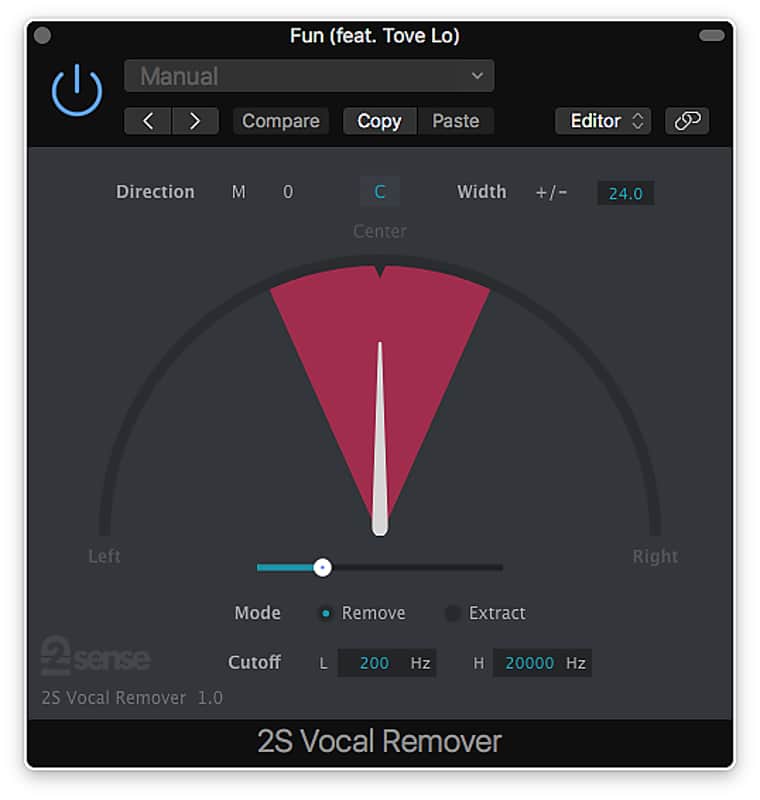
Stereo spectrum signal isolation and extraction from 2nd Sense.
What it is:
An efficient sound removal and extraction tool.
How we use it:
Remove vocals and more from the stereo signal.
Why it's cool:
Vocal Remover's intuitive interface makes it easy to pinpoint and extract a particular sound. Though named as Vocal Remover, the plugin is used for removing or extracting sound in a specified direction span from a stereo sound. If you use it to extract the center vocal sound, it becomes center vocal extractor. If you use it to remove the guitar sound on the left, it becomes side guitar remover.
Compatibility
System
Installation Instructions
General Instructions:
What it is:
An efficient sound removal and extraction tool.
How we use it:
Remove vocals and more from the stereo signal.
Why it's cool:
Vocal Remover's intuitive interface makes it easy to pinpoint and extract a particular sound. Though named as Vocal Remover, the plugin is used for removing or extracting sound in a specified direction span from a stereo sound. If you use it to extract the center vocal sound, it becomes center vocal extractor. If you use it to remove the guitar sound on the left, it becomes side guitar remover.
Compatibility
System
- OS X 10.6+ (32/64 bit)
- Windows 7+ (32/64 bit)
- VST 2.x (32/64 bit)
- Audio Units (32/64 bit)
- AAX Native (32/64 bit)
Installation Instructions
General Instructions:
- We auto-detect your computer operating system, so just click the download button above.
- Find the downloaded plugin (it's in your computer's download folder, or wherever you've chosen to save it) and double click the installer.
- A plugin installer window will open. Simply go through the installation process.
- We will also send you an email with a link to re-download in case you need it.
- If Ableton Live is closed, open it and skip to #5.
- If Ableton Live is already open, go to Preferences.
- Go to Files & Folder.
- Click "Rescan plugins".
- Find the plugin in the Ableton plugins folder in the sidebar.
- Drag-and-drop the plugin onto your track at the bottom of the screen.
- Open Logic Pro X. Newly installed plugins should be detected automatically every time Logic is opened.
- If you've downloaded an effect or utility plugin, these can be used on an insert for any track in the mixer.
- Create a software instrument track if you downloaded a virtual instrument plugin.
- Under Default Patch, go to AU Instruments and choose the plugin you just installed.
- Open Pro Tools. Newly installed plugins should be detected automatically every time Pro Tools is opened.
- If you've downloaded an effect or utility plugin, these can be used on an insert for many types of tracks (Audio, Aux, Instrument, Master Fader...)
- If you’ve downloaded a software instrument, create a new Instrument track.
- Navigate to the Mixer and locate the newly created Instrument track.
- Select the desired instrument plugin by clicking on any of the Inserts on the Instrument track.
- Go to the Reverb SYNC Software and plugin Collection.
- Choose your desired plugin.
- Reverb will auto-detect your platform, so simply click the download button.
- Continue the installation process by following the prompt.
- Hover your mouse over the smart control button.
- Click Show Inspector icon.
- Click on plugins and choose your desired plugin.