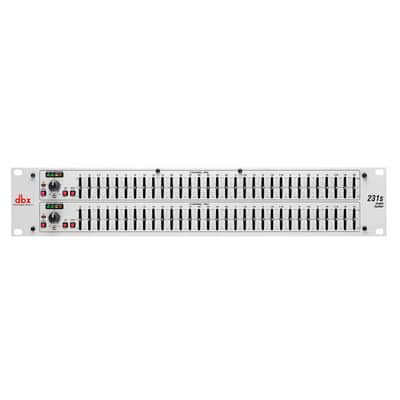
DBX 231s Dual 31-Band Graphic Equalizer

DBX 231s Dual 31-Band Graphic Equalizer
Price$335
Free Shipping

Free Shipping
from Oakland, NJ

Only 1 left
Grab it before it's gone
Listed:over a month ago
Views:841
Saves:3

Oakland, NJ, United States

30-Day Return Policy
Enjoy peace of mind with your new gear
Our users rate Reverb
The DBX 231S Dual 31-Band Graphic Equalizer meets the needs of the most demanding sound reinforcement environments, while offering the simplicity of straightforward controls. When the pros need an EQ, they turn to DBX.
DBX 231S Dual 31-Band Graphic Equalizer Features:
Sure to find a home in the studio, on tour and with installed sound venues, the DBX 231S is destined to take its rightful place in the lineage of great DBX signal processors that are the professional's choice in signal processing. With such affordable quality, there's no longer any excuse for compromising your sound.
CALIFORNIA PROPOSITION 65 WARNING - WARNING: Cancer and Reproductive Harm -
DBX 231S Dual 31-Band Graphic Equalizer Features:
- Dual 31-band, 1/3-octave Constant Q frequency bands
- Switchable boost/cut ranges of ±6 or ±12 dB
- Front panel bypass switch
- ±12 dB input gain range
- 4-segment LED ladders for monitoring output levels
- XLR and TRS Inpts and Outputs
- Frequency Repsonse of <10Hz to >50kHz
- Dynamic range of greater than 108dB
Sure to find a home in the studio, on tour and with installed sound venues, the DBX 231S is destined to take its rightful place in the lineage of great DBX signal processors that are the professional's choice in signal processing. With such affordable quality, there's no longer any excuse for compromising your sound.
CALIFORNIA PROPOSITION 65 WARNING - WARNING: Cancer and Reproductive Harm -
| Condition | Brand New (New) Brand New items are sold by an authorized dealer or original builder and include all original packaging.Learn more |
|---|---|
| Brand | |
| Model |
|
| Categories |
Product safety information may be available here.

