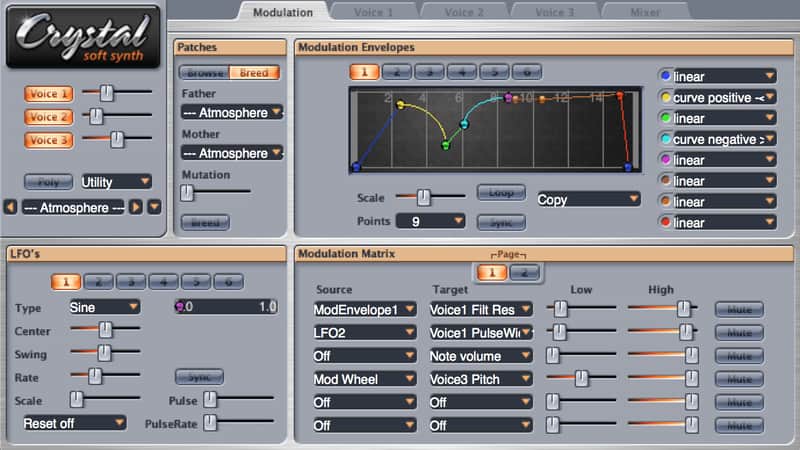
Crystal Soft Synthesizer
PriceFREE
Incl. VAT
Instant Download
This listing has ended
See similar gear from other Reverb sellers
Listed:over a month ago
Views:6,320
Saves:66
Downloads:2,704

Chicago, IL, United States
Our users rate Reverb
An advanced semi-modular synth with an inventive patch mutation algorithm.
What it is:
An all-purpose synthesizer packed with tweakable parameters, presets, and innovative mutate/breed function.
How we use it:
"Breed" the seperate patch banks via Crystal's mutation algorithm to create infinite hybrids of never before heard synthesis.
Why it's cool:
Crystal goes above and beyond the typical freeware synth - it is easy to use, packed with high quality sounds, and simply different. Simple semi-modular synthesizers have already been done. My goal with Crystal was to offer something more.
After you download and install Crystal, start up your virtual instrument host and load Crystal into your song. Try out the presets that come with Crystal to get an idea of the kinds of sounds you can make with it. As you're listening to the presets, note that some of the pads, ambient, and atmospheric presets take a while to evolve, so be patient: hold down a note and wait for it to develop.
When you listen to the "Tempo Synced" presets, turn your song tempo up to a dance tempo of 140-150 in order to get them to sound snappy. Also, note that the "Swell" programs are tempo sync'd, so hit the note on the "1", and the sound will climax on the "1" of the next measure. The patch names that end with "MW" are setup to do something interesting when you move your mod wheel, so be sure to wag it around when trying out those patches.
Compatibility
Note that when using the Audio Unit version on the Mac, Crystal 2.5 requires a host which supports Cocoa plugins. Almost all Audio Unit hosts on the Mac do support Cocoa plugins, but if you're using an old version of your host and having trouble getting the plugin window to display, that might be the problem.
Installation Instructions
Windows:
Crystal includes 128 patches and 8Mb of sampled waveforms built-in. For additional patches and waveforms, follow these additional instructions:
Mac OS X:
Crystal includes 128 patches and 8Mb of sampled waveforms built-in. For additional patches and waveforms, follow these additional instructions:
What it is:
An all-purpose synthesizer packed with tweakable parameters, presets, and innovative mutate/breed function.
How we use it:
"Breed" the seperate patch banks via Crystal's mutation algorithm to create infinite hybrids of never before heard synthesis.
Why it's cool:
Crystal goes above and beyond the typical freeware synth - it is easy to use, packed with high quality sounds, and simply different. Simple semi-modular synthesizers have already been done. My goal with Crystal was to offer something more.
After you download and install Crystal, start up your virtual instrument host and load Crystal into your song. Try out the presets that come with Crystal to get an idea of the kinds of sounds you can make with it. As you're listening to the presets, note that some of the pads, ambient, and atmospheric presets take a while to evolve, so be patient: hold down a note and wait for it to develop.
When you listen to the "Tempo Synced" presets, turn your song tempo up to a dance tempo of 140-150 in order to get them to sound snappy. Also, note that the "Swell" programs are tempo sync'd, so hit the note on the "1", and the sound will climax on the "1" of the next measure. The patch names that end with "MW" are setup to do something interesting when you move your mod wheel, so be sure to wag it around when trying out those patches.
Compatibility
Note that when using the Audio Unit version on the Mac, Crystal 2.5 requires a host which supports Cocoa plugins. Almost all Audio Unit hosts on the Mac do support Cocoa plugins, but if you're using an old version of your host and having trouble getting the plugin window to display, that might be the problem.
Installation Instructions
Windows:
- Download the windows version of Crystal. The name of this file is Crystal.dll
- Copy this file to your VST Instruments folder. See the documentation for your VST host for the location of this folder.
Crystal includes 128 patches and 8Mb of sampled waveforms built-in. For additional patches and waveforms, follow these additional instructions:
- For additional patches, download Crystal patch bank (.fxb) files and drag them, one at a time, to the "Import Bank Drop" well in Crystal's Browse tab (under Patches on the Modulation page). Once imported, you can load a bank from the Banks menu, and choose patches from the loaded bank with the Patches menu. You can find Crystal patch bank files here.
- For additional waveforms, first find your Crystal folder by choosing "Show Crystal Folder" from Crystal's Utility menu. Create a folder named CrystalSoundFonts in your Crystal folder. Download the 20MB SF2 ROM by clicking here.. Copy this to the CrystalSoundFonts folder. Place any other soundfonts in this folder as well. These soundfonts will show up on the Oscillator Type menu for each voice.
Mac OS X:
- Download and run the Crystal installer.
Crystal includes 128 patches and 8Mb of sampled waveforms built-in. For additional patches and waveforms, follow these additional instructions:
- For additional patches, download Crystal patch bank (.fxb) files and drag them, one at a time, to the "Import Bank Drop" well in Crystal's Browse tab (under Patches on the Modulation page). Once imported, you can load a bank from the Banks menu, and choose patches from the loaded bank with the Patches menu. You can find Crystal patch bank files here.
- For additional waveforms, first find your Crystal folder by choosing "Show Crystal Folder" from Crystal's Utility menu. Create a folder named CrystalSoundFonts in your Crystal folder. Download the 20MB SF2 ROM by clicking here.. Copy this to the CrystalSoundFonts folder. Place any other soundfonts in this folder as well. These soundfonts will show up on the Oscillator Type menu for each voice.
| Brand | |
|---|---|
| Model |
|
| Categories |
Product safety information may be available here.