
iZotope DDLY Dynamic Delay Plugin
New Price€10.06
Incl. VAT
Instant Download
This gear has sold
See similar gear from other Reverb sellers
Listed:over a month ago
Views:512
Saves:7
Offers:4

Chicago, IL, United States
Our users rate Reverb
Don't delay, delay today - responsive delay from iZotope.
What it is:
A responsive, transient-based delay.
How we use it:
Breathe new life into a track by creating versatile and intriguing delays.
Why it's cool:
DDLY provides for cleaner, more complex delays by reading the transients of your input signal and splitting it down analog or granular delay paths.
Compatibility
Installation Instructions
General Instructions:
What it is:
A responsive, transient-based delay.
How we use it:
Breathe new life into a track by creating versatile and intriguing delays.
Why it's cool:
DDLY provides for cleaner, more complex delays by reading the transients of your input signal and splitting it down analog or granular delay paths.
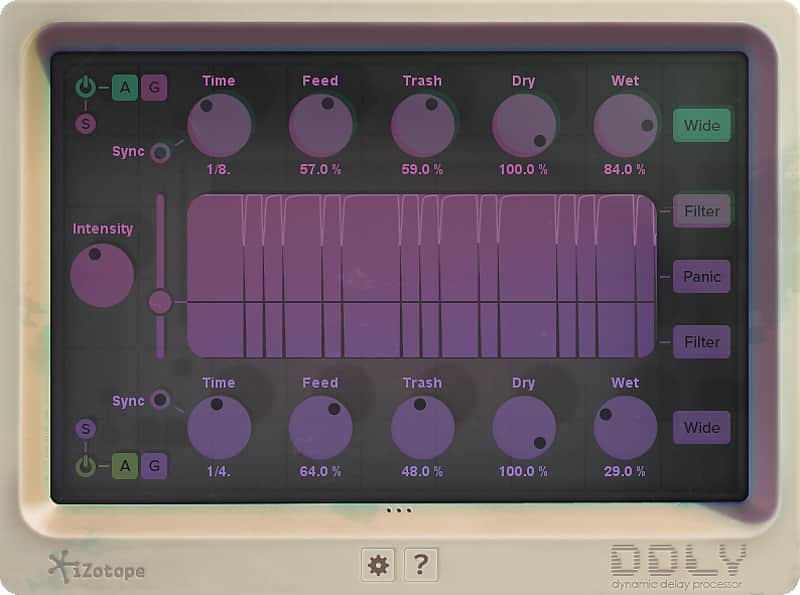
DDLY Dynamic Delay responds to your track's musical dynamics to create versatile and intriguing delays. It's a one-of-a-kind effects plug-in that delays the signal differently depending on the character of the sound, without turning your track to aural mud. Adjust the threshold to split your signal based on transients, then send it down two separate analog or granular delay paths.
Get a cleaner, more complex sound than a traditional full-signal delay plug-in with DDLY!
DDLY Key Features- Two delays in
one: DDLY analyzes your audio based on an adjustable threshold to determine what to send to
the top delay and what to send to the bottom delay. Adjust the Intensity
to affect how strongly the signal is split between the two—great for a punchy
delay on the harder, transient crack of your drums and a shuffling delay on the
main beat elements.
- Customize your
delay: Both delays have two modes to choose from: Analog or Grain. Analog
produces warm lo-fi delays with smearing and nostalgic degradation. Grain
produces melodic, symphonic, and futuristic sounds for truly new soundscapes.
- Responsive
interface: The interface of DDLY reacts to the material it’s applied to for
unique real-time visual feedback. As the knobs come to life, your sound gets
cooler. Go ahead, get ‘em all going!
- Automatable: DDLY
can be set up with automation in your audio host, to engage the dynamic delay
on your mix when you want it to and back off when you need the raw material to
shine.
Compatibility
- Format: Audio Unit, AAX (64-bit only) and AAX Audio Suite, RTAS and Audio Suite, VST 2, VST 3
- Mac Hardware Requirements: Intel processor, 4GB RAM minimum
- PC Hardware Requirements: Intel compatible processor, 4GB RAM minimum
- Mac OS Requirements: OS X 10.8-10.11
- PC OS Requirements: Windows 7 or later
Installation Instructions
General Instructions:
- We auto-detect your computer operating system, so just click the download button above.
- Find the downloaded plugin (it's in your computer's download folder, or wherever you've chosen to save it) and double click the installer.
- A plugin installer window will open. Simply go through the installation process.
- We will also send you an email with a link to re-download in case you need it.
- If Ableton Live is closed, open it and skip to #5.
- If Ableton Live is already open, go to Preferences.
- Go to Files & Folder.
- Click "Rescan plugins".
- Find the plugin in the Ableton plugins folder in the sidebar.
- Drag-and-drop the plugin onto your track at the bottom of the screen.
- Open Logic Pro X. Newly installed plugins should be detected automatically every time Logic is opened.
- If you've downloaded an effect or utility plugin, these can be used on an insert for any track in the mixer.
- Create a software instrument track if you downloaded a virtual instrument plugin.
- Under Default Patch, go to AU Instruments and choose the plugin you just installed.
- Open Pro Tools. Newly installed plugins should be detected automatically every time Pro Tools is opened.
- If you've downloaded an effect or utility plugin, these can be used on an insert for many types of tracks (Audio, Aux, Instrument, Master Fader...)
- If you’ve downloaded a software instrument, create a new Instrument track.
- Navigate to the Mixer and locate the newly created Instrument track.
- Select the desired instrument plugin by clicking on any of the Inserts on the Instrument track.
- Go to the Reverb SYNC Software and plugin Collection.
- Choose your desired plugin.
- Reverb will auto-detect your platform, so simply click the download button.
- Continue the installation process by following the prompt.
- Hover your mouse over the smart control button.
- Click Show Inspector icon.
- Click on plugins and choose your desired plugin.