FabFilter Timeless 2 Delay
FabFilter Timeless 2 Delay
This gear has sold
See similar gear from other Reverb sellers

Our users rate Reverb
What it is:
A perfectly modeled classic tape delay with chorus, phaser, and flange capabilities.
How we use it:
Add dizzying movement and modulation to a mix.
Why it's cool:
Per-channel phase inversion takes the already excessive capabilities of this unit a step further.
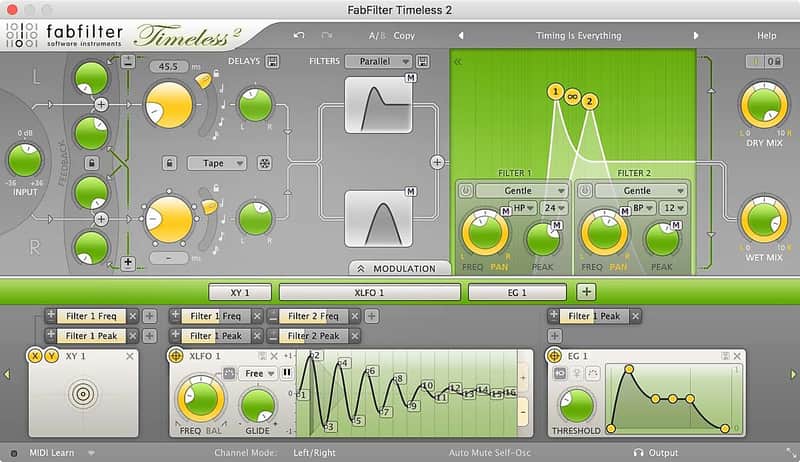
FabFilter Timeless 2 is not only a perfectly modelled classic tape delay. Its unique high-quality filters and many creative options turn it into the ultimate sound-mangling machine! Create echo, chorus, flanger, phaser, scratch effects and much more.
The delay signal is fed to two high-quality multimode filters, and then routed back to the delays with adjustable feedback and cross-feedback knobs. Per-channel phase inversion is provided to create jaw-dropping flanger and phasing effects.
Finally, you get all the usual FabFilter goodies: perfectly tuned knobs, MIDI Learn, Smart Parameter Interpolation for smooth parameter transitions, extensive help with interactive help hints, AltiVec and SSE optimization, and much more!
Features
- Two delay lines (5 ms to 5 sec) with host tempo sync and panning
- Feedback, cross-feedback and phase inversion
- Tape delay or time-stretching behavior when changing the delay time
- Mid/side processing
- Freeze buffer option
- Over 300 presets
- Tap feature
- Two state-of-the-art multimode filters with filter panning and 11 characteristics
- Interactive filter display
- Revolutionary interface, using our innovative what-you-use-is-what-you-see concept
- GPU-powered graphics acceleration
- Normal and wide interface layouts, with an option to show or hide the modulation section at the bottom
- Endless modulation options, with all the 16-step XLFOs, XY controllers, envelope generators, envelope followers and MIDI sources you will ever need
- Easy drag-and-drop modulation with 24-slot modulation matrix
- Modulation source signal visualization
- Interactive MIDI Learn
- Unique per-component presets
- Smart Parameter Interpolation
- Extensive help file with interactive help hints
- Undo, redo and A/B switch features
Compatibility
Windows
- 32-bit: Windows 8, 7, Vista or XP
- 64-bit: Windows 8, 7 or Vista(x64)
- VST 2/3 host or Pro Tools
Mac OS X
- 32-bit: OS X 10.5 or higher
- 64-bit: OS X 10.6 or higher
- AU or VST 2/3 host or Pro Tools
- Intel processor
Installation Instructions
Installation Instructions:
- After you purchase your FabFilter product, Reverb SYNC will email your serial number
- To activate that serial number, go to: https://www.fabfilter.com/activate/
- Fill out the form
- After you have filled in the following form, a personal product license key will be sent to you by e-mail immediately
- You will be directed to download the plugin and activate it
- If Ableton Live is closed, open it and skip to #5.
- If Ableton Live is already open, go to Preferences.
- Go to Files & Folder.
- Click "Rescan plugins".
- Find the plugin in the Ableton plugins folder in the sidebar.
- Drag-and-drop the plugin onto your track at the bottom of the screen.
- Open Logic Pro X. Newly installed plugins should be detected automatically every time Logic is opened.
- If you've downloaded an effect or utility plugin, these can be used on an insert for any track in the mixer.
- Create a software instrument track if you downloaded a virtual instrument plugin.
- Under Default Patch, go to AU Instruments and choose the plugin you just installed.
- Open Pro Tools. Newly installed plugins should be detected automatically every time Pro Tools is opened.
- If you've downloaded an effect or utility plugin, these can be used on an insert for many types of tracks (Audio, Aux, Instrument, Master Fader...)
- If you’ve downloaded a software instrument, create a new Instrument track.
- Navigate to the Mixer and locate the newly created Instrument track.
- Select the desired instrument plugin by clicking on any of the Inserts on the Instrument track.
- Go to the Reverb SYNC Software and plugin Collection.
- Choose your desired plugin.
- Reverb will auto-detect your platform, so simply click the download button.
- Continue the installation process by following the prompt.
- Hover your mouse over the smart control button.
- Click Show Inspector icon.
- Click on plugins and choose your desired plugin.