Waves Primary Source Expander
New Pricekr772.39
Instant Download
This gear has sold
See similar gear from other Reverb sellers
Listed:over a month ago
Views:283
Saves:2
Offers:7

Chicago, IL, United States
Our users rate Reverb
Live sound simplified.
What it is:
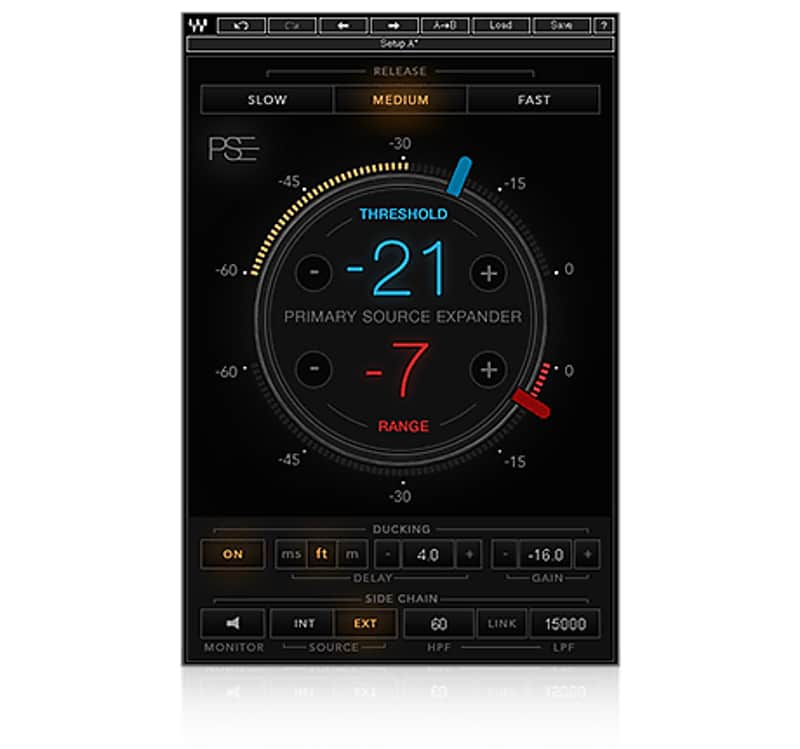
A precision expander that attenuates the channel at a specified threshold.
How we use it:
Reduce stage bleed and feedback sensitivity on idle mics.
Why it's cool:
Removing leakage and potential feedback hazards is a godsend for the live engineer. PSE lets you reduce stage bleed and sensitivity to feedback when a mic is idle by automatically lowering mic levels between musical phrases. Perfect for live sound and for mixing live recordings.
At the heart of the Primary Source Expander (PSE) plugin is a precision expander, tailored especially for melodic sources such as vocals, guitars, strings, brass, woodwinds and more. PSE works like a fader that smoothly attenuates the channel’s level when the source goes below the threshold you’ve set. You determine both the threshold and the amount of attenuation.
Reducing stage noise leakage when your microphones are idle will help you get an overall mix that is more coherent, more focused, and has better phase relations.
PSE also provides advanced sidechain and ducking controls for greater consistency and precision when treating complex live scenarios. Whether you are mixing FOH or monitors in a live venue or working on a live recording in the studio, PSE will ensure that your mics are as loud and clean as they can be, while preserving your source’s original tone and the natural ambience of your location.
Features:
Compatibility
Mac:
CPU
Memory
Operating System
Screen Resolution
Support for Visually Impaired Users
Windows:
CPU
Memory
Operating System
Screen Resolution
Installation Instructions
What it is:
A precision expander that attenuates the channel at a specified threshold.
How we use it:
Reduce stage bleed and feedback sensitivity on idle mics.
Why it's cool:
Removing leakage and potential feedback hazards is a godsend for the live engineer. PSE lets you reduce stage bleed and sensitivity to feedback when a mic is idle by automatically lowering mic levels between musical phrases. Perfect for live sound and for mixing live recordings.
At the heart of the Primary Source Expander (PSE) plugin is a precision expander, tailored especially for melodic sources such as vocals, guitars, strings, brass, woodwinds and more. PSE works like a fader that smoothly attenuates the channel’s level when the source goes below the threshold you’ve set. You determine both the threshold and the amount of attenuation.
Reducing stage noise leakage when your microphones are idle will help you get an overall mix that is more coherent, more focused, and has better phase relations.
PSE also provides advanced sidechain and ducking controls for greater consistency and precision when treating complex live scenarios. Whether you are mixing FOH or monitors in a live venue or working on a live recording in the studio, PSE will ensure that your mics are as loud and clean as they can be, while preserving your source’s original tone and the natural ambience of your location.
Features:
- Reduces stage bleed and sensitivity to feedback when mics are idle
- Smoothly attenuates levels when source drops below the threshold you’ve defined
- User-friendly GUI for quick operation – set and forget
- Internal and external sidechain with HP/LP filters
- Ducking mode for added precision in complex live scenarios
- Release time presets
Compatibility
Mac:
CPU
- Intel Core i5 / i7 / Xeon
Memory
- 8 GB RAM
- 8 GB free disk space on the system drive
Operating System
- 10.10.5 - 10.12.6
Screen Resolution
- Minimum: 1024x768
- Recommended: 1280x1024 / 1600x1024
- USB displays are not supported as the primary display.
Support for Visually Impaired Users
- Mac OS Sierra 10.12.4
- VoiceOver Utility enabled
- Pro Tools 12.7
- Logic 10.3.1
Windows:
CPU
- Intel Core i3 / i5 / i7 / Xeon / AMD Quad-Core
Memory
- 4 GB RAM
- 8 GB free disk space on the system drive
Operating System
- Windows 7 with SP1 64 bit
- Windows 8.1 64 bit
- Windows 10 64 bit
Screen Resolution
- Minimum: 1024x768
- Recommended: 1280x1024 / 1600x1024
Installation Instructions
- Create an account: https://www.waves.com/create-account (if you have an account, skip this step)
- Register the serial number we emailed: https://www.waves.com/account/register
- Download and install Waves Central for Mac | Windows.
- If you already have Waves Central installed, skip to step 4. - Launch Waves Central.
- Windows: via the desktop shortcut or Start Menu > All Programs > Waves.
- Mac: Applications > Waves Central. - Log into Waves Central using your Waves account information.
- Click on Easy Install & Activate.
- Select the products you wish to install & activate on this computer.
- Click on the Install & Activate button.