
u-he Zebralette
PriceFREE
Incl. VAT
Instant Download
This listing has ended
See similar gear from other Reverb sellers
Listed:over a month ago
Views:6,215
Saves:53
Downloads:1,830

Chicago, IL, United States
Our users rate Reverb
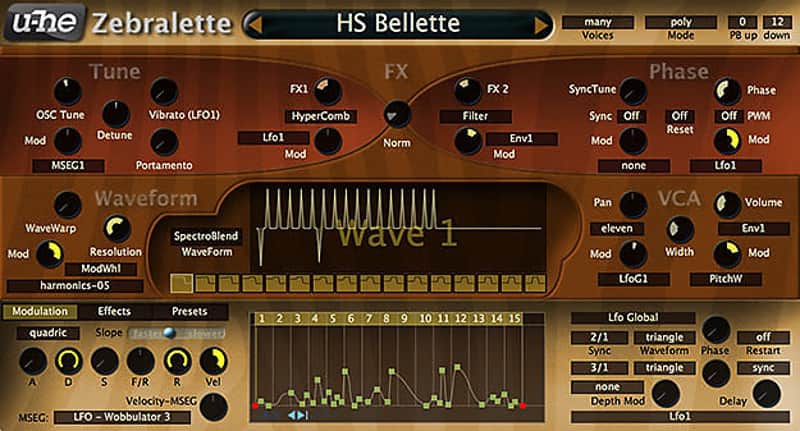
u-he's famed Zebra2 in a stripped down and concise package.
What it is:
The little brother to u-he's powerful Zebra2 synthesizer.
How we use it:
For all high-quality synth needs from bass to leads.
Why it's cool:
Zebra2's been used by the likes of Hans Zimmer - as heard in The Dark Knight series. Zebralette allows you a thorough look into the power of Zebra2, with enough features to make you wonder why it's free. Zebralette is just one of Zebra2's oscillators packed into a simple, easy-to-learn framework – but you have everything you need to make some pretty amazing sounds. Sounds that can be directly loaded into Zebra2 later. And should you eventually decide to upgrade to Zebra2, you will already know everything there is to know about the oscillators – which is quite an advantage!
Zebralette has two LFOs (one per voice, one global), a multi-stage envelope and three on-board effects (chorus, EQ, delay). Not forgetting Zebra2's famous dual spectral effects, which include several squelchy filter algorithms.
Megasaw? Zebralette also goes to eleven.
Compatibility
Installation Instructions
General Instructions:
What it is:
The little brother to u-he's powerful Zebra2 synthesizer.
How we use it:
For all high-quality synth needs from bass to leads.
Why it's cool:
Zebra2's been used by the likes of Hans Zimmer - as heard in The Dark Knight series. Zebralette allows you a thorough look into the power of Zebra2, with enough features to make you wonder why it's free. Zebralette is just one of Zebra2's oscillators packed into a simple, easy-to-learn framework – but you have everything you need to make some pretty amazing sounds. Sounds that can be directly loaded into Zebra2 later. And should you eventually decide to upgrade to Zebra2, you will already know everything there is to know about the oscillators – which is quite an advantage!
Zebralette has two LFOs (one per voice, one global), a multi-stage envelope and three on-board effects (chorus, EQ, delay). Not forgetting Zebra2's famous dual spectral effects, which include several squelchy filter algorithms.
Megasaw? Zebralette also goes to eleven.
Compatibility
- Current PC or intel Mac
- Multicore CPU with SSE2
(Sandy Bridge architecture or newer recommended) - Mac OSX 10.5 or newer
- Windows XP / Vista / 7 / 8 / 10
- 1GB RAM, more recommended
- 60MB free disc space
- display 1000x600px and up
- OSX: VST2 or AU compatible host software
- Windows: VST2 compatible host software
- Supports 32bit and 64bit in all formats
- AAX support for Pro Tools 10.3.7 or later, 11 & 12
Installation Instructions
General Instructions:
- We auto-detect your computer operating system, so just click the download button above.
- Find the downloaded plugin (it's in your computer's download folder, or wherever you've chosen to save it) and double click the installer.
- A plugin installer window will open. Simply go through the installation process.
- We will also send you an email with a link to re-download in case you need it.
- If Ableton Live is closed, open it and skip to #5.
- If Ableton Live is already open, go to Preferences.
- Go to Files & Folder.
- Click "Rescan plugins".
- Find the plugin in the Ableton plugins folder in the sidebar.
- Drag-and-drop the plugin onto your track at the bottom of the screen.
- Open Logic Pro X. Newly installed plugins should be detected automatically every time Logic is opened.
- If you've downloaded an effect or utility plugin, these can be used on an insert for any track in the mixer.
- Create a software instrument track if you downloaded a virtual instrument plugin.
- Under Default Patch, go to AU Instruments and choose the plugin you just installed.
- Open Pro Tools. Newly installed plugins should be detected automatically every time Pro Tools is opened.
- If you've downloaded an effect or utility plugin, these can be used on an insert for many types of tracks (Audio, Aux, Instrument, Master Fader...)
- If you’ve downloaded a software instrument, create a new Instrument track.
- Navigate to the Mixer and locate the newly created Instrument track.
- Select the desired instrument plugin by clicking on any of the Inserts on the Instrument track.
- Go to the Reverb SYNC Software and plugin Collection.
- Choose your desired plugin.
- Reverb will auto-detect your platform, so simply click the download button.
- Continue the installation process by following the prompt.
- Hover your mouse over the smart control button.
- Click Show Inspector icon.
- Click on plugins and choose your desired plugin.
| Brand | |
|---|---|
| Model |
|
| Categories |
Product safety information may be available here.