Waves SSL G-Channel Plugin

Waves SSL G-Channel Plugin
New PriceA$373.25
Instant Download
This gear has sold
See similar gear from other Reverb sellers
Listed:over a month ago
Views:1,405
Saves:13
Offers:13

Chicago, IL, United States
Our users rate Reverb
Solid State Logic - at your fingertips.
What it is:
SSL's G-Series EQ and dynamic controls.
How we use it:
Leverage the EQ and dynamics processing of the SSL G-Series.
Why it's cool:
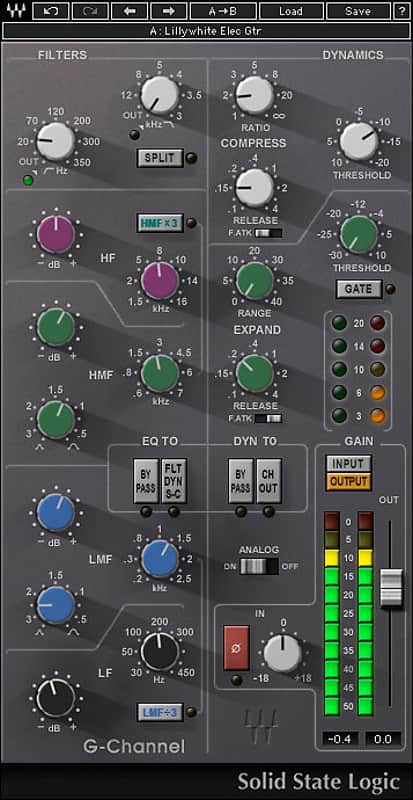
G-Channel brings that one of a kind SSL sound in one convenient package. The power of the complete Solid State Logic SL 4000 console series is now at your fingertips with the SSL G-Channel, a plugin that consolidates the equalization and dynamic controls of the SSL G-Series consoles into one convenient tool.
The G-Channel EQ module delivers the original hardware’s characteristic pre-boost dip, pre-cut rise, and broad Q for extreme frequency manipulation.
The Dynamics section features soft-knee compression and limiting, a gate/expander, and automatic makeup gain for rock steady output levels. Together, they deliver the one-of-a-kind sound and convenient routing flexibility that have made the SSL G-Series console a control room classic.
Features:
Compatibility
Mac:
CPU
Memory
Operating System
Screen Resolution
Support for Visually Impaired Users
CPU
Memory
Operating System
Screen Resolution
Installation Instructions
What it is:
SSL's G-Series EQ and dynamic controls.
How we use it:
Leverage the EQ and dynamics processing of the SSL G-Series.
Why it's cool:
G-Channel brings that one of a kind SSL sound in one convenient package. The power of the complete Solid State Logic SL 4000 console series is now at your fingertips with the SSL G-Channel, a plugin that consolidates the equalization and dynamic controls of the SSL G-Series consoles into one convenient tool.
The G-Channel EQ module delivers the original hardware’s characteristic pre-boost dip, pre-cut rise, and broad Q for extreme frequency manipulation.
The Dynamics section features soft-knee compression and limiting, a gate/expander, and automatic makeup gain for rock steady output levels. Together, they deliver the one-of-a-kind sound and convenient routing flexibility that have made the SSL G-Series console a control room classic.
Features:
- EQ and dynamics plugin modeled on the SSL G Series
- Heard on countless hit records
- Developed under license from Solid State Logic
Compatibility
Mac:
CPU
- Intel Core i5 / i7 / Xeon
Memory
- 8 GB RAM
- 8 GB free disk space on the system drive
Operating System
- 10.10.5 - 10.13.1
Screen Resolution
- Minimum: 1280x1024 / 1600x1024
- Recommended: 1920x1080
- USB displays are not supported as the primary display.
Support for Visually Impaired Users
- Mac OS Sierra 10.12.4
- VoiceOver Utility enabled
- Pro Tools 12.7
- Logic 10.3.1
CPU
- Intel Core i3 / i5 / i7 / Xeon / AMD Quad-Core
Memory
- 4 GB RAM
- 8 GB free disk space on the system drive
Operating System
- Windows 7 with SP1 64 bit
- Windows 8.1 64 bit
- Windows 10 64 bit
Screen Resolution
- Minimum: 1280x1024 / 1600x1024
- Recommended: 1920x1080
Installation Instructions
- Create an account: https://www.waves.com/create-account (if you have an account, skip this step)
- Register the serial number we emailed: https://www.waves.com/account/register
- Download and install Waves Central for Mac | Windows.
- If you already have Waves Central installed, skip to step 4. - Launch Waves Central.
- Windows: via the desktop shortcut or Start Menu > All Programs > Waves.
- Mac: Applications > Waves Central. - Log into Waves Central using your Waves account information.
- Click on Easy Install & Activate.
- Select the products you wish to install & activate on this computer.
- Click on the Install & Activate button.