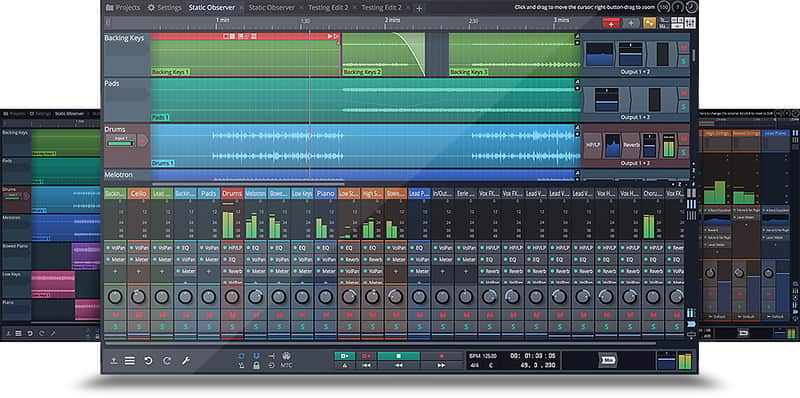
Tracktion Waveform
Price$99
Instant Download
This gear has sold
See similar gear from other Reverb sellers
Listed:over a month ago
Views:574
Watchers:5
Offers:1

Chicago, IL, United States
Our users rate Reverb
Unleash your creativity with this rapidly evolving DAW.
What it is:
A creative and inspirational DAW with a minimal learning curve.
How we use it:
Create and produce professional tracks.
Why it's cool:
Waveform was designed with the modern musician in mind - its ease of use, efficiency, and ability to inspire become evident the moment you dive in. Waveform is a rapidly evolving application specifically designed for the needs of modern music producers. Specializing in creative and inspirational workflows and avoiding features not explicitly needed allow the app to remain surprisingly fun and intuitive. While other apps try to appeal to broad user groups, for example film score, live sound, performance – we are laser focused on music production.
Composition Tools:
The all new MIDI composition tools available in Waveform are designed to empower and inspire the creative process. Tools which demystify complex musical structures and allow non trained enthusiasts to explore composition. Synchronized pattern generators allow you to dive into chord progressions with matching bass lines, melodies and arpeggios. Real time chord players turn one finger keyboard players into musical maestros. Don’t let your instrumental abilities restrict your creative flow.
Modular Mixing:
Waveform features an expanded modular mixer that can take advantage of multi screen setups. The customizable interface allows you to quickly switch from editing to mixing workflows and desired viewing. Waveform’s powerful ‘racks’ environment allow you to build limitless DSP chains and save/recall them as presets, whether it be your favorite DSP for a particular vocalist, or deep sound design patch. Embrace the power and flexibility of digital modular.
Collective:
Collective is a powerful sampler and synthesizer capable of generating a wide variety of instrument sounds. Developed to accompany the new music composition tools, Collective allows you to immediately start creating diverse musical styles. Quickly select from over 600 presets and deep dive to surgically craft your unique sound. Pull from the included sample library or load your own, combine with synthesis or cherish the supreme quality of traditional samples. One instrument to rule them all.
Unlimited Potential:
Waveform is an unlimited app designed for modern music production. Developed to be creative and inspirational and with a minimal learning curve, our goal is to empower music enthusiasts. Unlike other apps, Waveform supports all major plugin and loop varieties and runs on all major desktop operating systems – now including Raspberry Pi. The beautiful user interface has been carefully crafted to guide the user through the deep capabilities of a digital audio workstation. Dive in and start creating today.
Compatibility
Mac:
Installation Instructions
Windows Installation
Mac Installation
What it is:
A creative and inspirational DAW with a minimal learning curve.
How we use it:
Create and produce professional tracks.
Why it's cool:
Waveform was designed with the modern musician in mind - its ease of use, efficiency, and ability to inspire become evident the moment you dive in. Waveform is a rapidly evolving application specifically designed for the needs of modern music producers. Specializing in creative and inspirational workflows and avoiding features not explicitly needed allow the app to remain surprisingly fun and intuitive. While other apps try to appeal to broad user groups, for example film score, live sound, performance – we are laser focused on music production.
Composition Tools:
The all new MIDI composition tools available in Waveform are designed to empower and inspire the creative process. Tools which demystify complex musical structures and allow non trained enthusiasts to explore composition. Synchronized pattern generators allow you to dive into chord progressions with matching bass lines, melodies and arpeggios. Real time chord players turn one finger keyboard players into musical maestros. Don’t let your instrumental abilities restrict your creative flow.
Modular Mixing:
Waveform features an expanded modular mixer that can take advantage of multi screen setups. The customizable interface allows you to quickly switch from editing to mixing workflows and desired viewing. Waveform’s powerful ‘racks’ environment allow you to build limitless DSP chains and save/recall them as presets, whether it be your favorite DSP for a particular vocalist, or deep sound design patch. Embrace the power and flexibility of digital modular.
Collective:
Collective is a powerful sampler and synthesizer capable of generating a wide variety of instrument sounds. Developed to accompany the new music composition tools, Collective allows you to immediately start creating diverse musical styles. Quickly select from over 600 presets and deep dive to surgically craft your unique sound. Pull from the included sample library or load your own, combine with synthesis or cherish the supreme quality of traditional samples. One instrument to rule them all.
Unlimited Potential:
Waveform is an unlimited app designed for modern music production. Developed to be creative and inspirational and with a minimal learning curve, our goal is to empower music enthusiasts. Unlike other apps, Waveform supports all major plugin and loop varieties and runs on all major desktop operating systems – now including Raspberry Pi. The beautiful user interface has been carefully crafted to guide the user through the deep capabilities of a digital audio workstation. Dive in and start creating today.
Compatibility
Mac:
- macOS 10.9 or Later
- Intel Core 2 Duo 2GHz Processor
- 2GB RAM (4GB Recommended)
- Windows 7,8,10
- Intel Core 2 Duo 2GHz Processor
- 2GB RAM (4GB Recommended)
- Tested on Ubuntu 14.04
- Intel Core 2 Duo 2GHz Processor
- 2GB RAM (4GB Recommended)
Installation Instructions
- Enter an e-mail address and password to create an online account here.
- Then select
and download the appropriate version of Waveform here.
Windows Installation
- Run the downloaded installer; the onscreen Setup Wizard will guide you
through the different steps of the installation.
- When the installation is complete, launch Waveform by selecting the installed desktop icon, or by
selecting it from the list of programs.
- Initially, Waveform will run in trial demo mode.
- Select “Unlock” to be redirected to the login section of
our website, use the serial number emailed to you via Reverb SYNC and the e-mail address and the password you created previously.
- Waveform will then
be authorized automatically.
Mac Installation
- Download the 32-bit or 64-bit version of the
installer .pkg file onto your desktop.
- Double click on the .pkg file to launch the installer, then follow the onscreen prompts for the installer
window.
- When installation has completed successfully, Waveform will now be available to launch from your
Applications folder.
- Initially, Waveform will run in trial demo mode.
- If you have purchased a valid license, please select “Unlock” to be redirected to logon to our website
with the serial number emailed to you by Reverb SYNC and the e-mail address and the password you created previously.
- Waveform will then be
authorized automatically.