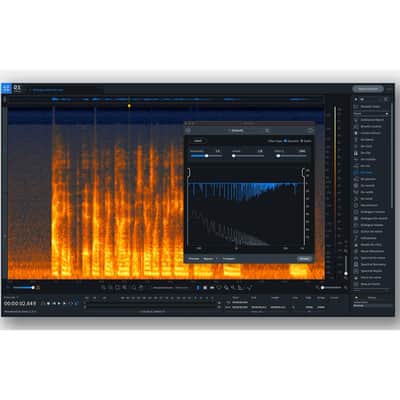

iZotope RX 9 Advanced (Download)
This listing has ended
See similar gear from other Reverb sellers

Our users rate Reverb
Designed specifically for the demanding needs of post production professionals, RX 9 Advanced continues to be the industry standard audio repair tool used on movies and TV shows to restore damaged, noisy audio to pristine condition.
Features
- Dialogue Isolate [New Algorithm]
- De-hum [New Mode]
- Ambience Match [New Mode]
- Dialogue De-reverb
- Spectral Repair
- Repair Assistant
- Spectral Editor [New]
- Batch Processor
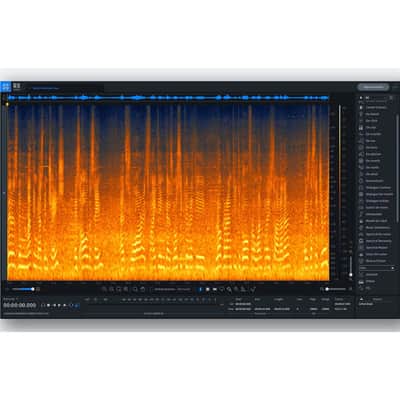
Surgical noise removal
Use a variety of selection tools to tame, replace, or completely remove any unwanted noise.
Work in the DAW or the app
RX comes with a versatile set of plug-ins and app modules to deal with hum, clipping, noise and much more.
Intelligent processing
With machine learning and assistive technology RX can listen to your audio and instantly offer suggestions to fix or improve it.
What's new in RX 9?
Let your dialogue shine
Using new iZotope machine learning in Dialogue Isolate, extract clean dialogue from non-stationary background noise such as crowds, traffic, footsteps, weather, or other noise with highly variable characteristics.
Instantly eliminate hum
Use the new Dynamic mode in De-hum to safely remove any amount of hum, ring, buzz, or interference without artifacts or affecting the quality of the audio.
Movement brings scenes to life
Seamlessly connect dialogue and ADR cuts with real background movement and textures with the new Complex mode in Ambience Match. Quickly match ambiences never before possible: ocean, wind, traffic, crowds, and more!
Restore Selection
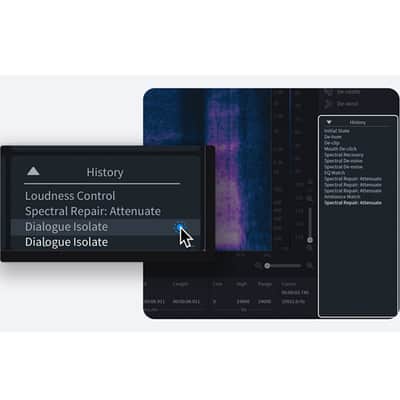
Roll back an audio selection to any previous step in the History list to get the best combined audio processing from any point in time.
Spectral Editor ARA For Logic Pro
Clean up any unwanted sounds directly in Logic using the new Spectral Editor ARA. Select the noise and remove it with a single click.
Expandable History Pane
Need to view more than 5 steps of undo history? No problem. The expandable History list now shows up to 30 of the last undo steps for quick referencing without scrolling.
New expandable History list
Need to view more than five steps of undo history? No problem. The expandable History list now shows up to 30 undo steps for quick reference.
Use the new Spectral Editor directly in Logic
Clean up unwanted sounds directly in Logic® using the new Spectral Editor, built on the ARA plug-in extension. Select noise and remove it without having to toggle between Logic and RX.
Discover RX
Guitar De-noise
Rescue your rig with Guitar De-noise, a powerful set of tools to control fret squeaks, amp buzz, and pick sounds.
Music Rebalance
We’ve supercharged Music Rebalance in RX 8 so you’ll be able to remix, re-edit, and re-repair with powerful, new capabilities. A newly engineered Music Rebalance algorithm enables improved source separation so you can create remixes with ease, adjust individual levels and the overall balance of a finished mix with maximum clarity, and create and export stems with a single click.
Loudness Control
Loudness Control has been rebuilt from the ground up. With single-click workflows to ensure your podcast is compliant with the latest broadcast standards, you can repair, mix, and deliver your podcast with confidence.
Horizontal Scrolling
You asked, and we listened. You can now scroll horizontally using your trackpad, touchpad, or mouse, just as you would in your favorite DAW.
Module Chain
Apply multiple-module processing in one fell swoop. Create a custom processing chain, in any order, any number of times, and render your audio with a single click. Or, use one of the included presets to apply a set of modules tailored to your needs.
Batch Processor
Batch Processor receives a major upgrade to make it easier than ever to process groups of files, or apply processing from multiple modules simultaneously. Save presets, import module chains, and process several files in record time.
De-hum
Use 16 frequency bands and a detailed audio spectrum analyzer to help you quickly locate and attenuate any hum in a signal with unrivaled precision.
Variable Pitch, Variable Time
The Variable Pitch module (formerly the Pitch Contour module in RX 6, but based on updated digital signal processing) and the Variable Time module give you full control over these two factors without affecting the other.
Use Variable Pitch to adjust the pitch of an audio selection while preserving time, great for:
- Changing the pitch on the bend of a guitar note
- Re-shaping the sound of a mono instrument
- Creatively affecting vocals
- Creative sound design
Use Variable Time to adjust stretch or condense time in an audio selection while preserving pitch, great for:
- Modifying the tempo of a performance that slows or speeds up over time (perfect for bands or orchestras)
- Altering time for sync purposes
- Creative sound design
The Variable Pitch and Variable Time modules feature a zoomed-in display of your selection on the spectrogram, giving you a better idea of the audio you’re adjusting. You can also resize the windows of both modules, giving you a more precise view of your changes!
Repair Assistant (expanded!)
While it was also introduced for RX Elements, Repair Assistant became even more powerful in RX 7 Standard and RX 7 Advanced.
In addition to providing three repair options, Repair Assistant also includes intensity sliders to adjust the amount of processing applied (Light, Medium, and Aggressive), giving you a total of nine processing options, which are all previewable.
Depending on whether you choose Dialogue, Music, or Other before running Repair Assistant, the settings within each module it sets will change too, letting you dial in the right amount of audio repair processing for the job. (Of course, you can always continue fine-tuning your audio after running Repair Assistant.)
Breath Control available as an AudioSuite plug-in
Taming (or even removing) unwanted breaths can be tedious in both vocal production and dialogue editing. The Breath Control module intelligently detects those breaths and suppresses them in a transparent and unobtrusive way. Avoid repetitive editing and run Breath Control as an AudioSuite plug-in.
Reverb Buyer Protection
Reverb has your back if your item is lost, damaged, or doesn't match its description. Simply report any issues within 7 days and we'll help you get a full refund.Learn more about Reverb Buyer Protection.
| Condition | Brand New (New) Brand New items are sold by an authorized dealer or original builder and include all original packaging.Learn more |
|---|---|
| Brand | |
| Model |
|
| Categories |
Product safety information may be available here.