


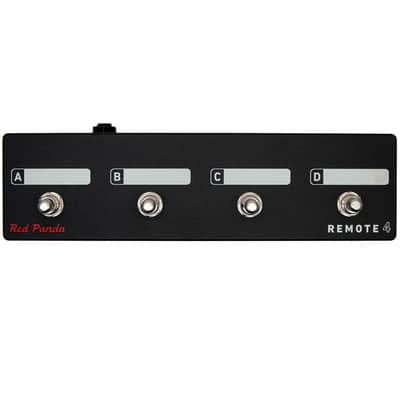
Red Panda Remote 4 4-Button Footswitch - Open Box
Il venditore non ha impostato il costo di spedizione per Italia. Per favore contatta e chiedigli il costo della spedizione.


Rarità
Non compaiono spesso

Politica per i resi entro 30 giorni
Concediti il massimo della tranquillità con il tuo nuovo strumento
I nostri utenti valutano Reverb
Remote Switch With 4 Modes to Access Presets And Pedal Functions
Scribble strips above each switch can be labeled with a Sharpie and erased using isopropyl alcohol.Connects to our pedals via a 1/4" TRS cable (included). The Remote 4 does not require power.
Bitmap 2 Remote Switch Modes
Mode 1
- A (Switch) - Preset 1 (hold to save)(Function)
- B (Switch) - Preset 2 (hold to save)(Function)
- C (Switch) - Preset 3 (hold to save)(Function)
- D (Switch) - Preset 4 (hold to save)(Function)
Mode 2
- A (Switch) - Next preset(Function)
- B (Switch) - Bypass / on(Function)
- C (Switch) - LFO hold(Function)
- D (Switch) - Tap(Function)
Context 2 Remote Switch Modes
Mode 1
- A (Switch) - Preset 1 (hold to save)(Function)
- B (Switch) - Preset 2 (hold to save)(Function)
- C (Switch) - Preset 3 (hold to save)(Function)
- D (Switch) - Preset 4 (hold to save)(Function)
Mode 2
- A (Switch) - Preset footswitch(Function)
- B (Switch) - Right footswitch(Function)
- C (Switch) - Reverb hold (latching)(Function)
- D (Switch) - Tap tempo(Function)
Mode 3
- A (Switch) - Dry kill (momentary)(Function)
- B (Switch) - Delay kill (momentary)(Function)
- C (Switch) - Reverb sustain (momentary)(Function)
- D (Switch) - Reverb damping (momentary)(Function)
Particle 2 Remote Switch Modes
Mode 1
- A (Switch) - Preset 1 (hold to save)(Function)
- B (Switch) - Preset 2 (hold to save)(Function)
- C (Switch) - Preset 3 (hold to save)(Function)
- D (Switch) - Preset 4 (hold to save)(Function)
Mode 2
- A (Switch) - Left footswitch(Function)
- B (Switch) - Right footswitch(Function)
- C (Switch) - Preset down(latching)(Function)
- D (Switch) - Preset up(Function)
Raster 2 Remote Switch Modes
Mode 1
- A (Switch) - Preset 1 (hold to save)(Function)
- B (Switch) - Preset 2 (hold to save)(Function)
- C (Switch) - Preset 3 (hold to save)(Function)
- D (Switch) - Preset 4 (hold to save)(Function)
Mode 2
- A (Switch) - Left footswitch(Function)
- B (Switch) - Right footswitch(Function)
- C (Switch) - Preset down(latching)(Function)
- D (Switch) - Preset up(Function)
Tensor Remote Switch Modes
Mode 1
- A (Switch) - Preset 1 (hold to save)(Function)
- B (Switch) - Preset 2 (hold to save)(Function)
- C (Switch) - Preset 3 (hold to save)(Function)
- D (Switch) - Preset 4 (hold to save)(Function)
Mode 2
- A (Switch) - Left footswitch(Function)
- B (Switch) - Right footswitch(Function)
- C (Switch) - Preset 1 (hold to save)(latching)(Function)
- D (Switch) - Preset 2 (hold to save)(Function)
Mode 3
- A (Switch) - Record / Overdub(hold to save)(Function)
- B (Switch) - Play / Stop(hold to save)(Function)
- C (Switch) - Play Once(hold to save)(Function)
- D (Switch) - Toggle TIME & PITCH (tap) Toggle SPEED (double tap)(hold to save)(Function)
Mode 4
- A (Switch) - Toggle SPEED knob(Function)
- B (Switch) - Toggle TIME knob(Function)
- C (Switch) - Toggle PITCH knob(Function)
- D (Switch) - Toggle RAND knob(Function)
Tensor Loop Sampler (Remote Mode 3)
Mode 3 is designed to use the Tensor as a loop sampler with live loop manipulation. Switches A-C control loop record, overdub, play, and retrigger functions. Switch 4 toggles between the current knob settings and the default (normal playback settings). For example, you can set SPEED to reverse and PITCH to -1 octave for instant access to reverse and half-speed effects. See the user's manual for complete details.
Features
Configuring the Remote Switch (all pedals)
- Start with the pedal powered on and nothing plugged into the CTRL port.
- Hold the right footswitch while plugging in the remote switch. The right LED will blink yellow 3 times to indicate it is in CTRL configuration mode. You can release the right footswitch and begin configu-ration immediately.
- Press one of the buttons on the remote switch to select a mode.
- Hold the right footswitch for 2 seconds to save the configuration. The right LED will blink green to indicate that the configuration has been saved.
| Condizione | Mint (Usato) Gli articoli Mint sono essenzialmente nella loro condizione originale, ma sono stati aperti o utilizzati.Scopri di più |
|---|---|
| Marchio | |
| Modello |
|
| Finish |
|
| Categorie | |
| Prodotto in |
|
| Formato pedale |
|
Le informazioni sulla sicurezza del prodotto sono disponibili qui.

Protezione di Reverb
Resi semplici, transazioni sicure, assistenza di persone in carne e ossa
Scopri di più