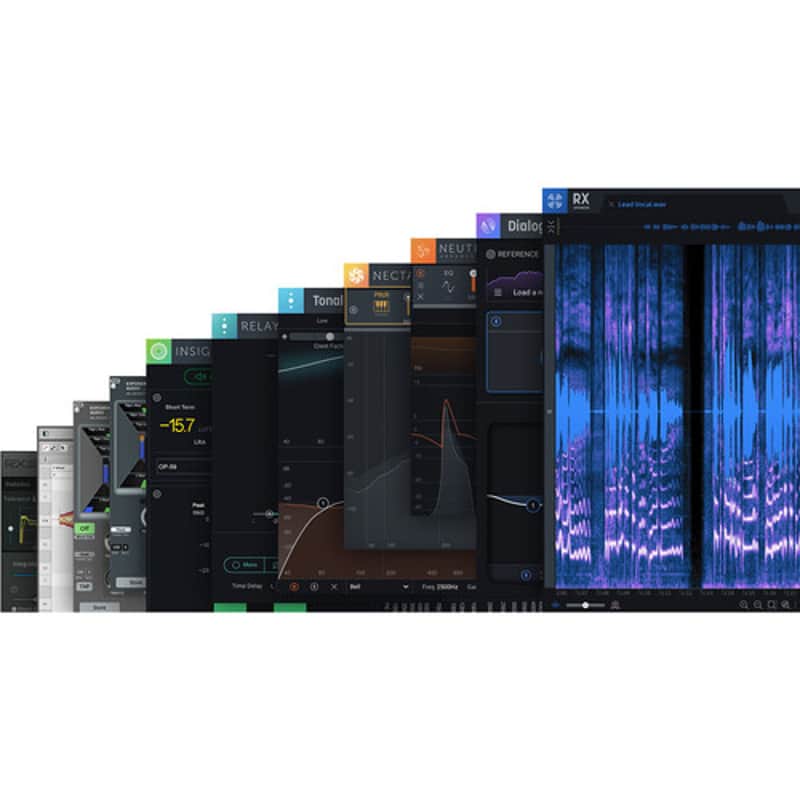
iZotope RX Post Production Suite 5 Software Bundle (Upgrade from RX 1-8 Standard)
This seller has not set a shipping cost for Denmark. Please contact them to ask about shipping.


14-Day Return Policy
Enjoy peace of mind with your new gear
Our users rate Reverb
- Includes RX 8 Advanced
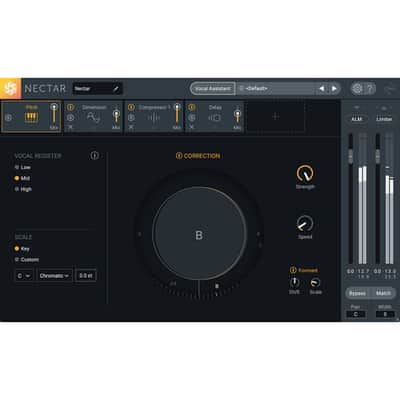
- Includes Neutron 3 Advanced and Nectar
- Includes RX Loudness Control
- Includes Insight 2 Metering
- Includes Tonal Balance Control 2
- Includes Exponential Audio Stratus 3D
- Includes Exponential Audio Symphony 3D
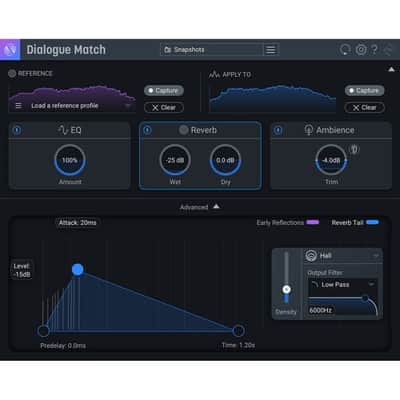
- Includes Dialogue Match
- Compatible with Mac & Windows Platforms
RX 8 Advanced gives you a spectral editor for zeroing in on troublesome audio and includes a plethora of modules that can help you mitigate sonic issues anywhere in the frequency spectrum. It provides a Repair Assistant which intelligently analyzes audio and suggests corrections.
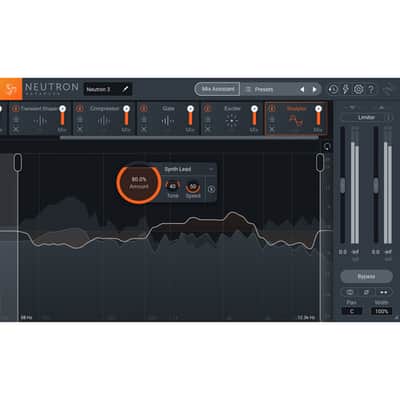
Neutron 3 Advanced provides a refined track assistant and a tailored limiter that meets broadcast specifications. Also provided are a noise gate, a sculpting module, and surround support. RX Loudness Control is included to help you meet your broadcast levels.
Insight 2 is a comprehensive metering suite with customizable controls for loudness, frequency, stereo-field monitoring, and dialogue intelligibility. Integrated, short-term and momentary LUFS meters are provided as well as a loudness history graph that can be copied and pasted into text documents. You can also complement your resulting mix by exporting a detailed history report with detailed loudness data and a graph for clients in the broadcast world. For your convenience, the GUI is resizable, so you can make it as big or small as you like.
Dialogue Match has been included to help you match ADR to on-set dialogue, quickly and easily. Tonal Balance Control 2 helps make sure your mix meets its frequency target. Two fully immersive Exponential Audio reverbs are also included: Stratus 3D and Symphony 3D.
This software operates in AAX, AU, VST, and RTAS formats, except for Dialogue Match which is only compatible with Pro Tool's AudioSuite. This software is compatible with Mac and Windows platforms.
Note: This pricing is for users who already own RX Standard Version 1 through 8. iZotope RX 8 Advanced Audio Restoration and Enhancement Software (Download)Available for download, iZotope RX 8 Advanced is the latest update to their audio-repair software, which is considered a staple within the recording, mastering, audio-for-video, and post-production communities. The software can operate either as a standalone application or a plug-in for both Mac- and Windows-based DAWs and NLEs. From fixing common audio problems like noises, distortions, and inconsistent recordings, to repairing severely damaged audio using Spectral Repair, the software can transform previously unusable audio into something usable.
The advanced edition of RX 8 takes nearly all of the modules provided in RX 7 Advanced and implements a graphic overhaul more in line with iZotope's current aesthetic. You'll also find many new and powerful modules, including Guitar De-Noise, Wow and Flutter, and Spectral Recovery.
Guitar De-Noise implements powerful processing to get rid of annoying fingerboard and pick noise that can distract from performances. It also offers the ability to eliminate the undesirable hum and buzz associated with amplifiers and/or pickups. Wow and Futter is a module that can save the day for anyone working with analogue tape. It lets you significantly reduce unstable pitch fluctuations that are the hallmark of degraded magnetic tape, doing so in a most transparent manner.
Spectral Recovery is a powerful tool for anyone who works with VoIP or phone-based audio. It can effectively intuit any missing frequencies over 4 kHz, so you can restore a feeling of air and presence to recordings made over the phone, made with cheap laptop mics, or captured over VoIP. This unit can also reconstruct and smooth out incongruent issues in an audio source through the use of Spectral Patching.
Music Rebalance has been significantly overhauled, with a simpler interface that gives you better, more natural results. A built-in stem isolator allows you to export isolated vocals, bass parts, percussion, and more within the program itself. It also sounds better, nulling with the original source file to a far greater degree than the previous version.
A Loudness Control module helps you meet your specific loudness standards with greater ease. A completely overhauled Batch Processor lets you execute batch functions on multiple files in a manner that is more streamlined, more effective, faster, and more dependable.
All previous modules are in place for RX 8, as is the Repair Assistant, multichannel support, high-quality resampling, dithering, and the rest of RX's classic features. As always, RX 8 can be used as a standalone audio editor (including standalone but connected to your host via RX Connect, or as your DAW's audio editor in the case of Logic Pro), although much of it can be used as a suite of plug-ins.
New Features Spectral Recovery With the increasing necessity of remote meetings, podcast interviews, and video calls, real-time audio streaming is becoming more and more prevalent. Unfortunately, audio transfer protocols over the internet compress the audio and remove high-end frequencies that aid in clarity and intelligibility. Spectral Recovery restores frequencies above 4 kHz, turning grainy dialogue audio into clear, articulate recordings. Wow and Flutter Physical audio recordings, such as magnetic tape and vinyl discs, inevitably fall prey to the elements as time goes by. This often results in pitch fluctuations in those physical recordings. Wow and Flutter is designed to correct pitch issues regardless of the intensity. Use Wow to fix longer, sustained pitch drift, and Flutter to correct pitch variances that occur at faster rates. Guitar De-noise Guitar De-noise lets you refine your guitar recordings for maximum clarity. Manage sounds unintentionally emphasized by the effects of compression or limiting, like electrical amp noise and interference, distracting fret or string squeaks, and harsh pick attacks. With intuitive sliders for sensitivity and gain reduction, polishing guitar performances for intelligibility and authenticity is now relatively easy and transparent. Loudness Control Prepare your recordings for final delivery with the detailed level readings and loudness-management power of the Loudness Control module. Load preset loudness-standard targets to ensure your audio conforms to broadcast requirements, and monitor your levels using the built-in numeric and histogram readouts for integrated, short-term, and momentary loudness. Plus, resize the module to fit your display perfectly and suit your unique workflow. General Features Improved Batch Processor Process several audio files in one pass with the newly overhauled Batch Processor. View pertinent metadata in your audio files prior to processing, then apply a full series of processors with the Module Chain, now accessible from within the Batch Processor interface. At the end of it all, export your files in multiple file formats and bit-depths for optimal efficiency and organization. This tool is ideal for refining hundreds of samples for custom-made sample libraries. Variable Time Adjust the time-stretch amount of an audio selection without altering its pitch. Variable Pitch Adjust the pitch of an audio selection while preserving the time and length. Improved Music Rebalance Identify vocals, bass, percussion, and other instruments in a mix, and adjust the gain for each element. Isolate or remove elements, or split stems for tweaking in your DAW. The results sound more transparent over the previous version, nulling to a far greater degree. Repair Assistant Repair Assistant is an intelligent tool that detects noise, clipping, clicks, and more, allowing you to solve audio-restoration issues quickly and effectively. After analyzing any snippet of audio you select, it will provide three different options for processing, and let you make the ultimate choice. Dialogue Contour Using this module, you can reshape the intonation of dialogue to rescue or improve a performance in post production. The module utilizes pitch-correction processing tailored to speech and designed to adjust inflection, allowing you to match phrases of dialogue that would not otherwise gel. Dialogue De-reverb Reduce and remove unwanted reverb from dialogue clips using this algorithm trained with machine learning optimized to separate spoken dialogue from reverberant signal content. You can use this as one more tool in the arsenal before resorting to ADR. Multichannel Support Tackle audio issues that appear in any or every surround channel up to Dolby Atmos (7.1.2) De-rustle The De-rustle module removes the noise or rustle generated when a lavalier microphone rubs or brushes against a person's clothing during a recording. Lav rustle can vary unpredictably over time, exhibiting a wide variety of sonic characteristics in the process (high-frequency crackling and low-frequency thuds); this module significantly ameliorates the problem. De-wind This module allows you to reduceand sometimes removedistracting wind noise from audio, addressing primarily the low-frequency rumble that occurs when intermittent bursts of wind come into contact with a microphone diaphragm. Dialogue Isolate The Dialogue Isolate module is designed to separate spoken dialogue from non-stationary background noise such as crowds, traffic, footsteps, weather, and more. It is suitable for increasing the level of dialogue in challenging low signal-to-noise ratio conditions. Composite View Composite View allows you to edit and apply processing to 16 individual audio tracks as if they were one, easily addressing audio issues that appear across multiple microphones. The Composite View feature in the RX Audio Editor combines all active tabs into one Composite tab that allows you to apply the same processing to multiple files simultaneously. Composite View can be used to increase expediency when performing repetitive spectral-editing functions. This makes it particularly useful when making repairs in recording situations with multiple microphones or repairs to multichannel files. De-bleed Working across multiple tracks, the De-bleed module reduces the leakage of one signal into another. De-bleed can help reduce or eliminate bleed from headphones, click tracks, multiple mics with small amounts of cross-bleed, and even some drum-bleed issues. De-ess The De-ess audio plug-in and module in iZotope RX 7 attenuates or reduces sibilancethe harsh high-frequency sounds that come from S, F, X, SH, and soft C sounds. Two modes for handling sibilance are provided. Classic Mode detects sibilants and attenuates them with a broadband gain envelope. Spectral Mode is more transparent, intelligent, and frequency-specific than Classic Mode. Spectral Mode only attenuates the high frequencies where sibilance is most active, leaving the lower frequencies untouched. Mouth De-click The Mouth De-click module has been finely tuned to detect and reduce mouth noises such as clicks and lip smacksmany listeners' worst nightmare. It's designed for use on longer audio selections, but it can be used to remove individual clicks. Breath Control The Breath Control module intelligently detects breath noise in dialogue or vocal recordings and suppresses them. Removing and reducing breath noise in recordings can be a time-consuming process for dialogue editors and music producers alike. Breath Control can help reduce the time spent on repetitive editing without sacrificing audio quality. Separated Voice De-noiser The zero-latency Voice De-noise has been designed to focus on dialogue and sung vocal treatment. Voice De-noise has an Adaptive mode that can adjust to a changing noise floor in real time, making it ideal for dialogue de-noising. Also added are optimization modes for dialogue and music. When optimized for music, Voice De-noise excels at attenuating unwanted background noise from air conditioners and street noise, and also cleans sung vocals in apartment recording situations. Key Features at a Glance- De-plosive eliminates every plosive from any dialogue track with transparency
- Leveler smooths any volume inconsistencies with an automatic clip-gain envelope; leveler is optimized for dialogue using intelligent De-breath and De-ess algorithms
- Instant Process tool is a one-click eraser for removing unwanted coughs, scene-interrupting sirens, and more
- Module Chain can process multiple modules at once, save your customized chains as presets, and execute them all with a single click, enhancing workflow and reducing mouse clicks
- Sync and integrate the RX Audio Editor with any DAW or NLE timeline using RX Connect
- Corrective EQ for removing harsh high frequencies, whines, rumbles, resonances, and distortion artifacts, and for accurately homing in on any problem-frequency areas
- Problem-oriented presets across several modules
- Signal Generator creates accurate test tones, calibration tones for post-production delivery specs, and bleep tones for eliminating obscenities in dialogue
- Markers and regions (search) provide greater flexibility for those longer edits, with the ability to perform text-based searches of any markers, regions, and comments in the metadata of the audio
- Turn flawed audio into usable material by removing noises, distortions, and more
- Edit audio with visual editing techniques using precision drawing tools, such as a brush and magic wand
- Salvage unusable material by filling in audio gaps instantly with Spectral Repair
- Seamlessly integrates with audio- or video-editing software, both as a standalone application or plug-in
- EQ Match allows for quickly learning the EQ of a source audio clip and applying that EQ curve to a target audio clip, enabling sonic balance and smooth transitions between multiple audio sources with different EQ qualities
- Ambience Match for matching the environment noise of two different audio recordings
- Learn the ambient noise from a source audio clip, apply it to another audio clip, and create long sections of constant ambient noise to insert under inconsistent dialogue recordings
- High-quality resampling using the SRC sample-rate conversion algorithm
- Reduce bit resolution for final delivery of a project without sacrificing quality with the MBIT+ Dither algorithm
- Rebuild distorted audio caused by analog and digital overload, and get through projects faster with the automatic Suggest feature
- Spectrum Analyzer delivers a detailed spectral display that detects peaks automatically
- Adaptive Hum Removal notches out fundamental hum frequencies that may change over time, like when recording a shot in multiple locations
- Nondestructive Clip Gain allows you to easily adjust and balance the volume of vocals and instrumentals
- Export marker regions as files
- Metadata display ID3 tags and broadcast WAV metadata like source timecode, etc.)
- Time-reverse audio
- Updated timeline ruler that displays original recorded source timecode
- Movable tabs
- Full-screen support for Mac
RX Loudness Control from iZotope is a postproduction plug-in that avoids the problems associated with rejected audio material due to noncompliance with broadcast loudness specifications. Based around faster-than-real-time intelligent algorithms, the software delivers compliant audio from multiple hosts according to global standards.
For many mixes, dynamics are not affected because only a fixed gain is required to meet specifications. In the case of a mix having high dynamic content or significant transients, compression and/or limiting may be applied to meet Short-term (Momentary) or True Peak specifications. Surround sound up to 5.1 is supported, and the software will also preserve the left total right total (LtRt) encoding on a Dolby-encoded mix.
Features- Ensures mixes meet the required delivery specifications with intelligent algorithms that take out the guesswork
- Deliver results globally using the latest loudness standards
- Extensive presets and efficient workflow that saves time on the final stage of TV production
- History graph and loudness report inform whether audio is within the appropriate tolerance of the selected loudness standard, and if not, shows where the overflows may be occurring
- Supports mono, stereo, and surround channel counts up to 5.1
- IRC (Intelligent Release Control) II transparent limiting algorithm, an offline process that corrects a mono, stereo, or surround sound audio file for True Peak value (dBTP)
- Supports offline processing as an AudioSuite plug-in for Avid Media Composer and Pro Tools 10 through 12
- Offline loudness-compliant processing is available as an audio extension for Adobe Premiere Pro
- BS.1770-1 (Global)
- BS.1770-2-3 (Global)
- EBU R128 (Europe)
- EBU R128 s1 (Europe)
- AGCOM 219/09/CSP (Italy)
- ATSC A/85 (U.S.)
- OP-59 (Australia)
- ARIB TR-B32 (Japan)
Neutron 3 Advanced represents the next step forward in iZotope's channel-strip plug-ins, giving you the ability to balance your entire session in three clicks with the new Mix Assistant. As with previous iterations, you get an equalizer, a compressor, a transient shaper, an exciter, and other goodies from Neutron 2. But iZotope has brought a new module into the mix as wella sweetening, tone-shaping module called Sculptor.
The modules offered in version 2 have been optimized to take as little CPU as possible. The GUI has seen an overhaul with a resizeable window as well as better control of the sliders than Version 2. The Masking Meter, which helps you identify and fix competing frequencies between two tracks, is now elegantly compacted into one, easy-to-understand window, with essential parameters like inverse link more readily available.
The most prominent additions to the Neutron platform are Mix Assistant and Sculptor. Through plug-in communication, the Mix Assistant can listen to all of the tracks in your mix and give you a static starting point. Use it at the beginning of the process: Simply place Neutron 3 or Relay on every track of your mix, run the Mix Assistant, choose the most prominent tracks when prompted (i.e., the vocal in a pop tune), and let Neutron handle all the busywork so you can get to the fun stuff.
Sculptor, on the other hand, is a sweetening, finalizing module that applies a comprehensive EQ, one that fluctuates in real-time, reacting to the track as it plays. It makes multiple dynamic choices per second. Use it to add both final polish and a creative emphasis to any track.
Neutron 3 Advanced is compatible with Mac and Windows computers and is available for download. It works in AU, AAX, and VST formats.
Mix Assistant Through inter-plug-in communication, Mix Assistant listens to your entire mix, communicating with every track in your session to give you a balanced starting point. This starting point is built around a focus of your choice. Neutron 3 listens to your session and makes decisions to give you a balanced mixa jumping off point from which you can make creative decisions. Sculptor Module Select a desired style from the menu, and the algorithm shapes the tone to achieve an ideal balance for that instrument. Change the speed at which the process is applied, or change the overall tonality, highs, or lows. You can even set filter points, stopping all processing below or above your desired frequency. This can be useful for sculpting just the midrange of track or for excluding the treble to obviate any undue harshness. Breakout Plug-Ins Neutron Advanced comes with 8 individual module plug-ins, so if you only need the EQ or Sculptor, you can instantiate it without loading the compressor, transient shaper, etc. Each of the modules can be loaded independently. Improved Masking Meter With a convenient one-window display, smoother metering with more obvious parameters, Masking Meter is now even better at helping you find and fix the competing elements of your mix. Optimized Performance Insert more instances of Neutron in your session, open sessions faster, and forget about bouncing sessions for overdubs. Not only is Neutron faster at processing your audio, but your sessions with multiple Neutrons will open faster with refresh rates doubled for visualizations. Other Features at a Glance- Visual Mixer and iZotope Relay: Launch Mix Assistant directly from the Visual Mixer and move your tracks in a virtual space, tapping into iZotope-enabled inter-plug-in communication.
- New EQ Functionality: EQ now has a Soft Saturation mode for a more analog feel and sound.
- Tonal Balance Control: Updated to support Neutron 3 to further help you shape a balanced mix.
- 7.1 Surround Sound Support: 7.1 Surround and zero-latency mode in all 8 modules for professional, lightweight processing for audio post or surround music mixes.
Available for download, iZotope Insight 2 is an update to their renowned metering software and comprises a set of tools designed for post-production and broadcast applications. Insight 2 provides an extensive set of audio analysis and metering tools that can help you visualize the changes made during mixing and mastering. These meters can
| Condition | Brand New (New) Brand New items are sold by an authorized dealer or original builder and include all original packaging.Learn more |
|---|---|
| Brand | |
| Model |
|
| Categories |
Product safety information may be available here.

