


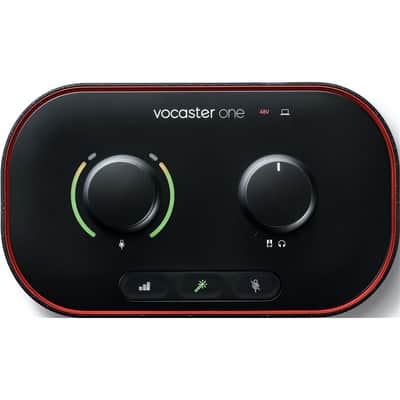
Focusrite Vocaster One USB Audio Interface 2022 - Present - Black
Il venditore non ha impostato il costo di spedizione per Italia. Per favore contatta e chiedigli il costo della spedizione.


Politica per i resi entro 14 giorni
Concediti il massimo della tranquillità con il tuo nuovo strumento
I nostri utenti valutano Reverb
Get the studio sound your podcast deserves. Capture incredible audio, with enough gain for any XLR microphone. Adjust levels, enhance your sound with a single click, and stand out with Vocaster One in seconds. Create great-sounding podcasts more easily than ever with Auto Gain, Enhance, the Easy Start tool, and award-winning support to get you recording right away.
Auto Gain sets your levels with a single click of a button, with more than enough gain for the most popular broadcast microphones—no amplifier needed.
The Enhance button reveals the true quality of your voice. Get the clearest sound the first time around. Four podcaster-approved voice presets bring out the best in any voice.
Don't let coughs and sneezes—or any other unexpected interruptions—ruin your podcast. Press the mute button and turn off the mic until you're ready to go again.
You're just one cable away from adding Vocaster studio sound to your vlog. No need to sync in post, just plug in and press the red button.
Play pre-recorded segments such as intros, outros, calls, or any other sound you can think of from your computer with two sets of stereo loops. Keep the story going and sound like you're in a broadcast studio.
Bring guests in over the phone with a single cable and capture the entire conversation, or record high-quality music or other audio files from your device seamlessly.
Make your show sound great with Vocaster's mixer. Just like a broadcast studio, Vocaster Hub lets you set your levels, enhance your sound, route audio from your phone and computer, and much more. Hear exactly what your listeners will hear with Show Mix—even without your computer.
FEATURES:
1. MIC INPUT
Connect any microphone via an XLR cable (included with Vocaster One Studio). 70 dB gain range and phantom power control.
2. HEADPHONE OUTPUT
Connect your headphones to hear your show mixed as the world will hear it.
3. SPEAKER OUTPUTS
Connect your speakers in mono or stereo to Vocaster when editing your podcast.
4. PHONE INPUT
Allows you to bring in audio from your phone, including called-in guests. (TRRS to TRRS cable required, not included.)
5. CAMERA OUTPUT
Record your professional audio podcast directly into your camera to simplify your life. (TRS to TRS cable required, not included.)
6. AUTO GAIN
Press and hold the Auto Gain button to have Vocaster listen and adjust the correct audio level, so you're ready to record.
7. ENHANCE
Bring out the best in your voice with a single click using a choice of four vocal presets, switchable in Vocaster Hub.
8. MUTE
Quickly mute to avoid interruptions.
9. MIC GAIN
The colored gain ring gives you instant visual feedback when your voice level is perfect.
10. VOLUME CONTROL
Keep your volume under control.
SPECIFICATIONS:
Microphone input gain range: 70 dB
Microphone input frequency range: 20 Hz - 20 kHz
Headphone output frequency range: 20Hz – 20kHz
Speaker output frequency range: 20Hz – 20kHz
Requires a 900mA USB port
Phone input and output: Mono. Requires a 3.5mm TRRS cable, not included
Camera output: Stereo. Requires a 3.5mm TRS cable, not included
| Condizione | Nuovo (Nuovo) Gli articoli "Nuovi” sono venduti da un rivenditore autorizzato o dal produttore originale e comprendono l’imballo originale.Scopri di più |
|---|---|
| Marchio | |
| Modello |
|
| Finish |
|
| Categorie | |
| Anno |
|
| Prodotto in |
|
| Connettività computer |
|
| Frequenza di campionamento |
|
| Elettronica |
|
| Compatibilità |
|
| Con cavo bus |
|
| Formato |
|
| Profondità di bit |
|
| I/O simultanei |
|
| Numero di output MIDI |
|
| Numero di input MIDI |
|
| Numero di output digitali |
|
| Numero di input digitali |
|
| Numero di canali |
|
| Numero di output per le cuffie |
|
| Numero di output analogici |
|
| Numero di input analogici |
|
| Numero di preamplificatori per microfoni |
|
Le informazioni sulla sicurezza del prodotto sono disponibili qui.

Protezione di Reverb
Resi semplici, transazioni sicure, assistenza di persone in carne e ossa
Scopri di più