



RODE Wireless GO II ultra-compact dual channel wireless microphone system
I nostri utenti valutano Reverb
RODE Wireless GO II ORIGINAL
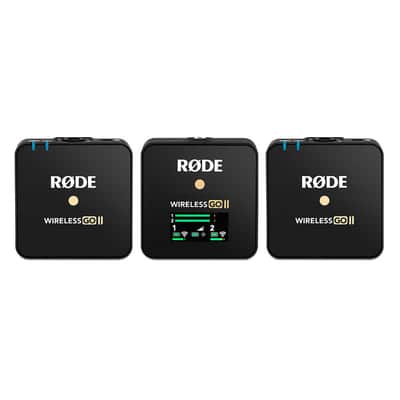
The Wireless GO II is a versatile and ultra-compact dual channel wireless microphone system consisting of a dual channel receiver and two transmitters.
Features
- Dual channel wireless microphone system for recording two sound sources simultaneously
- Series IV 2.4GHz digital transmission, 128-bit encryption – crystal-clear audio at up to 200m (line of sight), optimised for extremely stable operation in dense RF environments
- 3.5mm TRS analog output, USB-C and iOS digital output – universal compatibility with cameras, mobile devices and computers
- On-board recording – over 40 hours of internal memory
- Option to record each channel separately or combine them for ultimate flexibility in post-production
- Safety channel, flexible gain control (three-stage pad, expandable to 10-stage)
- In-built rechargeable lithium-ion battery – up to 7 hours battery life
- Compatible with all RØDE Series IV devices, including the Wireless ME, Wireless PRO, RØDECaster Duo, RØDECaster Pro II and Streamer X
- Designed and made in RØDE’s precision manufacturing facilities in Australia
The Dual Channel Receiver
The Wireless GO II features two transmitters and a dual channel receiver that allows you to connect both transmitters for recording two sound sources into a single device. Out of the box, the transmitters come auto paired to the receiver and will remember which channel they’ve been assigned to, so you don’t have to worry about pairing them again.
The receiver’s LED screen is split into four main sections, with icons for battery life, signal strength and input level displayed for each transmitter on the bottom left and right, and icons for battery life, backlight mode and output gain for the receiver in the middle. Above this is an output level meter for the receiver, which makes it easy to monitor the levels going into your camera or recording device and ensuring your signal isn’t too hot.
Harness the Freedom of Wireless
The Wireless GO II features RØDE’s state-of-the-art Series IV digital transmission to deliver incredibly stable and clear wireless audio at a ranges up to 200m (line of sight), even in dense RF environments like offices, malls, busy streets and universities.
Incredible Versatility
With its 3.5mm analog and USB-C digital outputs, the Wireless GO II can record two individual channels of audio to DSLR and mirrorless cameras, iOS and Android phones and tablets, and Mac and Windows computers. A wireless microphone system that adapts to your needs.
Safe and Sound
The Wireless GO II’s flexible gain control and safety channel ensure you can get perfect levels recorded to your camera, even if your subject suddenly gets louder, and with each transmitter featuring on-board recording, you’ll still have a backup of your audio even if you go out of range.
Pocket-sized Professional Audio
The Wireless GO II transmitters and receiver weigh less than 32g each and take up virtually no space in a camera kit bag, backpack, handbag or briefcase. With their uniquely compact form factor and innovative clip design, it’s incredibly easy to mount on clothing, camera cold shoes, boom poles or mobile camera rigs.
RØDE Central
RØDE Central is an easy-to-use desktop and mobile companion app for the Wireless GO II that allows you to configure your device settings anywhere, unlock advanced features, optimise and export recordings (desktop only), access device information, and update to the latest firmware. Download it for free to unlock the full potential of your Wireless GO II.
Note: OS Requirements – MacOS 10.15 or later; Windows 10 Version 1803 or later; iOS 14 or later; Android 9.0 or later.
RØDE Connect
RØDE Connect is a free podcasting and streaming software solution that is now compatible for use with the Wireless GO II. RODE Connect makes it easier to record or stream with professional-quality audio from your computer.
RØDE Connect allows up to four physical guests, with two Wireless GO II’s, to be connected to a single computer. It features an intuitive, easy-to-use interface inspired by the RØDECaster Pro.
Note: OS Requirements – MacOS 10.13 or later; Windows 10 Version 1803 or later.
Turning On and Pairing Your Wireless GO II
To turn on your Wireless GO II, simply press and hold the power button on the receiver. To pair your transmitters to the receiver, press and hold the power button on the transmitters one at a time. Once turned on, they will automatically pair to the receiver. This should take a few seconds.
If a transmitter loses connection with the receiver, the blue ‘∞‘ LED on the transmitter will flash and the icons for that channel will go blank on the receiver, making it easy to identify which one you need to reconnect.
If you need to reconnect a transmitter to the receiver, press and hold the pair button (‘∞‘) on the receiver for three seconds to enable pairing mode, then single-click the power button on the transmitter and wait a few seconds.
To disconnect a transmitter, select it by single-clicking the pair button, then press and hold the pair button for three seconds.
Understanding RØDE's Series IV 2.4GHz Digital Transmission
The Wireless GO II utilises RØDE’s all-new Series IV 2.4GHz digital transmission with 128-bit encryption. This delivers an extended transmission range of 200 metres (line of sight). The Wireless GO II is optimised for extremely stable operation in environments where there is a lot of RF activity, including dense urban areas, shopping malls, universities, convention centres, and offices, so you can worry less about dropouts and focus more on what you're recording.
Merged & Split Mode
The Wireless GO II gives you the option to record in either 'Merged' or 'Split' mode. This allows you to record each transmitter onto separate channels on the output or combine the two into a single output.
To switch between 'Merged' and 'Split' mode, press and hold both buttons on the receiver for three seconds and keep an eye on the output level meter on the LED screen.
When there are two meters, you are in 'Split' mode. This means that each transmitter's output is being recorded onto separate channels (left and right) on the Wireless GO II’s output, which can be processed individually in post-production. This is great for two-person interviews where you need to be able to edit and mix each sound source independently.
When there is just one meter, you are in 'Merged' mode. This means that the two transmitters are being combined into a single summed output. This is great if you’re only using one transmitter and want the audio recorded onto both channels of your recording device, or if you are using the safety channel (see below for more information). It also works well if you are using the Wireless GO II in a live presentation setup.
Channel Selection & Mute Control
Channel Selection
As mentioned, clicking the pair button on the receiver will allow you to cycle between the two transmitters. A single click will select transmitter 1, a second click will select transmitter 2, and a third click will exit the channel selection. Note this will only work when the transmitters are turned on and paired to the receiver. This allows you to connect and disconnect the transmitters and also mute them.
Mute Control via the Receiver
Once the desired transmitter has been selected via the channel selection, single-click the gain control/mute button to mute it. This is useful when the camera operator needs to quickly mute one of the transmitters.
Mute Control via the Transmitter
You can also mute via the transmitter. When paired to the receiver, single-click the transmitter power button to mute and unmute. This is useful when the speaker or presenter wants to mute themselves.
Device Connectivity
Connecting to Cameras
Use the supplied SC5 cable to connect your Wireless GO II to cameras and other devices with a 3.5mm TRS input. If you need to connect your microphone to a device with an XLR input, use an adaptor like the VXLR Pro.
Connecting to Computers
Use the supplied USB-C to USB-A cable to connect the Wireless GO II receiver to any computer with a USB-A input (use USB-C to USB-C cable for computers with a USB-C input), then go to your audio settings and select ‘Wireless GO II RX’ as your input device. This essentially turns the Wireless GO II receiver into a wireless USB audio interface.
Connecting to Mobile Devices
To connect the Wireless GO II to a smartphone or tablet, you will need additional cables. For iOS devices with a Lightning input, use the SC15 or SC19. The Wireless GO II is MFi-certified, meaning it will seamlessly interact with any iOS device. For Android and other devices with a USB-C input, use the SC16 USB-C to USB-C cable.
Note: To connect the Wireless GO II to iOS device with a Lightning port, you must use a RØDE Lightning Accessory Cable – either the SC15 or SC19. Standard USB-C to Lightning cables are not compatible with the Wireless GO II.
Pro Tip
Connecting the Wireless GO II to your smartphone or tablet via USB-C rather than using the 3.5mm analog TRS output gives you access to a number of useful features:
High-quality audio output – Using the USB-C output bypasses the recording device's analog input circuitry, giving a direct digital signal transfer for optimum quality.
Headphone monitoring – Using the USB-C output frees up the 3.5mm output so you can plug your headphones in and monitor your audio while recording. You can even use the gain control to adjust the volume of your headphones.
Connecting to the RØDECaster Series
You can pair up to two Wireless GO II transmitters to the RØDECaster Pro II or RØDECaster Duo and they will be treated like any other input channel, meaning that you can record, mix and apply the APHEX ® processing, effects to your wireless audio. To pair a Wireless GO II transmitter to your RØDECaster Pro II or Duo, access the channel set-up screen by pressing the physical button above the fader you wish to assign your wireless device to. On this screen, you will see a list of microphone, instrument and other input options that you can scroll through. Scroll to the left to select the ‘Wireless’ option, tap ‘Pair New Device’ to enter pairing mode, power on your Wireless GO II transmitter and short-press its power button (ensuring that the transmitter isn’t already connected to another receiver). Your device’s connectivity, recording, mute and battery status status will be displayed on this screen.
Note: Assigning any of the four input channels to the ‘Wireless’ option will override the associated physical XLR/TRS input, meaning that you won’t hear any audio coming from microphones or instruments plugged into that channel.
Gain Control
The Wireless GO II has flexible gain controls that allow you to precisely tailor the receiver’s output to avoid clipping or distortion in your recording device.
The gain control is found on the receiver. This is a three-stage pad that cuts your output level in 12dB increments. A single click of the gain control button will allow you to select between high (0dB), medium (-12dB), and low (-24dB) gain settings. The level icon in the middle of the screen indicates which gain setting is selected. An additional fine gain control mode can also be enabled in the RØDE Central app. See below for more information.
Note that the gain control only affects the 3.5mm output of the Wireless GO II, not the digital USB-C output. If you are using the Wireless GO II with a smartphone or computer and need to adjust your gain, do so in your recording software or app.
It’s also possible to have more granular control over the gain level, as well as to select a gain preset based on a wide variety of popular camera manufacturers and models. For more information, view the Fine Gain Control section of this user guide.
Battery Life and Power Saver Mode
Backlight Control/Power Saver Mode
To conserve battery life, you can activate power saver mode on the receiver. When enabled, this will turn the LED backlight off after 10 seconds of inactivity.
To turn power saver mode off, single-click the power button. The backlight will now always stay on. The small sun icon indicates if power saver mode is engaged or not (full = disengaged).
Battery and Charging
The Wireless GO II’s transmitters and receiver each have an in-built lithium-ion battery that can last up to seven hours. When the battery is low on a transmitter, the battery LED will start flashing. When it is very low, it will flash faster.
There are also battery level icons for each unit on the receiver screen. When the battery is fully charged, it will display a green outline. When the battery level is very low, it will turn red. The Wireless GO II can be recharged using the supplied USB cables. When charging, the battery LED on the transmitters will flash and the battery level icon on the receiver will display a lightning bolt. You can still use the Wireless GO II while it's charging.
Using the Windshields
Each transmitter features a high-quality in-built omnidirectional condenser capsule. These are sensitive microphones that are designed to pick up sound from all around in great detail.
When recording outdoors or in windy environments, it’s recommended you use the supplied furry windshields to help protect the capsules and reduce any wind or background noise in your recording.
The Wireless GO II comes with three furry windshields. These have been completely redesigned to ensure an extremely strong connection and will not fall off your transmitters, even with vigorous use.
To attach them securely, align the two white dots on the windshield with the black dots on the receiver, then push the windshield down and twist to lock it in place. Reverse the process to remove them.
RØDE Central
RØDE Central is an easy-to-use desktop and mobile companion app for the Wireless GO II that allows for complete device configuration anywhere, including:
- Configuring the on-board recording function
- Unlocking advanced features, including the safety channel, fine gain control and more
- Changing the Ø button function
- Manually powering on and off your units
- Running a diagnostic test on battery life, bugs and firmware version
Specifications
Acoustic Principle Pre-polarised pressure transducer
Polar Pattern Omnidirectional
Frequency Range 50Hz – 20kHz
Maximum SPL 100 dB SPL (1kHz @ 1m) dBu
Maximum Input Level (3.5mm) -20dBV
Microphone Preamp Gain 20dB
Equivalent Noise Level (A-Weighted) 22dBA
Power Requirements In-built rechargeable lithiumion battery charged via USB 5V, 0.3A
Operating Time Up to 7 hours
Analog Inputs 3.5mm TRS (lavalier microphone input)
Analog Outputs 3.5mm TRS
Transmission Range 200m (line of sight)
Computer Connectivity USB Type-C
OS Requirements macOS 10.11 above Windows 10 and above
Questo articolo è venduto "Come da descrizione”
Questo articolo è venduto "Come da descrizione" e non può essere restituito a meno che non arrivi in condizioni diverse da come è stato descritto o fotografato. Gli articoli devono essere restituiti nelle condizioni originali in cui sono stati spediti, con tutti gli imballi originali.Scopri di più.
| Condizione | Nuovo (Nuovo) Gli articoli "Nuovi” sono venduti da un rivenditore autorizzato o dal produttore originale e comprendono l’imballo originale.Scopri di più |
|---|---|
| Marchio | |
| Modello |
|
| Categorie | |
| Elettronica |
|
| Tipo di microfono |
|
| Con cavo/senza cavo |
|
Le informazioni sulla sicurezza del prodotto sono disponibili qui.

Protezione di Reverb
Resi semplici, transazioni sicure, assistenza di persone in carne e ossa
Scopri di più