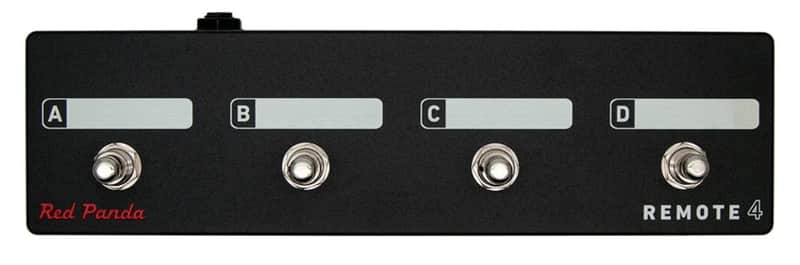
Red Panda Remote 4 Switch
This seller has not set a shipping cost for Hungary. Please contact them to ask about shipping.

Only 1 left
Grab it before it's gone

Our users rate Reverb
Remote switch with 4 modes to access presets and pedal functions. Scribble strips above each switch can be labeled with a Sharpie and erased using isopropyl alcohol.
Connects to our pedals via a 1/4" TRS cable (included). The Remote 4 does not require power.
Size: 10" x 2.75" x 2.25" high
Context Remote switch modes Mode Switch Function 1 A Preset 1 (hold to save) B Preset 2 (hold to save) C Preset 3 (hold to save) D Preset 4 (hold to save) 2 A Preset footswitch B Right footswitch C Reverb hold (latching) D Tap tempo 3 A Dry kill (momentary) B Delay kill (momentary) C Reverb sustain (momentary) D Reverb damping (momentary) Particle Remote switch modes Mode Switch Function 1 A Preset 1 (hold to save) B Preset 2 (hold to save) C Preset 3 (hold to save) D Preset 4 (hold to save) 2 A Left footswitch B Right footswitch C Preset down D Preset up Tensor Remote switch modes Mode Switch Function 1 A Preset 1 (hold to save) B Preset 2 (hold to save) C Preset 3 (hold to save) D Preset 4 (hold to save) 2 A Left footswitch B Right footswitch C Preset 1 (hold to save) D Preset 2 (hold to save) 3 A Record / Overdub B Play / Stop C Play Once D Toggle TIME & PITCH (tap) Toggle SPEED (double tap) 4 A Toggle SPEED knob B Toggle TIME knob C Toggle PITCH knob D Toggle RAND knob Tensor Loop Sampler (Remote Mode 3)Mode 3 is designed to use the Tensor as a loop sampler with live loop manipulation. Switches A-C control loop record, overdub, play, and retrigger functions. Switch 4 toggles between the current knob settings and the default (normal playback settings). For example, you can set SPEED to reverse and PITCH to -1 octave for instant access to reverse and half-speed effects. See the user's manual for complete details.
Configuring the Remote Switch (all pedals):-
Start with the pedal powered on and nothing plugged into the CTRL port.
-
Hold the right footswitch while plugging in the remote switch. The right LED will blink yellow 3 times
to indicate it is in CTRL configuration mode. You can release the right footswitch and begin configu-
ration immediately.
-
Press one of the buttons on the remote switch to select a mode.
-
Hold the right footswitch for 2 seconds to save the configuration. The right LED will blink green to
indicate that the configuration has been saved.
| Condition | Brand New (New) Brand New items are sold by an authorized dealer or original builder and include all original packaging.Learn more |
|---|---|
| Brand | |
| Model |
|
| Finish |
|
| Categories | |
| Pedal Format |
|
Product safety information may be available here.

