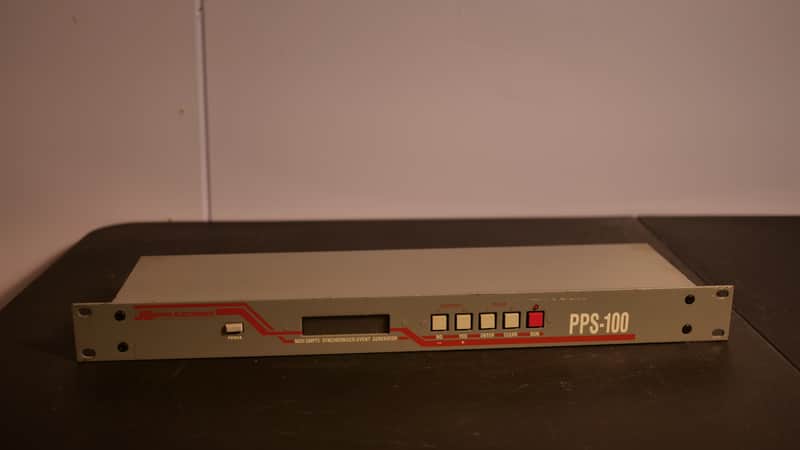
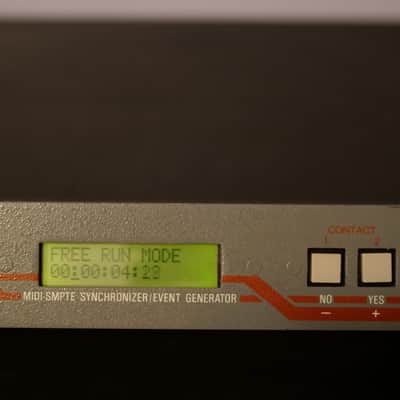
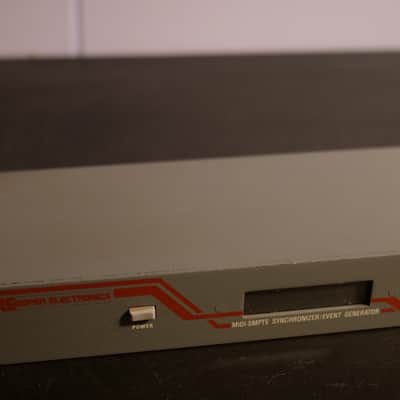
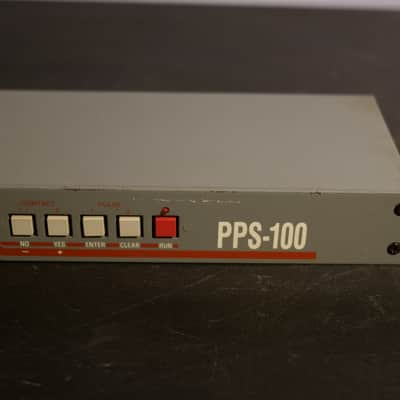
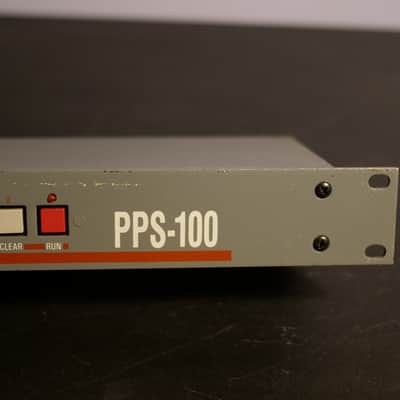
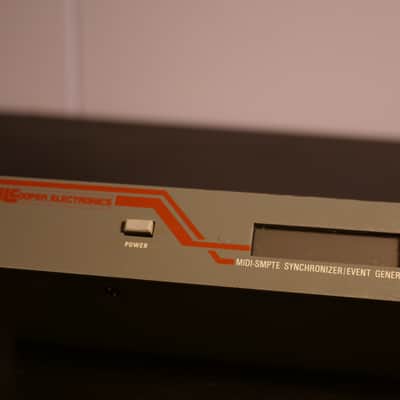
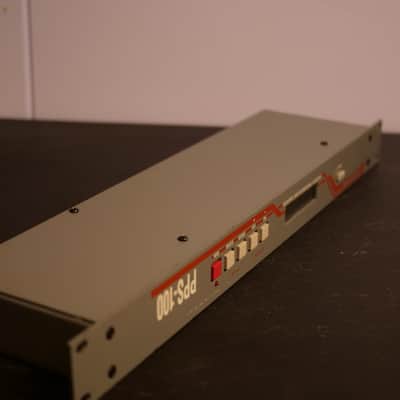
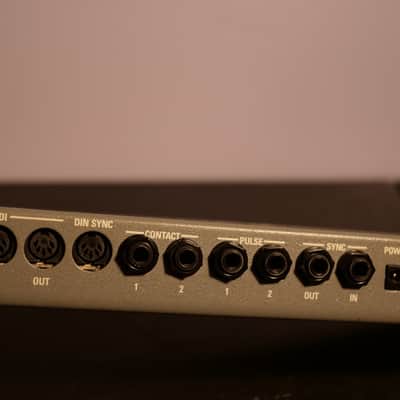
JL Cooper Electronics PPS-100 MIDI-SMPTE Synchronizer/Event Generator
Este equipo se ha vendido
Ver equipos similares de otros vendedores de Reverb
Publicado:hace 5 años
Visitas:261
Seguidores:6
Ofertas:0
Columbus, OH, Estados Unidos
Nuestros usuarios valoran Reverb
I didn't get the chance to integrate this thing like I wanted to, as I've sold much of the gear that I was planning to use it with. However, it has the capability to provide a lot of solutions for your studio - especially if you work with vintage drum machines and synthesizers.
Naturally, the DIN SYNC is ideal if you have an old 909, 808, 707, etc. or pretty much any piece of pre-MIDI Roland gear.
In my opinion, the most unique and powerful element of this unit is the PULSE outputs. These are +5V connections, allowing you to integrate CV control into the mix.
It'll do whatever you need it to, and it's much easier to navigate than similar units (or even some of the more modern solutions)
Pretty much everything you would need to interface with gear from last century in a simple 1U package
Operates off a 9VDC (500 mA) adapter - which is not included. Pretty common adapter, and one can be found easily/cheaply. You might already have one that'll work (even a pedalboard PSU with higher-amperage outs would likely work)
I recently cleaned, serviced, and tested the unit (in limited capacity, since I'd have to shuffle a lot of gear around to even test the SMPTE and DIN SYNC, but the connections are clean and what I was able to test functioned perfectly - so I have no reason to believe those connections would be any different)
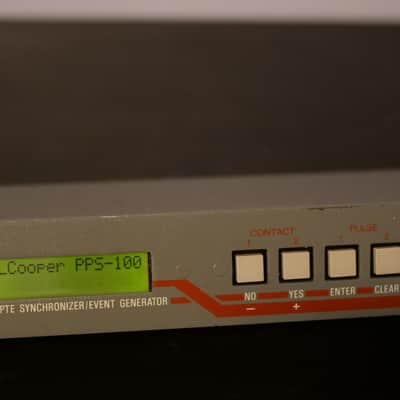
I also replaced the internal battery before listing. The original unit had a janky 3V soldered on, and I replaced it with a battery holder that accepts CR2032's for quick swaps in the future. Hence, the Display backlight is functioning again and whatever internal memory is stored with the battery should be good as well. (the backlight isn't necessarily bright, but that's how they were to begin with - reduces eye strain at least)
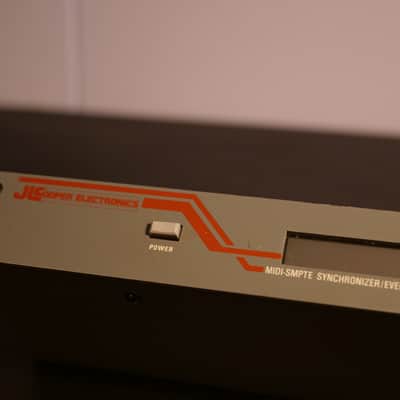
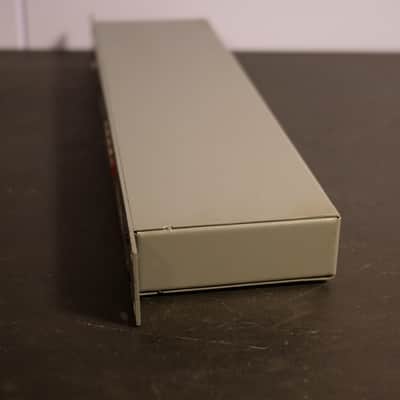
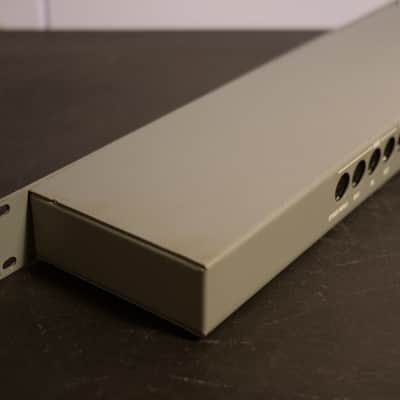
After uploading photos, I can see few spots of discoloration across the unit - I'll give it a more thorough cleaning before shipping, but it's mostly light signs of wear/age. There are a couple unnoticable blemishes/scratches, though minimal and unseen when racked. Very minimal rack-rash.
Buttons all press and rebound properly, circuit is in excellent condition, and all of the screws are intact.
The LED display is in good condition, no scratching or damage.
Ears are straight
Everything looks great and works great on this one
To supplement my description, I've included most of the information from the manual - which is still available on their website. Sorry if it's not very organized, but here's most of the technical details and what you'll need to know for operation:
The PPS- 100 will allow you to lock virtually any MIDI sequencer or drum machine to SMPTE. The Event Generator can be programmed to send out any kind of MIDI commands at any time, addition, the Event Generator may also automatically turn on and off switch and pulse operated equipment any user-programmed time.
Alternately, the PPS-1OO’s internal switches may be used to provide two channels of automated audio muting. All of these features allow you to use SMPTE in very creative ways to add greater dimension of control to your studio
FCD prompts you to select the displayed function.
CURSOR Indicates the number or function affected by NO or YES key.
NO (-) key causes the display to go “page-down” to the next function choice. This key will also decrement the value of the number above the cursor.
YES (+) key selects the currently displayed function, and calls up the menus associated with that function. This key will also increment the value of the number above the cursor.
ENTER key loads a value into memory, advances the cursor, and initiates some functions. After you have entered the last digit of a number, pressing the Enter key will cause the display to go “page down” to the next function.
CLEAR key generally exits the currently displayed function, and returns you to the top of the menu. For certain functions, the CLEAR key returns you to the previously displayed function, “page-up”.
The PPS-100 has a built-in input select switcher to save you from having to reconfigure your system to do bulk data transfers.
Use the CLEAR key to toggle the SYSEX INPUT on and off.
RUN key is used to initiate the FREE RUN MODE, or to manually terminate striping SMPTE.
The RUN key also moves the cursor back to facilitate entering and editing values. For certain functions, the RUN key returns you to the previously displayed function, “page-up
In REAL-TIME RECORD mode, the first four keys can be used to program CONTACT 1, CONTACT 2, PULSE 1, and PULSE 2, respectively.
RUN LED is on when striping SMPTE, receiving SMPTE, or when FREE RUN MODE is initiated.
Turn to the Main Menu diagram in the appendix, and begin to familiarize yourself with the front panel and the operation of the keys.
If you accidentally skip over the desired function, use the RUN key to go “page up” to the previously displayed function
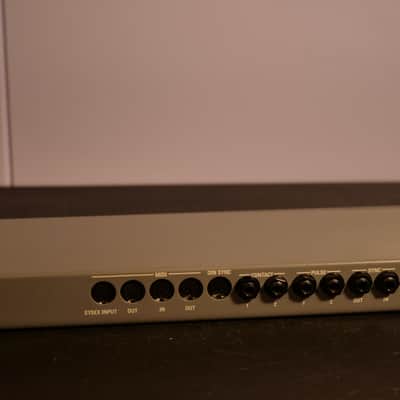
1.) SYSEX INPUT and OUT
This is an auxiliary set of MIDI connectors provided for your convenience.
The INPUT specifically intended for hookup to either an Atari or Macintosh computer for using the PPS-Cue™ software option. Alternately, you would use this extra set of MIDI connectors to hookup the PPS-100 to a computer running a sysex librarian program.
The OUT would go to the input of the computer. Actually, the PPS- 100’s two MIDI OUTs are identical, there is nothing “special” about this output, so it may be simply used as an extra MIDI output like the one described below.
2) MIDI IN accepts MIDI data for real-time recording. Any data coming into this input may also be merged with MIDI output data.
3) MIDI OUT sends out previously recorded MIDI events from the Event Generator, and also MIDI timing messages. These messages can be either MIDI Sync with Song Position Pointer, MTC or DTL. This output data may also contain merged data from the input if the MERGE function has been enabled.
4) DIN SYNC outputs 24 P.P.Q.N. (Pulses per Quarter Note) sync with a run/stop signal for driving earlier Roland equipment.
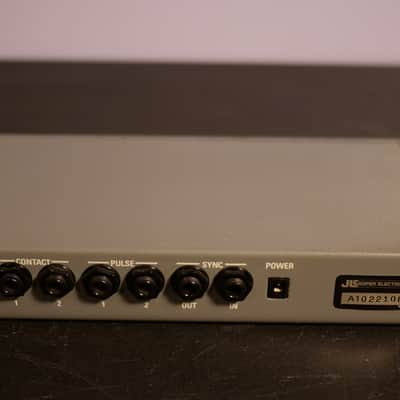
5) CONTACT 1 and 2 are the programmable relay contacts. The relay is a single-pole, single- throw type wired across the tip and sleeve of the 1/4” jack. There is no ground connection on this jack. When the contact is closed, the relay is on. That is, the tip is shorted to the sleeve. The contacts are rated at 250ma @ 100 VDC, so do not exceed these ratings.
6) PULSE 1 and 2 are the programmable +5 volt pulse outputs. PULSE 1 may be either a voltage pulse or a P.P.Q.N. (Pulses per Quarter Note) clock output at 24, 48, or 96 pulses per quarter note.
PULSE 2 may be either a voltage pulse or an audio click output.
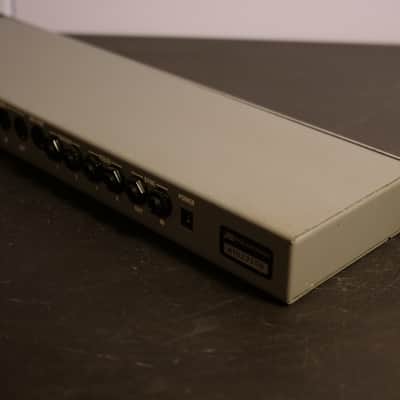
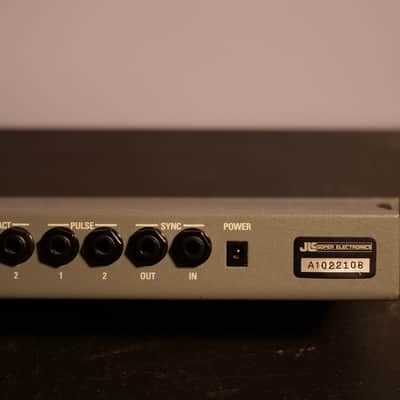
7) The POWER jack accepts the plug from an external 500ma 9VDC transformer.
To stripe tape with SMPTE, connect the SYNC OUT of the PPS-100 to an input of a mixing console, and route that input to your tape recorder. SMPTE is usually recorded on an outside track. (That is, track eight on an eight track.)
To read SMPTE from tape or some other source, connect the output of that tape track or other source to the SYNC IN of the PPS-100.
Hookup the MIDI OUT to the input of a MIDI sequencer, computer sequencer, or drum machine to lock that device to SMPTE. Both MIDI OUTs are identical. If you are not using the first OUT for SYSEX bulk data transfers, you may connect it to an additional drum machine or sequencer.
To record MIDI data into the PPS-100, or to record MIDI data into your sequencer while it is still hooked up to the PPS-100, connect the MIDI output of your keyboard to the MIDI input of the PPS-100.
To drive early Roland equipment with DIN sync (24p.p.q.n.), hook up a 5-pin DIN cable from this output to the sync input of the Roland device. Note: Many MIDI cables will not work for this application because Roland DIN sync uses pins 1, 2, and 3, but MIDI cables use only pins 2, 4, and 5, and may leave the other pins unconnected. If in doubt, and if you don’t have access to a cable continuity tester of some sort, be sure to buy a cable labeled “5-pin DIN” from an electronics parts store instead of a music store. Also, Roland manufactures cables labeled “MIDI/SYNC” which will work just fine because all of the pins are hooked up.
Hookup PULSE 1 output to the clock input of older drum machines such as the Linn Drum™ , Oberheim DMX™, and the Emu Drumulator™ (Use a 1/4” to RCA adapter.)
Pulse 2 may be used as a click output, and could drive some early model “one pulse per beat” arpeggiators.
Refer to figure 2.
Alternately the MIDI OUT may be hooked up to a MIDI switchbox or “thru-box” and then routed to a number of different MIDI devices. This would be a typical Event Generator hook up.
Contacts 1 and 2 may be connected to the remote punch in/out jack on many tape recorders. Some tape recorders also have a play/locate remote jack. Virtually anything operated by a switch contact can be hooked up to these jacks, provided that the voltage/currant ratings are not exceeded. (The Appendix in the back of this manual will show you how to wire a cable to use the contacts as an audio mute.)
DIRECT TIME LOCK (DTL)
This is a proprietary MIDI timing scheme invented by Mark of the Unicorn for use exclusively with their sequencing program, Performer™ . It is not really part of the MIDI Specification. While reading SMPTE, the PPS-100 can generate DTL to drive Performer™ .
MIDI CLOCK with Song Position Pointer
MIDI Clock is a “real time” MIDI message sent out by the PPS-100 synchronizer at 24 clocks- per quarter note. A MIDI device set to receive MIDI Clock will “slave” its tempo to the device sending MIDI Clock. Song Position Pointer is a message that indicates how many sixteenth notes have elapsed since the beginning of a song.
When the PPS-100 sends out a Song Position Pointer message, a “slaved” device that recognizes that message can internally prepare to playback at any location within the song.
MIDI Song Position Pointer message is sent out only ONCE when the PPS-100 synchronizer is started at some location other than the beginning of the song. (It is never sent continually.)
MIDI TIME CODE (MTC)
MTC is a way of sending SMPTE time on a MIDI cable. While reading SMPTE, the PPS-100 can directly convert the hour, minute, second, frame data into MTC. MTC is recognized by many software sequencers, digital audio workstations and hard disk recorders.
PPQN
Although the term PPQN means Pulses Per Quarter Note, PPQN usually refers specifically to a +5V clock pulse sent and received by pre-MIDI drum machines and sequencers. (Technically speaking, MIDI Clock and FSK schemes could also be referred to as PPQN-based systems.) The PPS-100 can put out 24, 48, or 96 PPQN while locked to SMPTE
DIN SYNC
This is the synchronization method employed by Roland Corp. on their earlier drum machines and sequencers. DIN Sync consists of a 24 clock-per-quarter note pulse on pin three of a 5-pin DIN connector. On pin one of the connector is a “run/stop” signal that is normally “low” (0 Volts), but goes “high” (5 volts) to inform a slaved device to start playing.
Initialization
The PPS-lOO’s internal memory may become scrambled if the unit ever receives a power surge. The PPS-100 may also behave incorrectly if it receives time code faster than 15% too fast.
The symptom of this is a scrambled display. If this happens, the PPS-100 can be fixed by initializing the memory.
To initialize, turn off the power. Hold in RUN button and while holding in RUN, turn on the power.
(This puts the PPS-100 into a self test mode. The red LED will flash and some codes will appear in the display, ignore these.) After about a second or so, turn off again.
This procedure completely clears out the memory of the PPS-100, making it like it is new out of the box. Any mysterious symbols will be gone
Naturally, the DIN SYNC is ideal if you have an old 909, 808, 707, etc. or pretty much any piece of pre-MIDI Roland gear.
In my opinion, the most unique and powerful element of this unit is the PULSE outputs. These are +5V connections, allowing you to integrate CV control into the mix.
It'll do whatever you need it to, and it's much easier to navigate than similar units (or even some of the more modern solutions)
Pretty much everything you would need to interface with gear from last century in a simple 1U package
Operates off a 9VDC (500 mA) adapter - which is not included. Pretty common adapter, and one can be found easily/cheaply. You might already have one that'll work (even a pedalboard PSU with higher-amperage outs would likely work)
I recently cleaned, serviced, and tested the unit (in limited capacity, since I'd have to shuffle a lot of gear around to even test the SMPTE and DIN SYNC, but the connections are clean and what I was able to test functioned perfectly - so I have no reason to believe those connections would be any different)
I also replaced the internal battery before listing. The original unit had a janky 3V soldered on, and I replaced it with a battery holder that accepts CR2032's for quick swaps in the future. Hence, the Display backlight is functioning again and whatever internal memory is stored with the battery should be good as well. (the backlight isn't necessarily bright, but that's how they were to begin with - reduces eye strain at least)
After uploading photos, I can see few spots of discoloration across the unit - I'll give it a more thorough cleaning before shipping, but it's mostly light signs of wear/age. There are a couple unnoticable blemishes/scratches, though minimal and unseen when racked. Very minimal rack-rash.
Buttons all press and rebound properly, circuit is in excellent condition, and all of the screws are intact.
The LED display is in good condition, no scratching or damage.
Ears are straight
Everything looks great and works great on this one
To supplement my description, I've included most of the information from the manual - which is still available on their website. Sorry if it's not very organized, but here's most of the technical details and what you'll need to know for operation:
The PPS- 100 will allow you to lock virtually any MIDI sequencer or drum machine to SMPTE. The Event Generator can be programmed to send out any kind of MIDI commands at any time, addition, the Event Generator may also automatically turn on and off switch and pulse operated equipment any user-programmed time.
Alternately, the PPS-1OO’s internal switches may be used to provide two channels of automated audio muting. All of these features allow you to use SMPTE in very creative ways to add greater dimension of control to your studio
FCD prompts you to select the displayed function.
CURSOR Indicates the number or function affected by NO or YES key.
NO (-) key causes the display to go “page-down” to the next function choice. This key will also decrement the value of the number above the cursor.
YES (+) key selects the currently displayed function, and calls up the menus associated with that function. This key will also increment the value of the number above the cursor.
ENTER key loads a value into memory, advances the cursor, and initiates some functions. After you have entered the last digit of a number, pressing the Enter key will cause the display to go “page down” to the next function.
CLEAR key generally exits the currently displayed function, and returns you to the top of the menu. For certain functions, the CLEAR key returns you to the previously displayed function, “page-up”.
The PPS-100 has a built-in input select switcher to save you from having to reconfigure your system to do bulk data transfers.
Use the CLEAR key to toggle the SYSEX INPUT on and off.
RUN key is used to initiate the FREE RUN MODE, or to manually terminate striping SMPTE.
The RUN key also moves the cursor back to facilitate entering and editing values. For certain functions, the RUN key returns you to the previously displayed function, “page-up
In REAL-TIME RECORD mode, the first four keys can be used to program CONTACT 1, CONTACT 2, PULSE 1, and PULSE 2, respectively.
RUN LED is on when striping SMPTE, receiving SMPTE, or when FREE RUN MODE is initiated.
Turn to the Main Menu diagram in the appendix, and begin to familiarize yourself with the front panel and the operation of the keys.
If you accidentally skip over the desired function, use the RUN key to go “page up” to the previously displayed function
1.) SYSEX INPUT and OUT
This is an auxiliary set of MIDI connectors provided for your convenience.
The INPUT specifically intended for hookup to either an Atari or Macintosh computer for using the PPS-Cue™ software option. Alternately, you would use this extra set of MIDI connectors to hookup the PPS-100 to a computer running a sysex librarian program.
The OUT would go to the input of the computer. Actually, the PPS- 100’s two MIDI OUTs are identical, there is nothing “special” about this output, so it may be simply used as an extra MIDI output like the one described below.
2) MIDI IN accepts MIDI data for real-time recording. Any data coming into this input may also be merged with MIDI output data.
3) MIDI OUT sends out previously recorded MIDI events from the Event Generator, and also MIDI timing messages. These messages can be either MIDI Sync with Song Position Pointer, MTC or DTL. This output data may also contain merged data from the input if the MERGE function has been enabled.
4) DIN SYNC outputs 24 P.P.Q.N. (Pulses per Quarter Note) sync with a run/stop signal for driving earlier Roland equipment.
5) CONTACT 1 and 2 are the programmable relay contacts. The relay is a single-pole, single- throw type wired across the tip and sleeve of the 1/4” jack. There is no ground connection on this jack. When the contact is closed, the relay is on. That is, the tip is shorted to the sleeve. The contacts are rated at 250ma @ 100 VDC, so do not exceed these ratings.
6) PULSE 1 and 2 are the programmable +5 volt pulse outputs. PULSE 1 may be either a voltage pulse or a P.P.Q.N. (Pulses per Quarter Note) clock output at 24, 48, or 96 pulses per quarter note.
PULSE 2 may be either a voltage pulse or an audio click output.
7) The POWER jack accepts the plug from an external 500ma 9VDC transformer.
To stripe tape with SMPTE, connect the SYNC OUT of the PPS-100 to an input of a mixing console, and route that input to your tape recorder. SMPTE is usually recorded on an outside track. (That is, track eight on an eight track.)
To read SMPTE from tape or some other source, connect the output of that tape track or other source to the SYNC IN of the PPS-100.
Hookup the MIDI OUT to the input of a MIDI sequencer, computer sequencer, or drum machine to lock that device to SMPTE. Both MIDI OUTs are identical. If you are not using the first OUT for SYSEX bulk data transfers, you may connect it to an additional drum machine or sequencer.
To record MIDI data into the PPS-100, or to record MIDI data into your sequencer while it is still hooked up to the PPS-100, connect the MIDI output of your keyboard to the MIDI input of the PPS-100.
To drive early Roland equipment with DIN sync (24p.p.q.n.), hook up a 5-pin DIN cable from this output to the sync input of the Roland device. Note: Many MIDI cables will not work for this application because Roland DIN sync uses pins 1, 2, and 3, but MIDI cables use only pins 2, 4, and 5, and may leave the other pins unconnected. If in doubt, and if you don’t have access to a cable continuity tester of some sort, be sure to buy a cable labeled “5-pin DIN” from an electronics parts store instead of a music store. Also, Roland manufactures cables labeled “MIDI/SYNC” which will work just fine because all of the pins are hooked up.
Hookup PULSE 1 output to the clock input of older drum machines such as the Linn Drum™ , Oberheim DMX™, and the Emu Drumulator™ (Use a 1/4” to RCA adapter.)
Pulse 2 may be used as a click output, and could drive some early model “one pulse per beat” arpeggiators.
Refer to figure 2.
Alternately the MIDI OUT may be hooked up to a MIDI switchbox or “thru-box” and then routed to a number of different MIDI devices. This would be a typical Event Generator hook up.
Contacts 1 and 2 may be connected to the remote punch in/out jack on many tape recorders. Some tape recorders also have a play/locate remote jack. Virtually anything operated by a switch contact can be hooked up to these jacks, provided that the voltage/currant ratings are not exceeded. (The Appendix in the back of this manual will show you how to wire a cable to use the contacts as an audio mute.)
DIRECT TIME LOCK (DTL)
This is a proprietary MIDI timing scheme invented by Mark of the Unicorn for use exclusively with their sequencing program, Performer™ . It is not really part of the MIDI Specification. While reading SMPTE, the PPS-100 can generate DTL to drive Performer™ .
MIDI CLOCK with Song Position Pointer
MIDI Clock is a “real time” MIDI message sent out by the PPS-100 synchronizer at 24 clocks- per quarter note. A MIDI device set to receive MIDI Clock will “slave” its tempo to the device sending MIDI Clock. Song Position Pointer is a message that indicates how many sixteenth notes have elapsed since the beginning of a song.
When the PPS-100 sends out a Song Position Pointer message, a “slaved” device that recognizes that message can internally prepare to playback at any location within the song.
MIDI Song Position Pointer message is sent out only ONCE when the PPS-100 synchronizer is started at some location other than the beginning of the song. (It is never sent continually.)
MIDI TIME CODE (MTC)
MTC is a way of sending SMPTE time on a MIDI cable. While reading SMPTE, the PPS-100 can directly convert the hour, minute, second, frame data into MTC. MTC is recognized by many software sequencers, digital audio workstations and hard disk recorders.
PPQN
Although the term PPQN means Pulses Per Quarter Note, PPQN usually refers specifically to a +5V clock pulse sent and received by pre-MIDI drum machines and sequencers. (Technically speaking, MIDI Clock and FSK schemes could also be referred to as PPQN-based systems.) The PPS-100 can put out 24, 48, or 96 PPQN while locked to SMPTE
DIN SYNC
This is the synchronization method employed by Roland Corp. on their earlier drum machines and sequencers. DIN Sync consists of a 24 clock-per-quarter note pulse on pin three of a 5-pin DIN connector. On pin one of the connector is a “run/stop” signal that is normally “low” (0 Volts), but goes “high” (5 volts) to inform a slaved device to start playing.
Initialization
The PPS-lOO’s internal memory may become scrambled if the unit ever receives a power surge. The PPS-100 may also behave incorrectly if it receives time code faster than 15% too fast.
The symptom of this is a scrambled display. If this happens, the PPS-100 can be fixed by initializing the memory.
To initialize, turn off the power. Hold in RUN button and while holding in RUN, turn on the power.
(This puts the PPS-100 into a self test mode. The red LED will flash and some codes will appear in the display, ignore these.) After about a second or so, turn off again.
This procedure completely clears out the memory of the PPS-100, making it like it is new out of the box. Any mysterious symbols will be gone
Este producto es vendido tal cual
Este producto fue vendido tal y no puede ser devuelto al menos qué sea entregado en una condición diferente a como fue descrito o fotografiado.Los productos deben ser devueltos en su estado original junto a todo su empaquetado original. Obtén más información.
| Publicado | hace 5 años |
|---|---|
| Estado | Muy bueno (segunda mano) Productos en estado muy bueno pueden mostrar algunas señales de gasto físico o rayones pero funcionan debidamente y están en condiciones favorables.Más información |
| Marca | |
| Modelo |
|
| Acabado |
|
| Categorías | |
| Año |
|
| Hecho en |
|
La información de seguridad del producto se encuentra disponible aquí.