Waves C6 Multiband Compressor
New Pricekr2,967.60
Instant Download
This gear has sold
See similar gear from other Reverb sellers
Listed:over a month ago
Views:736
Saves:10
Offers:8

Chicago, IL, United States
Our users rate Reverb
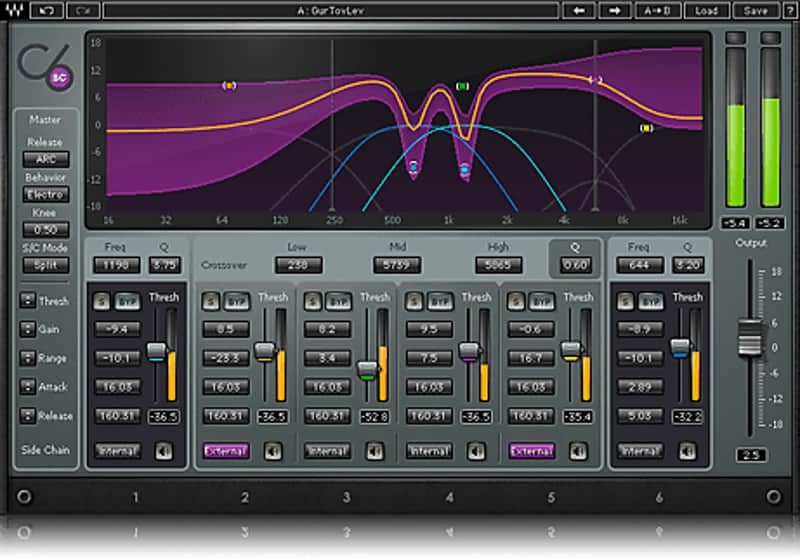
All the multiband compression and dynamic equalization you need to control, tame, and shape your sound.
What it is:
A live sound and studio staple - the C4 compressor - expanded upon.
How we use it:
One-stop vocal and instrument shaping.
Why it's cool:
From vocals to instruments - live performance or in the studio - C6's versatility guarantees it a spot in your rig. For years, the C4 has been a favorite of studio engineers the world over, and in live sound, it’s quickly become a must-have for front-of-house and monitor professionals as well. To create the C6, we took the tried-and-true functions of the C4, and added two additional floating bands plus a sidechain feature, for one-stop vocal and instrument shaping. Equally at home in the studio, live, and in post production, the C6 lets you zero in on problem frequencies with surgical precision.
Perfect for de-essing and de-popping in the studio or onstage, the C6 gives you all the multiband compression and dynamic equalization you need to control, tame, and shape your sound.
Features:
Compatibility
Mac:
CPU
Memory
Operating System
Screen Resolution
Support for Visually Impaired Users
Windows:
CPU
Memory
Operating System
Screen Resolution
Installation Instructions
What it is:
A live sound and studio staple - the C4 compressor - expanded upon.
How we use it:
One-stop vocal and instrument shaping.
Why it's cool:
From vocals to instruments - live performance or in the studio - C6's versatility guarantees it a spot in your rig. For years, the C4 has been a favorite of studio engineers the world over, and in live sound, it’s quickly become a must-have for front-of-house and monitor professionals as well. To create the C6, we took the tried-and-true functions of the C4, and added two additional floating bands plus a sidechain feature, for one-stop vocal and instrument shaping. Equally at home in the studio, live, and in post production, the C6 lets you zero in on problem frequencies with surgical precision.
Perfect for de-essing and de-popping in the studio or onstage, the C6 gives you all the multiband compression and dynamic equalization you need to control, tame, and shape your sound.
Features:
- Multiband compressor plugin
- Internal/external sidechain per band
- Individual band Listen mode
- Four crossover bands plus two floating bands
- Dynamic EQ, compression and expansion
- Double precision bit resolution processing
Compatibility
Mac:
CPU
- Intel Core i5 / i7 / Xeon
Memory
- 8 GB RAM
- 8 GB free disk space on the system drive
Operating System
- 10.10.5 - 10.12.6
Screen Resolution
- Minimum: 1024x768
- Recommended: 1280x1024 / 1600x1024
- USB displays are not supported as the primary display.
Support for Visually Impaired Users
- Mac OS Sierra 10.12.4
- VoiceOver Utility enabled
- Pro Tools 12.7
- Logic 10.3.1
Windows:
CPU
- Intel Core i3 / i5 / i7 / Xeon / AMD Quad-Core
Memory
- 4 GB RAM
- 8 GB free disk space on the system drive
Operating System
- Windows 7 with SP1 64 bit
- Windows 8.1 64 bit
- Windows 10 64 bit
Screen Resolution
- Minimum: 1024x768
- Recommended: 1280x1024 / 1600x1024
Installation Instructions
- Create an account: https://www.waves.com/create-account (if you have an account, skip this step)
- Register the serial number we emailed: https://www.waves.com/account/register
- Download and install Waves Central for Mac | Windows.
- If you already have Waves Central installed, skip to step 4. - Launch Waves Central.
- Windows: via the desktop shortcut or Start Menu > All Programs > Waves.
- Mac: Applications > Waves Central. - Log into Waves Central using your Waves account information.
- Click on Easy Install & Activate.
- Select the products you wish to install & activate on this computer.
- Click on the Install & Activate button.