1979 AO Algorithmic Oscillator

Our users rate Reverb
Digital oscillator with envelope and VCA/LPG
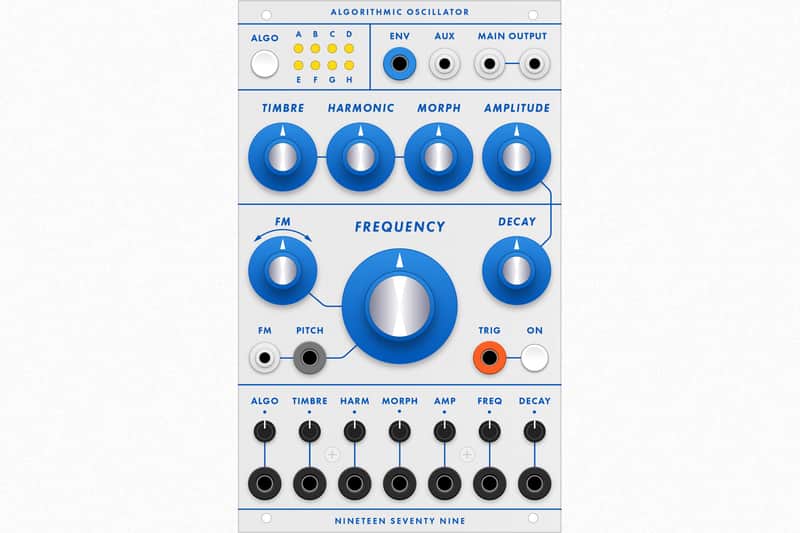
The Algorithmic Oscillator is a Buchla-format VCO based on Plaits by Mutable Instruments. The successor to the 1979 DAO, the AO has more knobs, more parameters, and more I/O than the DAO plus new features not present on Plaits. With an internal decay envelope and a VCA with adjustable LPG response, the AO is an ideal standalone oscillator for small Buchla systems.
Core Features
- High-fidelity digital oscillator (48 kHz, 16 bit)
- 16 synthesis algorithms (see the Algorithm List below)
- Auxiliary output with complementary audio signal
- Internal VCA with variable LPG mode
- Voltage-controlled decay envelope*
- Dedicated knobs for envelope decay and VCA/LPG amplitude*
- Pitch quantizer (12-TET and Octave options)*
- Inverting attenuators for all CV inputs (0-10V range)*
- Envelope CV output (0-10V range)*
*Upgraded features not available on Plaits
Quick Reference
Algorithm selection. Tap the ALGO switch to cycle through the 8 algorithms in each bank. Press the ALGO switch for a few seconds to toggle between the green and red banks. See the Algorithm List below for more info on each algorithm. You can also modulate the current algorithm using the Algo CV input. Try this with a sequencer to make a new selection with each step. This works well with the drum models, for example, allowing you to switch between kick, snare, and cymbal for each step of the sequence. Patching in a random CV source (such as the 1979 SVG) is also recommended.
LPG/VCA balance. On modules like the Buchla 292 there's a switch to toggle between VCA and VCFA (LPG). The AO allows you to crossfade between the two amplifier types instead. Press the Trig switch and turn the Amplitude knob to change the LPG/VCA balance. This is visualized on the top row of LEDs in the Algo section. Turn left for LPG, turn right for VCA. Audio is routed through the LPG only when the Trig switch is on. When the Trig switch is off, audio is passed through the VCA only. When the LPG is activated, the Decay knob will control the "ringing" of the simulated vactrol. Note that certain algorithms (red bank D-H) do not include the LPG option and will always use the VCA.
Quantizer options. Press the Trig switch and turn the Frequency knob to choose the quantizer mode. The mode is visualized on the bottom row of LEDs in the Algo section. With the knob in the left third of its range, the pitch is not quantized. In the middle third, semitone quantization (12-TET) is applied. In the right third, octave quantization is applied. When either of the two quantization modes is enabled, CVs patched to the Pitch input will snap to the nearest semitone or octave. CVs patched to the Freq input are not quantized. This allows for fine tuning, transposition, or microtonal modulation of quantized pitches.
Envelope output. Plaits has an internal modulation schema which routes the internal decay envelope to certain unpatched CV inputs. Although this is not possible with the banana jacks on the AO, you can now patch the envelope CV output to any or all of the CV inputs on the AO (or other modules) and use the envelope as a voltage-controlled modulation source (Plaits does not include a CV input for the envelope decay time).
FM attenuator. When the FM audio input is unpatched, the FM knob works as a fine-tune pitch control. When this input is patched, the FM knob becomes an inverting attenuator, with a 180° phase shift on the FM source when this knob is turned to the left of center.
Algorithm ListDual oscillator. Mix of two analog-style waveforms: a variable-width pulse and a second oscillator which can be continuously waveshaped from triangle to a glitchy sawtooth. Turn the Timbre knob fully to the left to silence the pulse, or turn the Morph knob fully to the right to silence the tri-saw waveform. This technique can be used to take one or both waveforms out of the mix. The AUX output is the sum of the two waveforms with hard sync applied.Timbre:
Pulse width shaperHarmonic:
Relative detuning ratioMorph:
Tri-saw shaperWaveshaping oscillator. An asymmetric triangle wave is routed through a waveshaper and a wavefolder. The AUX output is similar but uses a different wavefolding method. Both outputs are reminiscent of classic Buchla/Serge textures.Timbre:
Waveshaper waveformHarmonic:
Wavefolder amountMorph:
Waveform asymmetry2-Operator FM. Two sine oscillators with cross-modulation of phase. The AUX output is a suboscillator derived from the base frequency.Timbre:
Modulation indexHarmonic:
Frequency ratioMorph:
Feedback level/typeGranular formant oscillator. Simulation of formants using the multiplication, addition, and synchronization of sine wave segments. The AUX output is a simulation of filtered waveforms by windowed sine wavesTimbre:
Formant frequencyHarmonic:
Frequency ratioMorph:
Formant width/shapeHarmonic oscillator. An additive mixture of harmonically-related sine waves. The AUX output uses specific frequency ratios (1, 2, 3, 4, 6, 8, 10, 12) which emulate the drawbars on old organ/string synths.Timbre:
Formant frequencyHarmonic:
Frequency ratioMorph:
Formant width/shapeWavetable oscillator. Four banks of waveforms arranged in an 8x8 matrix. Left of center, the Harmonic knob scans through the four banks with interpolation between waveforms. Right of center, the waveforms are not interpolated. The AUX output is a lo-fi version of the main output with 5-bit resolution.Timbre:
Row index (X-axis)Harmonic:
Bank selectionMorph:
Column index (Y-axis)Four-note chords. Tuned waveforms emulate vintage string/organ machines with four-note polyphony. The AUX output provides only the root note of the chord.Timbre:
Inversion/TranspositionHarmonic:
Chord typeMorph:
Waveform typeSpeech synthesis. A collection of speech synthesis algorithms. Harmonic scans through various models including formant filtering, SAM, and LPC vowels, then goes through several banks of LPC words. The AUX output provides an unfiltered version of the underlying vocalization waveform.Timbre:
Species selectionHarmonic:
Crossfade speech modelsMorph:
Phoneme/word selectionGranular supersaw. A swarm of 8 enveloped sawtooth waves. The AUX output provides the same but with sine waves. For the classic "supersaw" sound, turn Morph fully to the right and apply subtle CV randomization to the Timbre and Harmonic inputs.Timbre:
Grain densityHarmonic:
Frequency randomizationMorph:
Grain duration/overlapFiltered noise. Variable-clock white noise processed by a morphing resonant filter. The tuned resonance will properly track CVs applied to the Pitch input. The AUX output uses two bandpass filters whose relationship is controlled by the Harmonic knob.Timbre:
Clock frequencyHarmonic:
Filter morph (LP>BP>HP)Morph:
Filter resonanceParticle noise. Dust noise processed by networks of all-pass or band-pass filters. The AUX output is the raw noise without processing.Timbre:
Particle densityHarmonic:
Frequency randomizationMorph:
Filter typeInharmonic strings. Similar to the "red mode" from Mutable's Rings with three voices of polyphony. This model requires an excitation signal. There are three ways to generate this signal. When the Trig input is switched off, an internal noise source will randomly trigger the exciter. If external CV is patched to the Pitch/Freq jacks, pitch changes over one semitone will also trigger the exciter. If the Trig jack is patched (and enabled with the Trig switch), the exciter will only be triggered when an external pulse is received. The AUX output is the raw excitation signal, which will be perceived as a short click or burst of noise.Timbre:
Exciter filter/brightnessHarmonic:
(In)harmonicsMorph:
Decay timeModal resonator. Similar to the "green mode" from Rings. Like the "Inharmonic strings" algorithm above, this algorithm also requires an exciation signal. All of the Trig and Pitch logic above also applies to this algorithm. The AUX output is the raw excitation signal.Timbre:
Exciter filter/brightnessHarmonic:
Material selectionMorph:
Decay timeAnalog bass drum. Low-frequency percussive model derived from analog hardware simulation. The AUX output provides a bass drum using an alternate DSP model.Timbre:
Lowpass filter cutoffHarmonic:
Envelope attack + driveMorph:
Decay timeAnalog snare drum. High-frequency percussive model derived from analog hardware simulation. The AUX output provides a snare drum using an alternate DSP model.Timbre:
Modal morphingHarmonic:
Harmonic/noise balanceMorph:
Decay timeAnalog cymbal. Generates metallic tones derived from six square wave oscillators mixed with a noise component, routed through a VCA modeled on a low-fidelity transistor circuit. The AUX output uses three ring-modulated square waves.Timbre:
Highpass filter cutoffHarmonic:
Harmonic/noise balanceMorph:
Decay timeThe last five algorithms in the red bank have unique responses to external triggers.
Algorithms D/E will be triggered randomly by an internal noise source if the Trig switch is off. Turn the Trig switch on to disable the noise source and switch to external triggers only. Note that with the Trig switch off and a trigger source patched in, events will be triggered by both the internal noise source and external triggers.
Algorithms F/G/H (kick/snare/cymbal) have their own tone-shaping envelope, which is controlled by the Morph knob. External triggers will activate that envelope. Turning on the Trig switch will change the Amplitude response.
The other 11 algorithms have a more direct response to triggers. With the Trig switch off, triggers will activate the envelope, which will open the VCA. Turn the Trig switch on to activate the LPG. The envelope will open the VCA while the trigger will ping a simulated vactrol model. The ringing time of the vactrol model can be adjusted. Press the Trig switch and turn the Amplitude knob. From left to right, the knob will morph from a short ring time, through a more sustained and gradual decay, to a more linear VCA. The amplifier response is visualized on the upper row of LEDs.
DEMO:
| Condition | Brand New (New) Brand New items are sold by an authorized dealer or original builder and include all original packaging.Learn more |
|---|---|
| Brand | |
| Model |
|
| Categories | |
| Made In |
|
Product safety information may be available here.

