M Live B Beat PRO16
Price€1,700
+ €80 Shipping
Listed:over a month ago
Views:163
Saves:2
Offers:0

Mantova, Italy
Our users rate Reverb
Available with 128 Gb Memory for 1390€ or with 1 Tb Memory + WIFI for 1700€
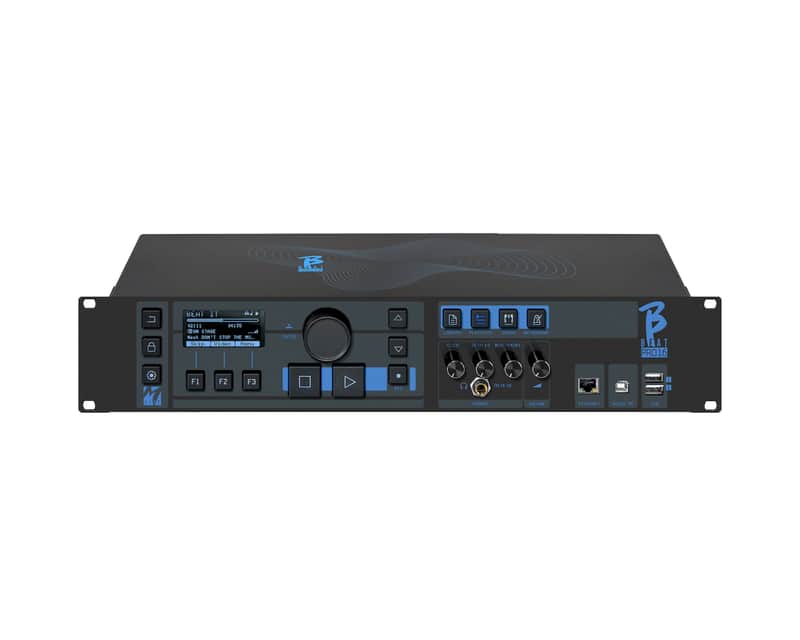
The B.Beat PRO16 is ideal for live performances with stereo sequences or up to 24 tracks, including videos, lyrics, and images.
- The B.BEAT PRO16 is ideal for live performances with stereo sequences or up to 24 tracks, including videos, lyrics, and images.
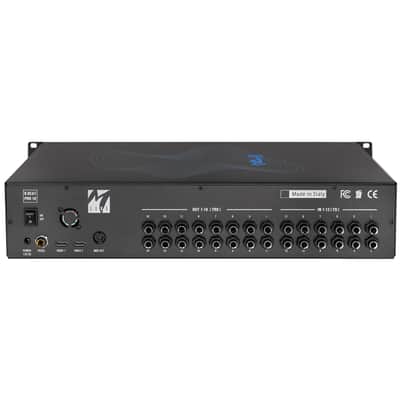
- The B.BEAT reads and plays music files in WAV, multi-track audio, stems, MIDI, MP4, MOV, and JPG formats. You can use backing tracks for up to 24 mono or 12 stereo tracks, and record up to 12 channels. The B.BEAT PRO16 can store a large number of backing tracks. It has two HDMI outputs for transmitting synchronized videos and lyrics for the on-stage prompter. You can upload scores and view them on Wi-Fi-connected smart devices. B.Beat PRO16 features a digital mixer for managing 24 audio tracks, 16 separate outputs, the click, and headphone management. Remote control via app via Wi-Fi or cable, MIDI Clock send.
- DIGITAL MIXER
- B.BEAT includes a digital mixer for managing 24 tracks on 16 separate outputs, 12 inputs, a headphone output for the click*, the return from the mixer, and the backing tracks. The 16 outputs allow the tracks that make up the backing tracks to be sent to the stage mixer. A stereo or mono audio signal from any source can be fed back to B.Beat through the 12 available inputs. B.Beat also recognizes the click track and can route it to any of the 16 available outputs and simultaneously to the headphone output*. When the headphone output is activated, the musician can use four convenient knobs to adjust the balance in real time to what they want to hear through their headphones during the performance.
- SOUND CARD
- B.Beat PRO16 also includes a fully-fledged 16-out, 12-in sound card, compatible with Windows and iOS. This card allows you to use a digitally connected PC alongside B.Beat, routing the outputs of the various B.Beat tracks exactly as you would in your DAW. This feature is extremely useful during sound checks and in the rehearsal room, before transferring the backing tracks directly to B.Beat.
- DIGITAL RECORDER
- B.Beat PRO16 is also a 12-channel digital recorder. Recorded tracks, up to 12, can be automatically inserted into audio projects. In the PLUS version, recording can also occur while B.Beat PRO16 is playing a backing track. Once recording is complete, you can decide whether to insert the new tracks into the existing backing track.
- B.BEATX ON STAGE
- B.Beat was designed for maximum reliability during live performances. There's a dedicated [LIVE] button on the panel that can be used once the show begins, because from that moment on, B.Beat's processor will be engaged to ensure maximum performance without wasting resources. This minimizes the risk of involuntary crashes and protects the user from operating errors.
- B.Beat PRO16 has a Sync system for use in conjunction with Auto Switch systems that prevent shutdown in the event of a crash.
- TWO VIDEO OUTPUTS
- B.Beat PRO16 has two HDMI video outputs, because on stage it's often necessary to have a video wall that accompanies musical performances, while simultaneously displaying lyrics in the Prompter version. Song lyrics can be written and synchronized very easily using the B.Beat Manager program. The same can be done with sheet music, which can be uploaded as PDFs, and each instrument on stage can have its own score. The score can be viewed on a smart device via Wi-Fi.
- ORGANIZE THE PERFORMANCE
- B.Beat PRO16 manages individual Backing Tracks that can be organized into convenient Playlists or into full-fledged Shows composed of multiple Scenes of various types. Projects can contain Music, Video, and Images, as well as MIDI tracks for sending messages to the various devices used for live performances. The philosophy behind B.Beat is to simplify the management of Backing Tracks and Video during a Show. With B.Beat, there's no need to bring computers, tablets, sound cards, video cards, cables, or mixers on stage.
- PREPARING B.BEAT FOR THE SHOW
- Create your Backing Tracks with your DAW, and once you've finished your work in the recording studio, you're ready to transfer the music to B.Beat PRO16. To do this, an app called B.Beat Manager is included, running on Windows PC and Mac. With the Manager, you can assign outputs to the various tracks and complete the editing process by adjusting the volume as desired. If you've synced the videos to the music, you can upload everything to B.Beat.
- METRONOME AND CLICK
- B.Beat has a dedicated Metronome section. You can easily manage a metronome directly on stage. The metronome's audio click can be output to one of the 16 outputs, and simultaneously to the headphone output, if one has been set. The same thing happens with the click when it's recorded on the backing tracks. When you track it a click is present in the multitrack Backing Tracks and is recognized and sent to a separate output and headphones
- SONG SERVICE WEBSITE
- B.Beat can read files in MTA (Multitrack Audio) format produced and distributed by M-Live via the Song Service website. MTA files are multitracks that B.Beat reads as 8 stereo tracks. The Backing Tracks are organized as follows: Track 1 Drums, Track 2 Bass, Track 3 Guitar, Track 4 Keyboards, Track 5 Orchestra, Track 6 Wind Instruments, Track 7 Click, Track 8 Melody. Audio projects with 16 separate stereo tracks are also available, which can be freely adapted to B.Beat with any DAW.
| Condition | Mint (Used) Mint items are in essentially new original condition but have been opened or played.Learn more |
|---|---|
| Brand | |
| Model |
|
| Categories | |
| Made In |
|
Product safety information may be available here.

