iZotope Music Production Suite 4 Software Bundle (Upgrade from Any Paid iZotope Product,)
This gear has sold
See similar gear from other Reverb sellers

Our users rate Reverb
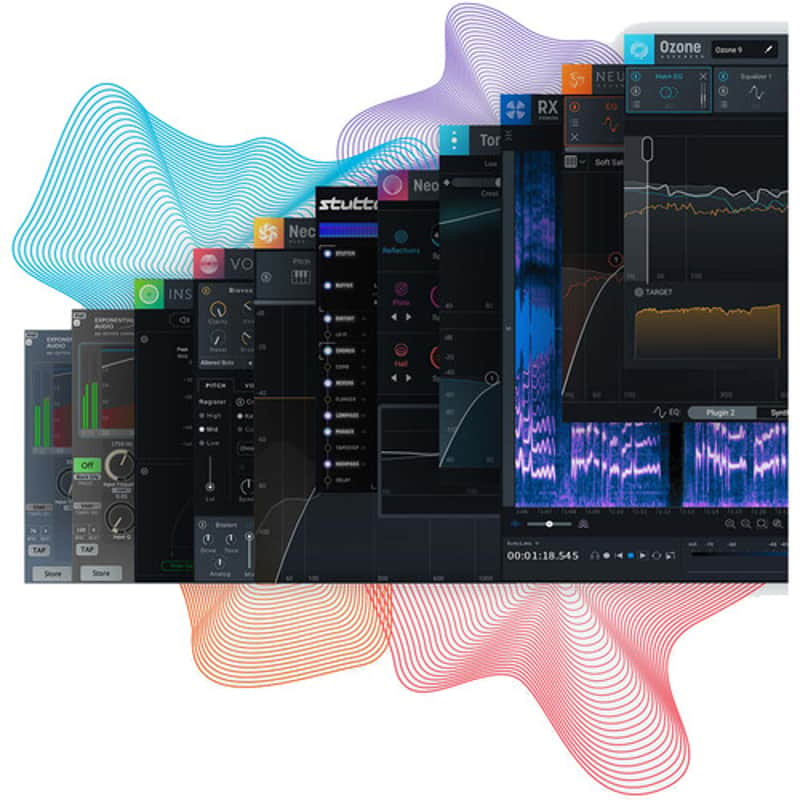
iZotope's Music Production Suite 4 offers professional software for everything related to editing, mixing, and mastering music. For editing, it provides RX8 Standard. For mixing, the bundle includes Nectar 3 Plus, Neutron 3 Advanced, Stutter Edit 2, VocalSynth 2, Nimbus, R4, and Neoverb. Finally, Music Production Suite 4 offers Ozone 9 Advanced for mastering alongside Tonal Balance Control 2 and Insight 2 for metering.
Note: Upgrade from Any Paid iZotope Product, iZotope RX 8 Standard Audio Restoration and Enhancement SoftwareAvailable for, iZotope RX 8 Standard is the latest update to iZotope's audio repair software, which is considered a staple for recording, mastering, and audio-for-video post-processing. The software can operate either as a standalone application or as a plug-in for both Mac- and Windows-based DAWs and NLEs. From fixing common audio problems like noises, distortions, and inconsistent recordings, to repairing severely damaged audio using Spectral Repair, RX can transform previously unusable audio into something usable.
The standard edition of RX 8 takes nearly all the modules provided in RX 7 Standard and implements a graphic overhaul more in line with iZotope's current aesthetic. You'll also find helpful new functions, such as horizontal scrolling with compatible mouses and touchpads, as well as the ability to edit 32 tabs at once. You'll also find new and powerful modules, including Guitar De-noise and Loudness Control.
Guitar De-noise implements powerful processing to get rid of annoying fingerboard and pick noise that can distract from performances. It also offers the ability to eliminate the undesirable hum and buzz associated with amplifiers and/or pickups. Loudness module helps you meet your specific loudness standards with greater ease.
Variable Time lets you change the time stretch of an audio selection without affecting its pitch. Variable Pitch does the opposite, allowing you to adjust the pitch of an audio selection without negatively impacting its duration. Previously, these processes were combined into one module.
The De-hum module has been improved, as has Music Rebalance, which has undegone a signficant upgrade in RX 8. You'll find a simpler interface that gives you better, more natural results, as well as a built-in stem isolator, which allows you to export isolated vocals, bass parts, percussion, and more within the program itself. Music Rebalance sounds better than before, nulling with the original source file to a far greater degree than the previous version.
Previous features are in place, including the Repair Assistant, multichannel support, high-quality resampling, dithering, and the Module Chain. In fact, the Module Chain now works hand in hand with an overhauled Batch Processor to make treating multiple files a painless, easy endeavor. As always, RX 8 can be used as a standalone audio editor (but connected to your host via RX Connect or as your DAW's audio editor, in the case of Logic Pro) though much of it can be used as a suite of plug-ins.
Note: Upgrade from Any Paid iZotope Product, New Modules and Features Guitar De-noise Guitar De-noise lets you refine your guitar recordings for maximum clarity. Manage sounds unintentionally emphasized by the effects of compression or limiting, like electrical amp noise and interference, distracting fret or string squeaks, and harsh pick attacks. With intuitive sliders for sensitivity and gain reduction, polishing guitar performances for intelligibility and authenticity is now relatively easy and transparent. Loudness Control Prepare your recordings for final delivery with the detailed level readings and loudness-management power of the Loudness Control module. Load preset loudness-standard targets to ensure your audio conforms to broadcast requirements, and monitor your levels using the built-in numeric and histogram readouts for integrated, short-term, and momentary loudness. Plus, resize the module to fit your display perfectly and suit your unique workflow. 32-Tab Lmit for Audio Tabs Time is precious when editing audio in post. To help you tackle more work faster, RX 8 doubles the previous 16-tab limit, now allowing you to view and edit up to 32 files within RX Audio Editor. Cover more ground in less time with greater efficiency and in-app real estate. Horizontal Scrolling Horizontal scrolling is now built into the intuitive Spectrogram Display. Use the scroll gesture on your trackpad or mouse with your cursor to scroll through your audio across the X-axis for lightning-fast edits. General Features Improved De-hum The De-hum module in RX 8 Elements uses an improved detection and reduction algorithm to automatically identify the base frequency of your unwanted hum and precisely remove it and its harmonics, ensuring a clean overall sound. For more complex hum and buzz removal, De-hum automatically recommends when to use De-noise instead, so you'll always have the best tool at hand for the job. Don't forget to use Adaptive mode to remove hum that changes in frequency over time. Improved Batch Processor Process several audio files in one pass with the newly overhauled Batch Processor. View pertinent metadata in your audio files prior to processing, then apply a full series of processors with the Module Chain, now accessible from within the Batch Processor interface. At the end of it all, export your files in multiple file formats and bit-depths for optimal efficiency and organization. This tool is ideal for refining hundreds of samples for custom-made sample libraries. Improved Music Rebalance Identify vocals, bass, percussion, and other instruments in a mix, and adjust the gain for each element. Isolate or remove elements or split stems for tweaking in your DAW. The results sound more transparent over the previous version, nulling to a far greater degree. Variable Time Adjust the time-stretch amount of an audio selection without altering its pitch. Variable Pitch Adjust the pitch of an audio selection while preserving the time and length. Music Rebalance Identify vocals, bass, percussion, and other instruments in a mix, and adjust the gain for each element. Isolate or remove vocals. This module is also available as an AudioSuite plug-in. Repair Assistant Repair Assistant is an intelligent tool that detects noise, clipping, clicks, and more, allowing you to solve audio-restoration issues quickly and effectively. After analyzing any snippet of audio you select, it will provide three different options for processing, and let you make the ultimate choice. Composite View Composite View allows you to edit and apply processing to 32 individual audio tracks as if they were one, easily addressing audio issues that appear across multiple microphones. De-bleed Working across multiple tracks, the De-bleed module reduces the leakage of one signal into another. De-bleed can help reduce or eliminate bleed from headphones, click tracks, multiple mics with small amounts of cross bleed, and even some drum bleed issues. De-ess The De-ess plug-in and module attenuates or reduces sibilance (the harsh high-frequency sounds that come from S, F, X, SH, and soft C sounds). Two modes for handling sibilance are provided. Classic Mode detects sibilants and attenuates them with a broadband gain envelope. Spectral Mode is more transparent, intelligent, and frequency-specific and only attenuates the high frequencies where sibilance is most active, leaving the lower frequencies untouched. Mouth De-click The Mouth De-click module has been finely tuned to detect and reduce mouth noises such as clicks and lip smacksmany listeners' worst nightmare. It's designed for use on longer audio selections, but it can also be used to remove individual clicks. Breath Control The Breath Control module intelligently detects breaths in dialogue or vocal recordings and suppresses them. Removing and reducing breaths in recordings can be a time-consuming process for dialogue editors and music producers. Breath Control can help reduce the time spent on repetitive editing without sacrificing audio quality. Voice De-noise The zero-latency Voice De-noise has been designed to focus on dialogue and sung vocal treatment. Voice De-noise has an Adaptive mode that can adjust to a changing noise floor in real time, making it ideal for dialogue denoising. Also added are optimization modes for dialogue and music. When optimized for music, Voice De-noise excels at attenuating unwanted background noise from like air conditioners and street noise from sung vocals in apartment recording situations. Key Features at a Glance- De-plosive eliminates every plosive from any dialogue track with transparency
- Leveler smooths any volume inconsistencies with an automatic clip gain envelope; leveler optimized for dialogue using intelligent De-breath and De-ess algorithms
- Instant Process tool is a one-click eraser for removing unwanted coughs, scene-interrupting sirens, etc.
- Module Chain can process multiple modules at once, save your customized chains as presets, and execute them all with a single click, enhancing workflow and reducing mouse clicks
- Sync and integrate the RX Audio Editor with any DAW or NLE timeline using RX Connect
- Corrective EQ for removing harsh high frequencies, whines, rumbles, resonances, and distortion artifacts, and for accurately honing in on any problem frequency areas
- Multiple problem-oriented presets across several modules
- Signal Generator creates accurate test tones, calibration tones for post-production delivery specs, bleep tones for eliminating obscenities in dialogue
- Markers and regions (search) provide greater flexibility for those longer edits, with the ability to perform text based searches of any markers, regions, and comments in the metadata of the audio
- Turn flawed audio into usable material by removing noises, distortions, and more
- Edit audio with visual editing techniques using precision drawing tools, such as a brush and magic wand
- Salvage unusable material by filling in audio gaps instantly with Spectral Repair
- Seamlessly integrates with audio or video editing software, both as a standalone application or plug-in
- EQ Match allows for quickly learning the EQ of a source audio clip and applying that EQ curve to a target audio clip, enabling sonic balance and smooth transitions between multiple audio sources with different EQ qualities
- Ambience Match for matching the environment noise of two different audio recordings
- Learn the ambient noise from a source audio clip and apply it to another audio clip, and create long sections of constant ambient noise to insert under inconsistent dialogue recordings
- Loudness module processes whole program mixes or segments to comply with international industry standards, ensuring mixes never fail network specifications
- High-quality resampling using the SRC sample-rate conversion algorithm
- Reduce bit resolution for final delivery of a project without sacrificing quality with the MBIT+ Dither algorithm
- Rebuild distorted audio caused by analog and digital overload and get through projects faster with the automatic Suggest feature
- Spectrum Analyzer delivers a detailed spectral display that detects peaks automatically
- Adaptive Hum Removal notches out fundamental hum frequencies that may change over time, like when recording a shot in multiple locations
- Nondestructive Clip Gain allows for easily adjusting and balancing the volume of vocals and instrumentals
- Export marker regions as files
- Metadata display (ID3 tags and broadcast WAV metadata like source Timecode, etc.)
- Time-reverse audio
- Updated timeline ruler that displays original recorded source Timecode
- Movable tabs
- Full-screen support for Mac
Polish your vocals to a professional sheen with iZotope Nectar 3 Plus, aable plug-in designed for vocal mixing and production. Everything you need to process the human voice is here, from high-quality equalizers and compressors to modulation and time-based effects. No longer will you need to break out a vocal into parallel tracks or aux returnsnow you can do it all in one intuitive yet powerful interface.
Nectar 3 Plus is a revamped version of Nectar 3, a plug-in venerated among top pros and aspiring amateurs alike for its ease of use and for its studio-quality sound. Chief among the improvements is an upgraded Virtual Assistant. Like many iZotope plug-ins, this software can analyze incoming audio and generate a custom-tweaked starting point for your mix. Nectar 3 Plus improves the Unmask Mode of the Virtual Assistant, giving you more control over how your vocal sits in the overall mix. Also, RX 8 Breath Control is now included, alongside Melodyne 4 Essentials for pitch correction.
Note: Upgrade from Any Paid iZotope Product, Revamped Unmask Mode In larger mixes, vocals often compete with other instruments like guitars, pianos, and cymbals. Nectar 3 Plus helps you manage this problem with an improved Vocal Assistant Unmask Mode. This mode uses Inter-Plug-in Communication to help you place your vocal at the forefront of the mix. Now you can control the EQ on any clashing track, allowing you to scale back the amount of EQ for more subtlety, or engage in Dynamic and Sidechain modes for an EQ that responds dynamically to the vocal. Bread and Butter Tools for Vocal Processing- Shape your tracks with a comprehensive drag-and-drop EQ, one which can follow the harmonics in a vocal to automatically tamp down resonances or emphasize pleasant parts of the voice. This EQ can also be used in a dynamic mode for creative or tone-correcting effects.
- Balance your vocal level without pumping or other compression artifacts thanks to an exceedingly natural auto-level, which rides the vocal in a ±3 dB range of your selected target.
- De-ess your vocals transparently with the De-esser module.
- Add character-enhancing or dynamics-taming compression with a dedicated compression module, which has several selectable modes to model vintage or modern hardware.
- Gate out extraneous noise with the gate.
- Use subtle automatic pitch correction, or dive in deeper with Melodyne 4 Essentials, included with Nectar 3 Plus.
- Control stray breaths with RX 8's Breath Control Module.
- The Dimension module provides chorus, flanging, and more.
- Reverb and Delay modules offer exciting and tweakable time-based effects.
- The Harmony module offers the ability to add up to 8 voices of harmony, which can be pitched up or down, at Unison for double tracking effects, or played through MIDI. The Harmony mode offers modulation over the pitch and speed of the additional harmonies, and you can pan them all on an easy-to-read GUI.
- Add harmonic excitement to the vocals with Saturation.
Neutron 3 Advanced represents the next step forward in iZotope's channel-strip plug-ins, giving you the ability to balance your entire session in three clicks with the new Mix Assistant. As with previous iterations, you get an equalizer, a compressor, a transient shaper, an exciter, and other goodies from Neutron 2. But iZotope has brought a new module into the mix as wella sweetening, tone-shaping module called Sculptor.
The modules offered in version 2 have been optimized to take as little CPU as possible. The GUI has seen an overhaul with a resizeable window as well as better control of the sliders than Version 2. The Masking Meter, which helps you identify and fix competing frequencies between two tracks, is now elegantly compacted into one, easy-to-understand window, with essential parameters like inverse link more readily available.
The most prominent additions to the Neutron platform are Mix Assistant and Sculptor. Through plug-in communication, the Mix Assistant can listen to all of the tracks in your mix and give you a static starting point. Use it at the beginning of the process: Simply place Neutron 3 or Relay on every track of your mix, run the Mix Assistant, choose the most prominent tracks when prompted (i.e., the vocal in a pop tune), and let Neutron handle all the busywork so you can get to the fun stuff.
Sculptor, on the other hand, is a sweetening, finalizing module that applies a comprehensive EQ, one that fluctuates in real-time, reacting to the track as it plays. It makes multiple dynamic choices per second. Use it to add both final polish and a creative emphasis to any track.
Neutron 3 Advanced is compatible with Mac and Windows computers and is available for. It works in AU, AAX, and VST formats.
Note: Upgrade from Any Paid iZotope Product, Mix Assistant Through inter-plug-in communication, Mix Assistant listens to your entire mix, communicating with every track in your session to give you a balanced starting point. This starting point is built around a focus of your choice. Neutron 3 listens to your session and makes decisions to give you a balanced mixa jumping off point from which you can make creative decisions. Sculptor Module Select a desired style from the menu, and the algorithm shapes the tone to achieve an ideal balance for that instrument. Change the speed at which the process is applied, or change the overall tonality, highs, or lows. You can even set filter points, stopping all processing below or above your desired frequency. This can be useful for sculpting just the midrange of track or for excluding the treble to obviate any undue harshness. Breakout Plug-Ins Neutron Advanced comes with 8 individual module plug-ins, so if you only need the EQ or Sculptor, you can instantiate it without loading the compressor, transient shaper, etc. Each of the modules can be loaded independently. Improved Masking Meter With a convenient one-window display, smoother metering with more obvious parameters, Masking Meter is now even better at helping you find and fix the competing elements of your mix. Optimized Performance Insert more instances of Neutron in your session, open sessions faster, and forget about bouncing sessions for overdubs. Not only is Neutron faster at processing your audio, but your sessions with multiple Neutrons will open faster with refresh rates doubled for visualizations. Other Features at a Glance- Visual Mixer and iZotope Relay: Launch Mix Assistant directly from the Visual Mixer and move your tracks in a virtual space, tapping into iZotope-enabled inter-plug-in communication.
- New EQ Functionality: EQ now has a Soft Saturation mode for a more analog feel and sound.
- Tonal Balance Control: Updated to support Neutron 3 to further help you shape a balanced mix.
- 7.1 Surround Sound Support: 7.1 Surround and zero-latency mode in all 8 modules for professional, lightweight processing for audio post or surround music mixes.
Quit wasting hours trying to blend your reverb correctly in the mix; instead, iZotope's Neoverb, and hear the right reverb in seconds, thanks to its AI-powered technology. The Reverb Assistant customizes the verb to your particular needs. No matter the sound source, Neoverb can listen to it, analyze it, and create the perfect reverberation setting in response.
Neoverb is a rare piece of software that is equally useful to beginners and professionals. For the beginner, tweaking a reverb to blend correctly is difficult and time-consuming, but Neoverb accomplishes this feat quickly. The Reverb Assistant also shows you how it generated settings through its intuitive interface, teaching you about reverb in the process. The professional engineer, on the other hand, is often working against deadlines. Neoverb cuts down on the time it takes to select and tweak the right plug-ins, helping you achieve the sound you want with greater speed.
Note: Upgrade from Any Paid iZotope Product, Built-In Reverb Assistant Press the prominent Reverb Assistant button, and you'll automatically have a leg up on the sound: this button opens a window that allows you to simply suggest some governing parameters. You can guide the assistant to give you something realistic, or something dramatic; something dark or something bright; something small, like a room, or large, like a cathedral. Play audio, and the assistant listens to it, EQs it to minimize clash and conflict, and gives you back a sterling reverb in accordance with the settings you chose up top. Advanced Features for Those Who Need It Under the hood, Neoverb utilizes three discrete reverb engines to give you a result with exceptional depth. Not only can you blend these three reverb tanks however you wishyou can also access advanced controls for each reverb engine, tweaking Attack, Crossover, Damping, and other parameters to your fancy. Sync Pre-Delay to your track's tempo, or have it stand out for greater emphatic control in the mix. Blend Pad for Reverb Engines The Blend pad allows you to fine-tune the blend of Neov| Condition | Brand New (New) Brand New items are sold by an authorized dealer or original builder and include all original packaging.Learn more |
|---|---|
| Brand | |
| Model |
|
| Categories | |
| Year |
|
Product safety information may be available here.