


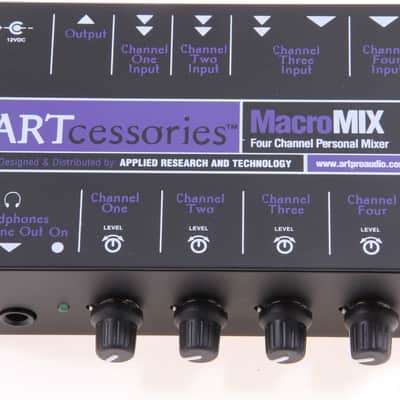
ART MacroMIX Four-Channel Personal Mixer
This seller has not set a shipping cost for Norway. Please contact them to ask about shipping.


30-Day Return Policy
Enjoy peace of mind with your new gear
Our users rate Reverb
How to use the MacroMix:
1. Connect the AC adapter cable to the 12V DC Input on the MacroMIX, and plug the other end into a 120V AC power outlet.
2. Connect your various signal sources to the appropriate Inputs on the MacroMIX with unbalanced shielded cables. Electric instruments or amplifier line outputs would go to the 1/4” input on channel 3 and/or 4. Stereo sources (tape deck, CD player, etc.) would be connected to the RCA Inputs on channels 1 and 2.
3. Connect headphones to the Line/Headphone output. Alternatively, this jack can be connected to the stereo inputs of a powered monitor speaker or a
headphone amplifier if added headphone loudness is required.
4. Connect the MacroMIX’s stereo RCA Outputs to the LandR inputs on your tape deck, PC, or a PA mixer with stereo inputs.
5. Adjust the Level controls for the desired mix.
Features:
- Four input channels: Ch. 1 and 2 have dual L/R RCA inputs, with Ch. 3 you have a choice of one 1/4” or dual L/R RCA inputs, and Ch 4 has a 1/4” unbalanced input.
- Four Level controls, one for each channel
- Dual L/R RCA Output connectors
- 1/4” Line Out/Stereo Headphone output jack
- Active preamplification and mixing circuitry
Specs:
- Input Impedance: 10K ohms unbalanced (all inputs)
- Ch. 1/2/3 and 4 Input Gains: 32dB/26dB/26dB and 26dB
- S/N Ratio: >90dB
- THD: <0.008%
- IMD (SMPTE): <0.008%
- Power: 12V DC (Adapter included)
- Dimensions: 5.625 x 3.75 x 1.75 inches (143mm x 92mm x 45mm)
- Weight: 2 lbs (0.91kg)
| Condition | Brand New (New) Brand New items are sold by an authorized dealer or original builder and include all original packaging.Learn more |
|---|---|
| Brand | |
| Model |
|
| Categories | |
| Electronics |
|
Product safety information may be available here.

