Apogee Symphony Desktop USB-C Audio Interface — Original Box, USB-C Cable & Apogee Thumb Drive
This seller has not set a shipping cost for Romania. Please contact them to ask about shipping.


Our users rate Reverb
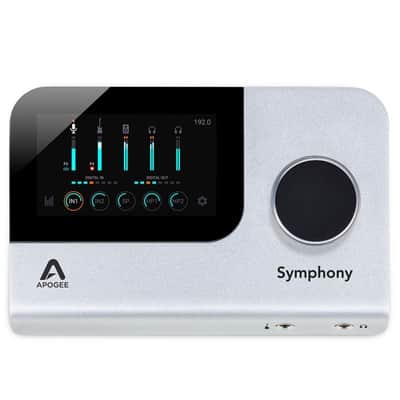
Apogee Symphony Desktop — the 10x14 USB-C interface that put Apogee's flagship conversion on a desk instead of in a rack.
Two mic/line/instrument inputs with Apogee's Advanced Stepped Gain preamps, stereo monitor outs, two independent headphone outputs, optical I/O, a USB host port, and the colour touchscreen that lets you run the whole thing without opening any software. Up to 192 kHz.
What's included:
• Symphony Desktop unit
• Original Apogee box with the factory foam
• USB-C cable
• Apogee USB thumb drive (this is what the touchscreen uses for firmware updates — easy to lose, good to have)
• Power supply, see the note below
Getting it running — it's four steps:
1. Go to apogeedigital.com/download-files and request the download.
2. Drag the firmware file onto the included Apogee thumb drive, plug the drive into the USB HOST port on the back, then on the touchscreen go to the third page of Settings and tap Update.
3. Run the Control 2 installer on your computer. It offers 14-day trials of Apogee's extra FX plugins — you can uncheck those and just install Control 2.
4. Before restarting, go to System Settings > Privacy & Security and click Allow for the Apogee extension. Restart and you're done.
On an Apple Silicon Mac you'll adjust the startup security settings first; Apogee's knowledge base has a short article on it. You do not need to register the unit to use it.
About the plugins: the Apogee Alloy mic preamp emulation runs on the Symphony's own DSP and comes with the hardware, so that one is yours. The ECS Channel Strip and Clearmountain's Spaces were redeemed with a one-time access card from the original box — that card is long gone, and Apogee's policy is that used units don't qualify for new codes. You can run the 14-day trials or buy them separately. I'd rather you know that now than wonder later.
About the power supply: this ships with a third-party replacement rather than the original Apogee one. I’ve been running it on this supply with no issues — you can see the unit powered up and metering in the photos. If you’d prefer the factory supply you can get one from Apogee, but you won’t need it to use this.
Condition is excellent. It's lived on a desk in a home studio, never travelled, never been rack-mounted. Screen is clean, chassis has no scratches, every input and output works exactly as it should.
To be straight about why it's going: there is nothing wrong with this interface. The conversion is genuinely superb — it's the cleanest-sounding box I've owned, and I'd recommend it to anyone. I just ended up building my workflow around a different system, and this has been sitting more than it's been used. It should be in front of somebody tracking on it every week.
Smoke-free studio. Ships double-boxed with the original carton protected inside an outer box.
| Listed | 2 hours ago |
|---|---|
| Condition | Excellent (Used) Excellent items are almost entirely free from blemishes and other visual defects and have been played or used with the utmost care.Learn more |
| Brand | |
| Model |
|
| Finish |
|
| Categories | |
| Year |
|
| Computer Connectivity |
|
| Sample Rate |
|
| Bus-Powered |
|
| Electronics |
|
| Digital Output Format |
|
| Compatibility |
|
| Format |
|
| Digital Input Format |
|
| Bit Depth |
|
| Simultaneous I/O |
|
| Number of Headphone Outputs |
|
| Number of MIDI Outputs |
|
| Number of MIDI Inputs |
|
| Number of Digital Outputs |
|
| Number of Digital Inputs |
|
| Number of Analog Outputs |
|
| Number of Analog Inputs |
|
| Number of Channels |
|
| Number of Mic Preamps |
|
Product safety information may be available here.