
Waves InPhase LT Phase Correction
Nuovo prezzo€167.93
Download istantaneo
Lo strumento è stato venduto
Vedi strumenti simili di altri venditori Reverb
Pubblicato:più di un mese fa
Visualizzazioni:1.145
Salvataggi:7
Offerte:1

Chicago, IL, Stati Uniti
I nostri utenti valutano Reverb
Cure any and all phasing issues with this excellent tool from Waves.
What it is:
The ultimate in phase correction.
How we use it:
From the simplest to most complex phase manipulation, InPhase LT is the go-to for any alignment issues.
Why it's cool:
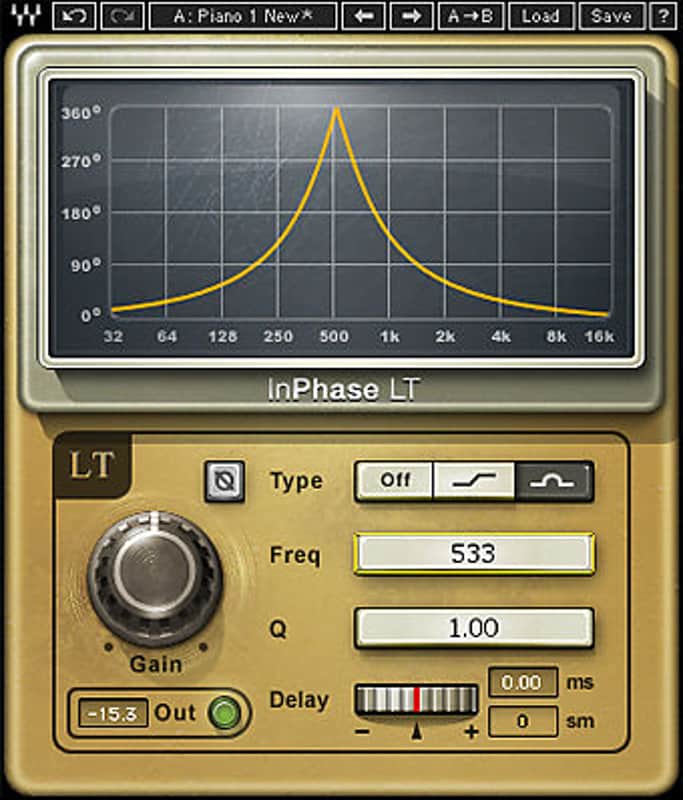
The visual meter makes InPhase LT just as much of a beginner's learning tool as a professional correctional tool. With its simplified controls, intuitive interface, and powerful phase-shift filters, InPhase LT is a one-stop creative tool that will help you enhance, manipulate and accentuate your tracks.
Compatibility
Running InPhase LT on a Mac OS:
CPU
Memory
Operating System
Screen Resolution
Supported Hosts - Mac:
Running InPhase LT on a Windows OS:
CPU
Memory
Operating System
Screen Resolution
Supported Hosts - Windows:
Installation Instructions
What it is:
The ultimate in phase correction.
How we use it:
From the simplest to most complex phase manipulation, InPhase LT is the go-to for any alignment issues.
Why it's cool:
The visual meter makes InPhase LT just as much of a beginner's learning tool as a professional correctional tool. With its simplified controls, intuitive interface, and powerful phase-shift filters, InPhase LT is a one-stop creative tool that will help you enhance, manipulate and accentuate your tracks.
- Pure delay control to compensate for timing differences
- Phase shift curve window shows users the phase shift curve across the frequency line
- Mono and stereo components, and dedicated live components
Compatibility
Running InPhase LT on a Mac OS:
CPU
- Intel Core i3 / i5 / i7 / Xeon
Memory
- 4 GB RAM
- 4 GB free disk space
Operating System
- 10.9.5 - 10.12.1
- 10.8.5 for ProTools 10 only
Screen Resolution
- Minimum: 1024x768
- Recommended: 1280x1024 / 1600x1024
- USB displays are not supported as the primary display.
Supported Hosts - Mac:
- Pro Tools 11.3.2 - 12.6 (AAX Native 64-bit, Audiosuite)
- Pro Tools 10.3.10 (RTAS, Audiosuite)
Sidechain not supported - Logic Pro X 10.2 - 10.2.4 (Audio Units)
Sidechain not supported - Digital Performer 9.0 - 9.1.2 (Audio Units)
- Ableton Live 9.2.2 - 9.7 (VST)
- Nuendo 7.0.20 - 7.1 (VST3)
- Cubase 8.0.30 - 8.5 (VST3)
- WaveLab 9.0.10 - 9.0.15 (VST3)
- Main Stage 3.2 - 3.2.3 (Audio Units)
- Garage Band 10.1.0 - 10.1.3 (Audio Units)
- Audition CC2015, CC2017 (VST3)
- Adobe Premiere CC2015, CC2017 (VST3)
- Final Cut Pro X 10.2.2 - 10.2.3 (Audio Units)
- Studio One 3.1 - 3.3.1 (VST3)
- Media Composer 8.6.3 - 8.6.4 (AAX Native)
- Sound Forge Pro 2.5 (Audio Units)
- REAPER 5.18 - 5.22 (VST3)
Running InPhase LT on a Windows OS:
CPU
- Intel Core i3 / i5 / i7 / Xeon / AMD Quad-Core
Memory
- 4 GB RAM
- 4 GB free disk space
Operating System
- Windows 7 with SP1 64 bit
- Windows 8.1 64 bit
- Windows 10 64 bit
Screen Resolution
- Minimum: 1024x768
- Recommended: 1280x1024 / 1600x1024
Supported Hosts - Windows:
- Pro Tools 11.3.2 - 12.6 (AAX Native 64-bit, Audiosuite)
- Pro Tools 10.3.8 - 10.3.10 (RTAS, Audiosuite)
Sidechain not supported - Ableton Live 9.1.6 - 9.7 (VST)
- Nuendo 6.5.35 - 7.1 (VST3)
- Cubase 7.5.30 - 8.5 (VST3)
- WaveLab 8.5, 9.0.10 - 9.0.15 (VST3)
- Sonar X3e (VST3), Platinum (VST3)
- Sound Forge 10.0e, 11 (VST)
- Vegas Pro 12 - 14 (VST)
- Acid 7.0e (VST)
- Audition CC2014, CC2015, CC2017 (VST3)
- Adobe Premiere CC2014, CC2015, CC2017 (VST3)
- Samplitude Pro X (VST), Pro X2 (VST), Pro X3 (VST)
- Sequoia 12 - 13 (VST)
- Pyramix 9.0.7 - 9.1.6 (VST)
- Studio One 3.1 - 3.3.1 (VST3)
- Media Composer 7.0.4 (RTAS), 8.6.3 - 8.6.4 (AAX Native)
- FL Studio 12.1.3 - 12.4 (VST3)
- REAPER 5.18 - 5.22 (VST3)
Installation Instructions
- Create an account: https://www.waves.com/create-account (if you have an account, skip this step)
- Register the serial number we emailed: https://www.waves.com/account/register
- Download and install Waves Central for Mac | Windows.
- If you already have Waves Central installed, skip to step 4. - Launch Waves Central.
- Windows: via the desktop shortcut or Start Menu > All Programs > Waves.
- Mac: Applications > Waves Central. - Log into Waves Central using your Waves account information.
- Click on Easy Install & Activate.
- Select the products you wish to install & activate on this computer.
- Click on the Install & Activate button.