Qlab 4.7 (Audio, Video, & Lighting License) Performance Playback Software 2020s
This seller has not set a shipping cost for Sweden. Please contact them to ask about shipping.

Our users rate Reverb
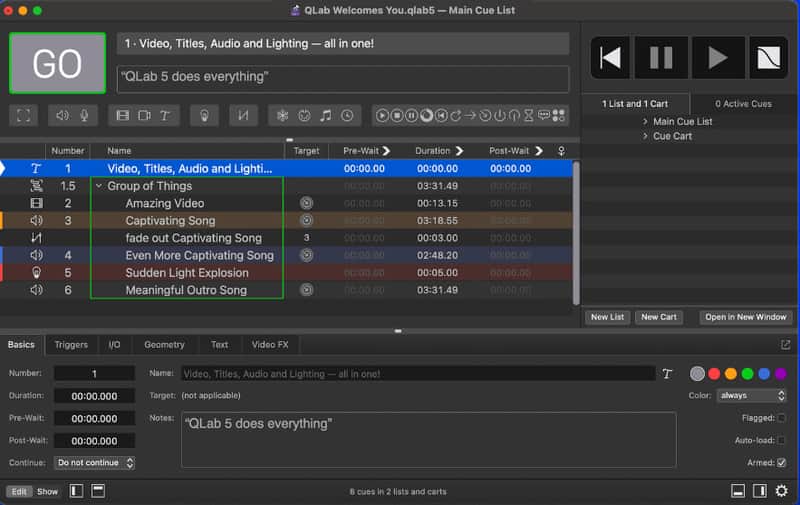
QLab is a cue-based, multimedia playback software package for macOS, intended for use in theatre and live entertainment. It can be used for designing and playing back sound, video, light, and show control cues. Qlab is developed by Figure 53, a USA based company.
The item here on sale is a perpetual license for audio, video, and lighting. It can be installed on 2 machines. Upon purchase I will unpair my registered machines and send over the license information for you to install.
Qlab 4.7 was the last version before the new Qlab 5 came out in 2022, and is still very relevant.
Audio playback
QLab allows an end-user or designer to align audio files in a sequential order. Once the audio files are inserted into the cue list, the end-user can then manipulate it by looping it, changing the amplitude or volume, and adding fades in or out. Audio cues can also be placed into groups, so that multiple files can be triggered at one moment.
Video playback
QLab is capable of playing back multiple video formats, fully integrated with audio playback and other cues. In addition to video files, QLab can route and display video signals from cameras, through multiple supported protocols. A text editor is also available for surtitles and other applications, and video effects can be applied to any content. The video system in QLab supports advanced use cases such as projection mapping.
Video output is available through a variety of protocols. QLab 5 utilizes multiple layers of abstraction in its video output system, allowing output devices such as screens and projectors to be split, combined, and manipulated. QLab can output video through the Mac's native video outputs, Blackmagic Design video adapters, and network devices over Syphon and NDI.
Lighting control - Show control integration
QLab supports MIDI bi-directionally. QLab allows MIDI signals to be sent as a cue to trigger other devices, such as digital audio consoles. The software also accepts MIDI signals as triggers for its own cues. MIDI signals can be sent to QLab from any other MIDI capable device, using a MIDI interface.
Live playback
A key software feature with QLab is its ease of use in live playback situations. The designer of a cue sheet can save their show file, and lock it, preventing any changes to the cues. After doing so, an untrained user can run the software in a playback situation. By default, a cue is triggered by clicking a large GO button on the screen, or by pressing the space bar.
| Listed | 2 years ago |
|---|---|
| Condition | Mint (Used) Mint items are in essentially new original condition but have been opened or played.Learn more |
| Brand |
|
| Model |
|
| Categories | |
| Year |
|
Product safety information may be available here.