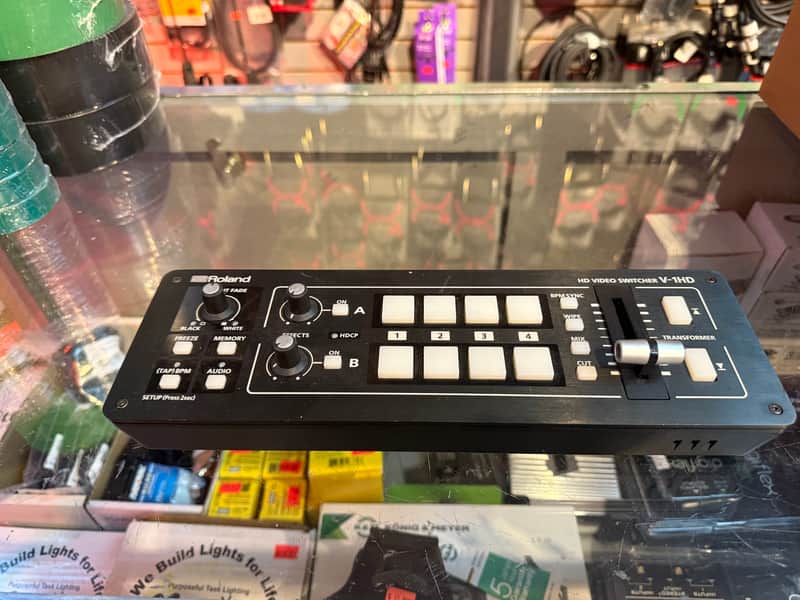
ROLAND V-1HD (Pre owned-very clean-30 days warranty)
This seller has not set a shipping cost for Finland. Please contact them to ask about shipping.


Our users rate Reverb
THE V-1HD MAKES IT EASY TO CONNECT AND SWITCH VIDEO CAMERAS, SMART PHONES, COMPUTERS, TABLETS, BLU-RAY PLAYERS AND OTHER HDMI VIDEO SOURCES WITH A SIMPLE PUSH OF A BUTTON OR SLIDE OF THE T-FADER.
- Support for video cameras, action cameras, smart phones, tablet computers and other HDMI devices.
Picture-in-picture and split functions.
Two EFFECTS knobs deliver genuine visual performance.
Remote Control via USB or MIDI Connection.
Software Control using V-1HD RCS Application for Mac, PC and iPad. - 4 HDMI inputs
- Supports up to Full HD 1080p
- Easy to Use Interface
- Full 12 Channel Audio Mixer Included
- Easy to Operate with Hardware Controls
- Two HDMI Outputs
System Program Version 2.0
System Program Version 2.0 is a free update for the popular V-1HD HDMI video switcher including the companion Remote Control Software version 2.0 for Windows & MacOS. Version 2.0 expands Picture in Picture effects with a new 1/3 sizing option. Turn on Auto Scan for hands free switching. Numerous user interface improvements include viewing audio level meters on the multi-viewer, panel lock and quickly reset system values by holding the WIPE button.
INPUT4 HDMI INPUTS
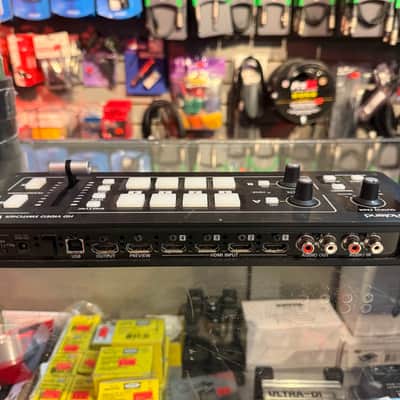
- The V-1HD has 4 HDMI input connectors compatible with a variety of equipment.
The V-1HD supports 1080p/1080i/720p video resolutions. - Devices outputting the same resolution can be input regardless of what type of device they are.
- HDTV Camera
- Action Camera
- PC/Mac
- Smart Phone/Tablet
- Blu-ray Disc Player
- Both progressive and interlace signals can be input allowing for both 1080i and 1080p signals to be used at the same time.
- Video signals input from a PC are accurately displayed thanks to progressive signal processing.
- HDCP is supported for input of copy protected content from devices such as Blu-ray disc players.
OPERATIONEASY-TO-USE INTERFACE
- Large back-lit buttons for intuitive video switching even in low light conditions.
Red lit buttons indicate the current source being output.
Green lit button is for the video that will be output on the next transition.
If a button is not lit, then there is no video being input to that channel. - Broadcast style Preview/Program switching for professional results.
- The TRANSFORMER buttons can be used for switching the video instantly or applying effects.
There are 11 options for the operation of the buttons. - There are three buttons for applying transition effects, CUT, MIX (4 types) and WIPE (30 types).
- Auto scan function switches the video automatically across the four video inputs.
- By using the T-Fader and BPM SYNC button, you can deliver visuals synced to a music performance.
- You can save or recall up to 8 presets using the MEMORY button.
- Use the FREEZE button to temporarily pause the incoming video.
- Output fade function makes the output video fade to black or white.
- Large back-lit buttons for intuitive video switching even in low light conditions.
- Wipe TypesButtons and Knob Used for Displaying Menus or Adjusting Video Output.
EFFECTSVARIOUS EFFECTS
- Two-screen composition is possible
- Picture-in-PictureThe position of the inset screen and the width and colors of the border can be changed.
- SplitThe screen can be split horizontally or vertically.
- Chroma Key/Luminance KeyKeying colors of blue, green, black and white are supported.
- Use knob A and knob B to apply effects to A bus and B bus respectively.
Many of the visual performance functions made popular by the V-4EX and V-8 are included.
(9 types of filter effects including silhouette, colorpass, negative and findedge are possible)Control various effects directly
AUDIO MIXINGFULL AUDIO MIXER INCLUDED
- Included is a 12ch digital audio mixer.
- In addition to 4 stereo audio inputs from the HDMI ports, the V-1HD also supports a stereo line level input and a mic level input.
- Every channel is equipped with a delay function to synchronize the video and the audio.
*The maximum delay time is 500ms. - Audio follow function enables the audio to transit along with the video.
- Reverb function and mastering function used for adjusting sound quality and volume are also supported.
- With audio output jacks you can send the audio mix to a PA system or record it on an external device.
- The Mic input jack on the left side panel supports plug-in power.Mastering effect applied to final mix.
PREVIEWEASY TO OPERATE WITH HARDWARE CONTROLS
- Basic operations can be done by operating the buttons and the T-Fader on the unit.
- To make detailed settings you just need to connect a monitor to the preview connector.
- Display the list of items to operate on screen.
OUTPUTTWO HDMI OUTPUTS
- Four-way multi-view preview screen shows every input source (non-drop frame).
A red border shows the video currently being output and a green one indicates the video to be output next. - There are three types of view modes available for the preview output which are Multi-view, Output (as a program output) and Preview.
On-screen display can be turned on or off. - Example 1: Multiview and program layoutOperate with 4 split screens with on screen display and record.
* Recording requires a separate recorder. - Example 2: Recording and delivery with 2 program outsProgram out for both systems.
Output to two devices simultaneously.* Recording is required for recording, and encoder for distribution is required separately - Example 3: Output A and B buses independentlyPreview output selects Preview.
* Switching effect can not be used.
- Example 1: Multiview and program layoutOperate with 4 split screens with on screen display and record.
EXTERNAL CONTROLREMOTE CONTROL VIA USB OR MIDI CONNECTION
- V-1HD RCS
V-1HD RCS is an application for remote control of V-1HD from a PC.
By connecting the V-1HD to a computer via USB, you can perform remote control from the computer, backup / restore settings, and update system software.
* "V-1HD RCS" can be downloaded for free.* "V-1HD RCS" supports Windows / MacOS. - V-1HD Remote
V-1HD Remote is an application to control V-1HD connected with USB by USB.
Graphically displays the status of the operation. It is also possible to perform operations that are divided into "image switching with the main unit, audio mixing with the application.* V-1HD Remote can be downloaded for free from the App Store.* Please use Apple's Lightning-USB Camera Adapter for connecting iPad.
. - Supports coordination with instruments and sequencers via MIDI input and output.
- V-1HD RCS
BLOCK DIAGRAM/DIMENSIONS
Product SpecificationsV-1HD Switcher Video Processing4:2:2 (Y/Pb/Pr), 8-bitInput ConnectorsHDMI INPUT: 1-4: Type A (19pins) x 4 *HDCP SupportedOutput Connectors
HDMI OUTPUT: Type A(19 pins)
HDMI PREVIEW: Type A (19 pins) *HDCP Supported
Input Formats
HDMI
720/59.94p,720/50p(FORMAT switch = 720p)
HDMI
1080/59.94i,1080/50i,1080/59.94p,
1080/50p(FORMAT switch = 1080i or 1080p)
*The input interlaced video signal is converted to progressive video signal by internal processing.
*The video signal frame rate is selected by SETUP parameters (59.94 or 50).
Output Formats
HDMI
720/59.94p,720/50p(FORMAT switch = 720p)
HDMI
1080/59.94i,1080/50i(FORMAT switch = 1080i)
HDMI
1080/59.94p,1080/50p(FORMAT switch = 1080p)
*The video signal frame rate is selected by SETUP parameters (59.94 or 50).
Video Effects
Transition
CUT, MIX (DISSOLVE/FAM/NAM/MOSAIC), WIPE (30 types), TRANSFORMER(11 types)
Effects
NEGATIVE, EMBOSS, COLORIZE, COLORPASS, POSTERIZE, SILHOUETTE, MONOCOLOR, FINDEDGE, FLIP, WH-LUMIKEY@, BK-LUMIKEY@, GR-CHROMAKEY@, BL-CHROMAKEY@, PinP(1/4)@, PinP(1/2)@, SPLIT(H-STRETCH)@. SPLIT(H-CENTER)@, SPLIT(V-STRETCH)@, SPLIT(V-CENTER)@
*@ marked Effects are effected common to A-BUS and B-BUS.
Audio Audio ProcessingSampling rate 24bit/48kHzInput Connectors
Digital: HDMI INPUT 1–4 (19 pins) x 4
Analog: AUDIO IN (RCA pin type), MIC (Stereo mini type, plug-in power supported)
Output Connectors
Digital: HDMI OUTPUT (HDMI Type A 19 pins), HDMI PREVIEW (HDMI Type A 19 pins)
Analog: AUDIO OUT (RCA pin type), PHONES (Stereo mini type)
Input LevelAUDIO IN: -10 dBu (Maximum : +8 dBu), MIC: -41 – -13dBu (Maximum : -1 dBu)Input ImpedanceAUDIO IN: 15 k ohms, MIC:10 k ohmsOutput Level
AUDIO OUT: -10 dBu (Maximum : +8 dBu)
PHONES: 72mW + 72mW (32 ohms)
Output Impedance
AUDIO OUT: 1k ohms
PHONES: 10 ohms
Audio EffectsEQ, Delay, Compressor, HPF, Gate, Reverb, Mastering effectOther ConnectorsUSB: B Type (for remote control from PC), MIDI: IN, OUT/THRUMisc Other Functions
MEMORY (8 types), FREEZE (input video captured),
BPM SYNC (auto transition synchronized to tempo), OUTPUT FADE (WHITE/BLACK)
Power SupplyAC adaptorCurrent Draw1.5A Power Consumption18WDimensions (WxDxH)313mm x 102mm x 59mm (12.25" x 4" x 2.25")Weight
(excluding AC adaptor)1.2 kg 2 lbs 10-2/5 ozAccessoriesAC Adaptor, Power Cord, Cord Hook
| Listed | 4 days ago |
|---|---|
| Condition | Excellent (Used) Excellent items are almost entirely free from blemishes and other visual defects and have been played or used with the utmost care.Learn more |
| Brand | |
| Model |
|
| Finish |
|
| Year |
|
| Made In |
|
Product safety information may be available here.

