Arturia DX7 V Digital Synthesizer Virtual Instrument Software
Pricekr.1,244.56
Incl. VAT
Instant Download

Free Shipping
from Chicago, IL, United States
Listed:over a month ago
Views:1,012
Saves:5
Offers:0

Chicago, IL, United States
Our users rate Reverb
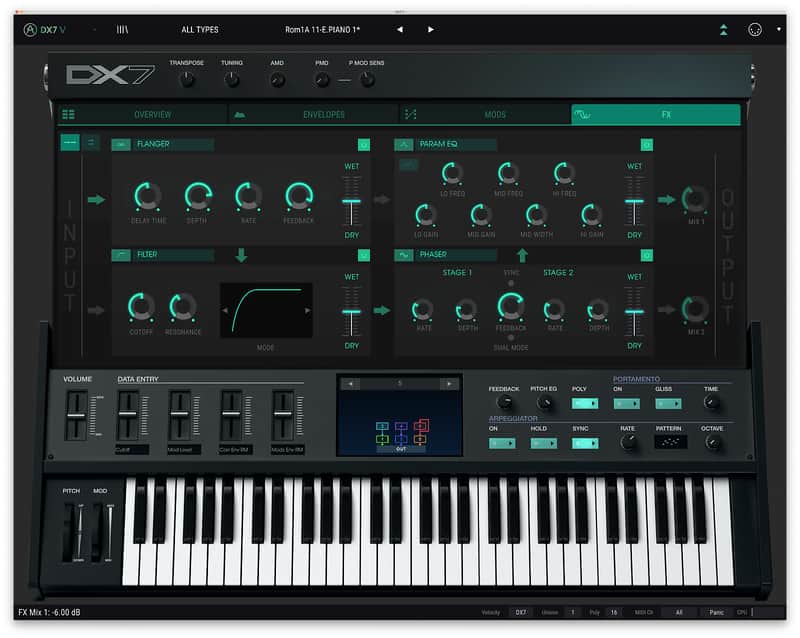
The DX7 brought digital synthesis to everyday musicians, transformed the sound of the charts, and won the title of best-selling synth of all time. DX7 V is a software reimagining of the icon, bringing that iconic glassy, punchy, crystal-clear sound to your DAW.
Compatibility
Windows
Installation Instructions
- 32 original DX7 algorithm
- All DX7 original parameters
- Original DX7 SysEx import
- 25 available waveforms per operators
- 6 Operators with multi-mode filter and feedback per operators
- DX7, DADSR and Multi-Segments envelopes (syncable and loopable) per operators
- 2 Modulation envelopes
- 4 assignable macros
- Advanced modulation matrix
- A step sequencer, 2 LFOs with 6 waveforms and an arpeggiator
- 4 FXs slots that can be routed in parallel or in serie
- An oscilloscope
- Vintage and Modern DAC Mode for a proper emulation of the DX7 converter
- 32 voices of polyphony
- 4 voices of unison with unison detune
- 432 factory presets
Compatibility
Windows
- Win 10+ (64bit)
- 4 GB RAM
- 4 cores CPU, 3.4 GHz (4.0 GHz Turbo-boost)
- 3GB free hard disk space
- OpenGL 2.0 compatible GPU
- ARM processors not supported on Windows
- Works in Standalone, VST, AAX, Audio Unit, NKS (64-bit DAWs only).
- Mac OS 11+
- 4 GB RAM
- 4 cores CPU, 3.4 GHz (4.0 GHz Turbo-boost) or M1 CPU
- 3GB free hard disk space
- OpenGL 2.0 compatible GPU
- An elegant and simple solution to help you install, activate, and update your Arturia software instruments.
Installation Instructions
To download your purchase, follow this link to download the Arturia Software Center (ASC)
Once downloaded, launch the ASC and log in (new users can select “Create Account”)
After logging in, find your product in the list and select “Activate”
Once the product has been activated, select “Install”
| Brand | |
|---|---|
| Model |
|
| Categories |
Product safety information may be available here.

