Antares Auto-Tune Live - Pitch-correction Plug-in
New Price$199
Instant Download
This gear has sold
See similar gear from other Reverb sellers
Listed:over a month ago
Views:1,691
Saves:18
Offers:12

Chicago, IL, United States
Antares' acclaimed pitch correction meets the needs of today's most demanding producers and performers.
What it is:
Real-time pitch correction from Antares.
How we use it:
Generate pitch correction as well as the auto-tune effect on the fly.
Why it's cool:
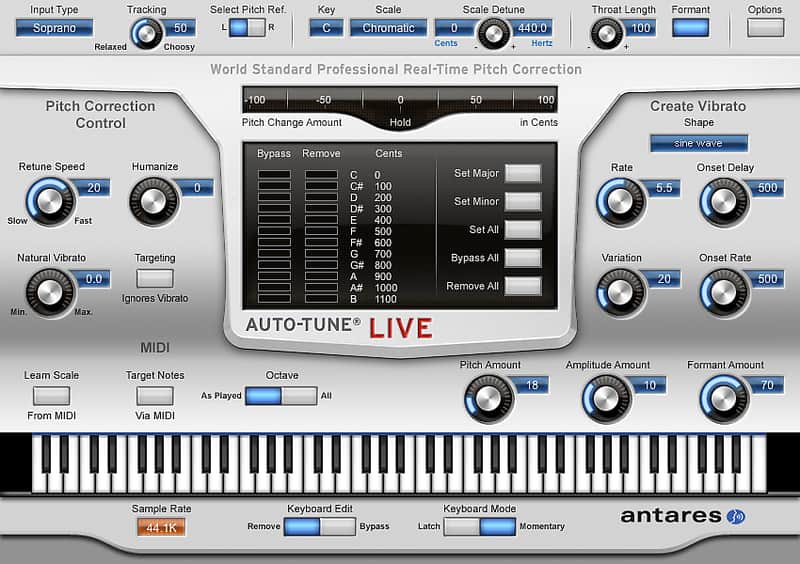
Real-time MIDI control makes the voice and effect playable. Whether you're performing on stage or tracking vocals in the studio, Auto-Tune Live features genuine Antares Auto-Tune technology optimized for real-time pitch correction or creatively modifying the intonation of a performance.
Thanks to its ultra low latency, Auto-Tune Live allows virtually instant response in performance or when tracking in the studio. And with its MIDI control capabilities, you can control all of Auto-Tune Live's key performance parameters with your MIDI controller for creative real-time pitch processing.
Auto-Tune Live key features include:
Compatibility
Auto-Tune Live requires an iLok (not included).
Mac
AAX Native (64 and 32-bit)
AAX Native (64 and 32-bit)
Installation Instructions
What it is:
Real-time pitch correction from Antares.
How we use it:
Generate pitch correction as well as the auto-tune effect on the fly.
Why it's cool:
Real-time MIDI control makes the voice and effect playable. Whether you're performing on stage or tracking vocals in the studio, Auto-Tune Live features genuine Antares Auto-Tune technology optimized for real-time pitch correction or creatively modifying the intonation of a performance.
Thanks to its ultra low latency, Auto-Tune Live allows virtually instant response in performance or when tracking in the studio. And with its MIDI control capabilities, you can control all of Auto-Tune Live's key performance parameters with your MIDI controller for creative real-time pitch processing.
Auto-Tune Live key features include:
- Ultra low latency performance for virtually instant response on stage or when tracking in the studio
- Real-time MIDI control of Auto-Tune Live's key performance parameters
- MIDI control of target notes lets you define target pitches in real time during performance
- A Humanize function for pitch correction that is even more natural and realistic
- Natural Vibrato control that lets you modify (in real time) the depth of any vibrato that is present in the original performance
- Formant correction and Antares' unique Throat Modeling technology for unmatched creative control of vocal timbre
Compatibility
Auto-Tune Live requires an iLok (not included).
Mac
AAX Native (64 and 32-bit)
- Pro Tools 10.3.8 or later (except Pro Tools SE and M-Powered Essential, which do not accept 3rd party plugins)
- Mac OS 10.8.5 to 10.12 as required by your version of Pro Tools
- Pro Tools 8.x to 10.x.
- Mac OS 10.5.8 to 10.9.5 as required by your version of Pro Tools.
- A compatible VST host program that supports the VST3 format.
- Mac OS 10.8.5 to 10.12 as required by your host.
- A compatible host program that supports the Audio Units format.
- Mac OS 10.8.5 to 10.12 as required by your host.
AAX Native (64 and 32-bit)
- Pro Tools 10.3.8 or later (except Pro Tools SE and M-Powered Essential, which do not accept 3rd party plugins)
- Windows 7 to Windows 10 as required by your version of Pro Tools
- Pro Tools 8.x - 10.x
- Windows XP, Vista, 7, 8, or 8.1 as required by your version of Pro Tools
- A compatible host program that supports the VST3 format.
- Windows 7 to 10 as required by your host. (Not compatible with Windows XP.)
Installation Instructions
- Authorize your license (emailed you via Reverb) here.
- Open the iLok License Manager application and log in to your iLok account.
- Click the "Available" tab at the top of the iLok License Manager.
- Find the license you are trying to activate, and drag it onto your iLok
- You'll be asked if you would like to activate the license. Click "Yes" to complete the activation.
- Download the proper installer from Antares here.