Softube Abbey Road Studios Brilliance Pack Software Suite
This gear has sold
See similar gear from other Reverb sellers

Our users rate Reverb
What it is:
Three treble EQs hailing from Abbey Road Studios.
How we use it:
Add sweet, airy, top-end to any track.
Why it's cool:
For the first time ever, these plugins bring indispensable secret weapons from Abbey Road to the outside world. Softube purchases are strictly licensed for sale to customers in the USA only!
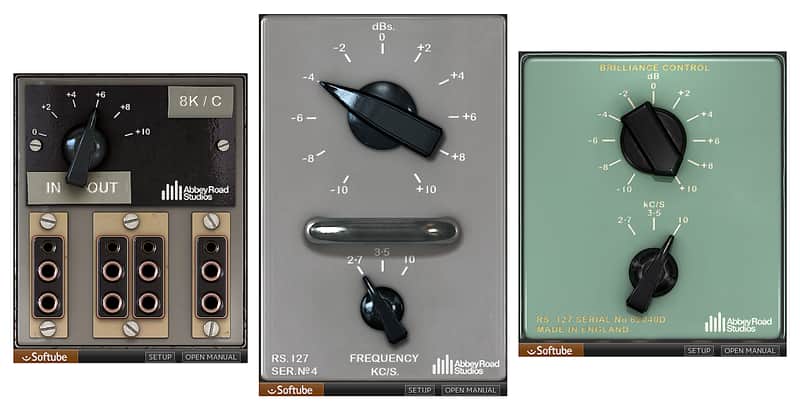
Meticulously modeled by Softube, the RS127 Rack, RS127 Box and RS135 deliver the sweetest treble equalization imaginable. With the Brilliance Pack, today's DAW-based mix engineers can add all the air and top frequencies they want, without the slightest trace of harshness—just like Abbey Road Studios' engineers have done on their recordings from the 1960s onwards.
Abbey Road Studios Brilliance Pack
A highly specialized, but indispensable, tool for mix engineers of all genres. The three included equalizers focus entirely on the presence/treble frequencies, breathing air into single tracks or entire mixes.
Abbey Road Studios engineers found the presence boxes excellent for guitars, vocals and drums, especially snare and kick drum direct to tape. The units were in constant operation throughout the studios during recording and mixing, used to define the sound of instruments, brighten up the feed to the echo chambers and patch over compressors to create de-essers. They even found their way into the cutting rooms.
The original equalizers were exclusively built in-house by the Abbey Road engineers in the 1960s and quickly became a secret weapon at the studios. Before the plug-in version was released, they had never been available outside of Abbey Road Studios. Softube has faithfully modelled the passive circuitry of the three original units, component by component.
RS127 Rack (grey faceplate)
The grey RS127 Rack is the original Abbey Road Studios treble equalizer. It offers a boost or cut of up to 10 dB at 2.1, 3.5 and 10 kHz (or kilocycles per second as they used to be known).
RS127 Box (green faceplate)
When more units were needed in the studio, the portable green RS127 Box was built. The same circuit was used as in the original RS127, but with the addition of an audio transformer. The engineers quickly discovered that the transformer dramatically altered the sound character and the operating frequencies of the RS127. The frequencies got shifted a bit higher, which is of course also holds true for the plug-in model.
RS135
Lastly, the RS135 was created to fill in the frequency gap that the RS127 units left out. It's fixed at 8 kHz, offers boost only and is just as sweet and silky as its siblings.
In Short:
- Adds beautiful sounding treble and presence without harshness
- Three different passive treble equalizers, modeled from Abbey Road Studios' originals
- The original grey RS127, the green RS127 with added transformer and the 8 kHz only RS135
- Very low CPU usage
Compatibility
Mac Hardware: Intel Core 2 Duo or higher, 2GB RAM minimum
Windows Hardware: Intel Core 2 Duo/AMD Athlon 64 X2 or higher, 2GB RAM minimum
Mac OS Requirements: OS X 10.9 or later
Windows OS Requirements: Windows 7 SP1 or later
Format: AAX DSP, AAX Native, VST, VST3, AU
Installation Instructions
Create a Softube/Gobbler account here: https://www.softube.com/index.php?id=myaccount
Download and install the Gobbler App
- Open the Gobbler App and sign in using your Softube/Gobbler account
- In the Gobbler App, click "Install All" to install all Softube products you have a license for - use the license key emailed to you by Reverb SYNC.
- If you have new licenses, keep the Gobbler App running when starting your DAW. The first time you run a plug-in, you will get a prompt for activation. Please follow the step by step instructions.
- We auto-detect your computer operating system, so just click the download button above.
- Find the downloaded plugin (it's in your computer's download folder, or wherever you've chosen to save it) and double click the installer.
- A plugin installer window will open. Simply go through the installation process.
- We will also send you an email with a link to re-download in case you need it.
- If Ableton Live is closed, open it and skip to #5.
- If Ableton Live is already open, go to Preferences.
- Go to Files & Folder.
- Click "Rescan plugins".
- Find the plugin in the Ableton plugins folder in the sidebar.
- Drag-and-drop the plugin onto your track at the bottom of the screen.
- Open Logic Pro X. Newly installed plugins should be detected automatically every time Logic is opened.
- If you've downloaded an effect or utility plugin, these can be used on an insert for any track in the mixer.
- Create a software instrument track if you downloaded a virtual instrument plugin.
- Under Default Patch, go to AU Instruments and choose the plugin you just installed.
- Open Pro Tools. Newly installed plugins should be detected automatically every time Pro Tools is opened.
- If you've downloaded an effect or utility plugin, these can be used on an insert for many types of tracks (Audio, Aux, Instrument, Master Fader...)
- If you’ve downloaded a software instrument, create a new Instrument track.
- Navigate to the Mixer and locate the newly created Instrument track.
- Select the desired instrument plugin by clicking on any of the Inserts on the Instrument track.
- Go to the Reverb SYNC Software and plugin Collection.
- Choose your desired plugin.
- Reverb will auto-detect your platform, so simply click the download button.
- Continue the installation process by following the prompt.
- Hover your mouse over the smart control button.
- Click Show Inspector icon.
- Click on plugins and choose your desired plugin.
General Instructions: