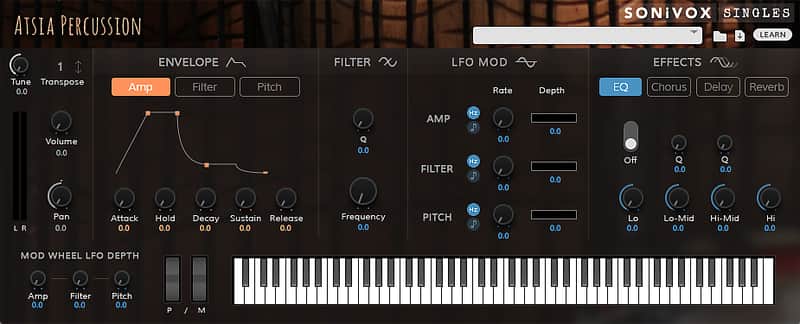
SONiVOX Atsia Percussion
This gear has sold
See similar gear from other Reverb sellers

Our users rate Reverb
What it is:
A collection of high quality, virtual world percussion.
How we use it:
From bells to talking drums, Atsia Percussion adds a new dimension to any track.
Why it's cool:
Atsia Percussion focuses on some rather esoteric percussion samples - leaving plenty of room for inspiration, without cluttering the studio. Atsia Bass Drums
This collection includes the Dunumba, Kenkeni, and Sangban (all from Ewe tribe of Ghana), Gungon (from the Dagomba of Northern Ghana), and Macana Surdo (from Brazil). All are cylindrical, double headed drums, though they are otherwise built quite differently and create a variety of sound. They are typically used for foundation rhythms. Up to 4 velocity levels, with both open and closed (muted) hits.
Atsia BellsAn essential component in African percussion ensembles, these bells provide an important structure to the rhythms. Instruments include Iron Castenet, Kenken, and Toke, and the all important Gankoqui Bells. Gankogui is the foundation of the entire ensemble. Its voice provides the metronomic background around which most Anlo-Ewe music is structured. 5 separate Gankoqui bells have been included. Up to 4 velocities and both open and muted strikes, give a wide variety of timbres.
Atsia Floor DrumsHand HitThis set of drums includes the Djembe (one of the most popular hand drums around the world in drum circles, rituals, and gatherings), Apentema, and three differenrt Kpanlogo drums - conga shaped drums covered with antelope skin. Both strong hand and weak hand hits have been sampled. Open and muted hits and open and muted slaps of up to four velocities, give you a wide range of percussive sounds to work with.
Atsia Floor Drums Hand & Stick HitThis set of drums is played with both hands and sticks and includes the Atsimevu, Boba, and Sogo. The Atsimevu is the lead drum and most important performer in the Ewe ensemble. The function of the Atsimevu is to lead the rest of the group through a performance. The performer utilizes a variety of strokes to produce a rhythmic language communicating with the rest of the ensemble. The Sogo is the second most important drum in the ensemble next to the Atsimevu and is the largest of the supporting drums. The Boba is a large barrel shaped drum that produces a thunderous, booming bass sound for the ensemble. Up to 4 veloceties, with a wide variety of open and muted stick hits, slaps, stokes, and double hits give you a wide ranging percussive "vocabulary" with which to create your music.
Atsia Floor DrumsStick HitThe floor drums in this set of instruments function in both lead and supporting roles. All are played with sticks. Instruments include: Kaganu, Kidi, Kloboto, Kpegisu, and Totodzi. Kpegisu is one of the oldest living oral traditions of West Africa, and is deeply expressive in its use of allegory and metaphor. Formerly a dance for those going off to war, Kpegisu is now performed on special occasions. The Kpegisu drum is named after this dance. Both strong hand and weak hand hits have been sampled. Open and muted hits plus side stick are included, with up to four velocities.
Atsia Frame DrumsThe Gome and Tamalin are two unique frame drums from the Ashanti and Ga peoples of Ghana. The Gome is like a small table with a rectangular or square shaped skin table top. When placed on its side on the ground, the drummer sits on it, playing it with the hands and the heels of the feet, which press against the skin to change pitch. The Tamalin is square or rectangular shaped and is held with one hand in the middle of the cross-shaped frame and struck with the other hand. A wedge tuning system and goatskin head produce a high steady tone. Up to 4 velocities of center and edge hits, mutes, and slaps.
Atsia Shakers & SnapsShakers add color and texture to a percussion ensemble. These shakers are from Ghana and Brazil and include Afoxe, 4 different Axatse, 2 different Caxixi, Frogs Eggs, Ganza, Maracas, and Shekere. Finger Snaps are also included. Multiple velocities, single shakes, double shakes, and taps.
Atsia Talking DrumsShakers add color and texture to a percussion ensemble. These shakers are from Ghana and Brazil and include Afoxe, 4 different Axatse, 2 different Caxixi, Frogs Eggs, Ganza, Maracas, and Shekere. Finger Snaps are also included. Multiple velocities, single shakes, double shakes, and taps.
Compatibility
Windows:
- Windows 7 - 10
- Minimum 2GB RAM, 4GB Recommended
- A VST 32/64 or AAX 32/64 compatible host application
- OS X Version 10.8 - 10.11
- Minimum 2GB RAM, 4GB Recommended
- A VST 32/64, AU 64 or AAX 32/64 compatible host application
Installation Instructions
To install SONiVOX software and content:
-
Double-click the .exe (Windows) or .pkg (Mac OS X) installer file emailed to you by Reverb SYNC.
-
Follow the on-screen instructions to continue the installation.
-
Authorize your installation. See "Authorization" below to learn how to do this.
Important: Due to the quantity and quality of samples included in the software, allow some time for the installation to complete. This could take several minutes.
Authorization
To authorize your product:
- Either double-click the software Authorizer on your computer desktop or open the software on a MIDI track in your digital audio workstation (DAW).
- In the window that appears, enter the authorization code you received with your installation,
and then click Activate.
- Alternatively, click Try to start using a trial version of the software, or click Cancel to exit the authorization process.
- After clicking Activate, the next window will ask you for your authorization code. Enter the code you received with your purchase, and then click Next.
- The next window will ask for your e-mail address.
- If you do not have an iLok account, enter your e-mail address, and then click Continue.
- If you already have an iLok account, enter your e-mail address, check the "Register with my existing iLok.com account" box, and then click Continue.
- If you already have an iLok account, the next window will ask for your account information. Enter your iLok User ID and Password, and then click Next. Continue on to Step 6 below.
- If you do not have an iLok account, the next window will where you want to store your new iLok license. Click the Store button next to On my computer.
- The next window will confirm that your activation was successful. Click Continue to finish the authorization. You’re now ready to use your software— skip the following steps, and start making music! Select where you want to store your iLok license. Any available locations will appear in the panel in the window, including your computer or any physical/hardware iLoks registered with your iLok account (and are also connected to your computer).
- After you have selected your desired location, click Next. The next window will confirm that your activation was successful. Click Continue to finish the authorization. You’re now ready!
| Brand | |
|---|---|
| Model |
|
| Categories |
Product safety information may be available here.