Opcode Studio 64X 64-Channel Midi Interface/Patchbay
This gear has sold
See similar gear from other Reverb sellers
Listed:8 years ago
Views:123
Watchers:2
Offers:0

Santa Clarita, CA, United States
Our users rate Reverb
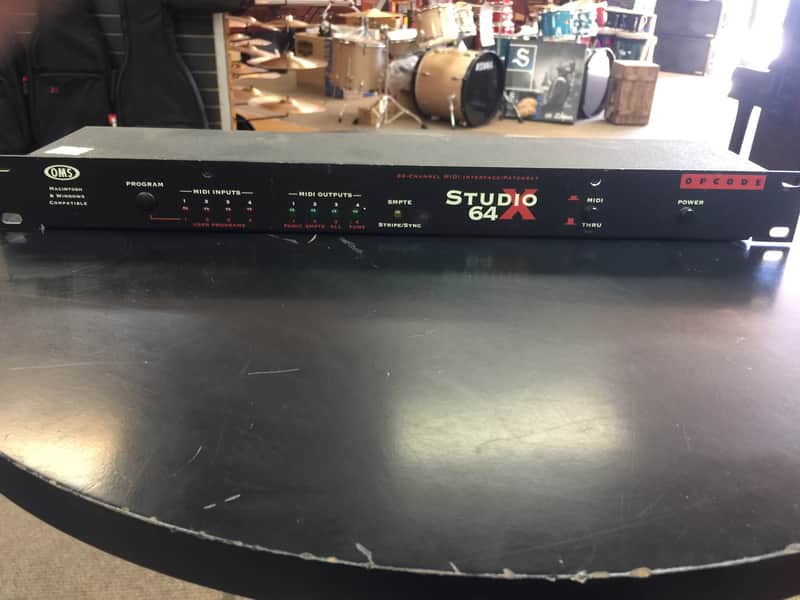
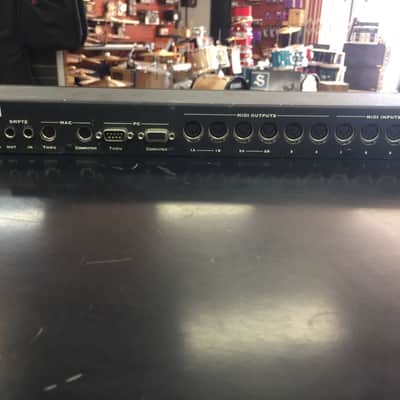
Opcode's Studio 64X is aimed at those people who need more than just a simple 1-port MIDI interface, and thus represents the entry level of the pro or semi-pro market. It's a 4-port, 64-channel interface, MIDI patchbay and SMPTE box, all housed in a compact, 1U rackmount case. Opcode have been making MIDI hardware since the beginnings of MIDI, so they know what users need -- which is why two of the ports on the Studio 64X have dual output sockets. These built-in 'Thru boxes' enable you to use extra equipment on the spare channels of a port without needing to buy a separate Thru box. The Studio 64X can also generate or receive SMPTE timecode via two dedicated quarter-inch jack sockets.
ROUTING & FILTERING
The Studio 64X enables you to route any MIDI input port to any of the MIDI output ports (although usually you don't connect something back to itself). It provides comprehensive control over exactly which messages can be sent out of each port, so it's possible to specify that only particular types of messages can pass, to choose which MIDI channel can pass through, or even to change the MIDI channel to a different one. All of the settings in the four available user routing programs are stored in non-volatile (battery-backed) memory inside the Studio 64X. Editing the patching, filtering and other settings can only be done via software on a computer -- but the routing programs are still useable without the computer.
USER INTERFACE
The Studio 64X front panel has a minimalist user interface. The input and output monitor LEDs allow you to visually check that your MIDI signals are arriving at the patchbay, and that they are being routed correctly. Dim LEDs usually indicate MIDI Clock messages, while bright flashes are ordinary MIDI messages, and long bright LED flashes mean SysEx or over-use of pitch bend, mod wheel or aftertouch/key pressure.
Pressing the Program button advances through the four user programs first, then through the four factory preset programs. In each case the relevant LED flashes to show that that the program is active. The first factory program is a 'panic' mode, which sends Note Off messages for each note on each channel to each port, and is used when you get a stuck note. The MIDI/Thru push button selects whether the computer is connected to the Studio 64X, or to the printer, modem or other serial device. It is not easy to figure out which mode the button is in without actually pressing it to find out whether it is in or not! A better indication would have been useful, and would not have increased the cost hugely -- for example, it's possible to get buttons which reveal a brightly coloured band when they are in the 'out' position.
This does not any include and power supply or cables
ROUTING & FILTERING
The Studio 64X enables you to route any MIDI input port to any of the MIDI output ports (although usually you don't connect something back to itself). It provides comprehensive control over exactly which messages can be sent out of each port, so it's possible to specify that only particular types of messages can pass, to choose which MIDI channel can pass through, or even to change the MIDI channel to a different one. All of the settings in the four available user routing programs are stored in non-volatile (battery-backed) memory inside the Studio 64X. Editing the patching, filtering and other settings can only be done via software on a computer -- but the routing programs are still useable without the computer.
USER INTERFACE
The Studio 64X front panel has a minimalist user interface. The input and output monitor LEDs allow you to visually check that your MIDI signals are arriving at the patchbay, and that they are being routed correctly. Dim LEDs usually indicate MIDI Clock messages, while bright flashes are ordinary MIDI messages, and long bright LED flashes mean SysEx or over-use of pitch bend, mod wheel or aftertouch/key pressure.
Pressing the Program button advances through the four user programs first, then through the four factory preset programs. In each case the relevant LED flashes to show that that the program is active. The first factory program is a 'panic' mode, which sends Note Off messages for each note on each channel to each port, and is used when you get a stuck note. The MIDI/Thru push button selects whether the computer is connected to the Studio 64X, or to the printer, modem or other serial device. It is not easy to figure out which mode the button is in without actually pressing it to find out whether it is in or not! A better indication would have been useful, and would not have increased the cost hugely -- for example, it's possible to get buttons which reveal a brightly coloured band when they are in the 'out' position.
This does not any include and power supply or cables
This item is sold As-Described
This item is sold As-Described and cannot be returned unless it arrives in a condition different from how it was described or photographed. Items must be returned in original, as-shipped condition with all original packaging.Learn More.
| Listed | 8 years ago |
|---|---|
| Condition | Good (Used) Good condition items function properly but may exhibit some wear and tear.Learn more |
| Brand | |
| Model |
|
| Categories |
Product safety information may be available here.