Waves Nx – Virtual Mix Room Over Headphones

Waves Nx – Virtual Mix Room Over Headphones
New Price€109.51
Incl. VAT
Instant Download
This gear has sold
See similar gear from other Reverb sellers
Listed:over a month ago
Views:690
Saves:10
Offers:4

Chicago, IL, United States
Our users rate Reverb
Mix with confidence via this virtual mix room from Waves.
What it is:
The acoustics of a pro-grade mix room - inside your headphones.
How we use it:
Insert the plugin on the master buss, and hear all the elements of your mix accurately laid out in a virtual space.
Why it's cool:
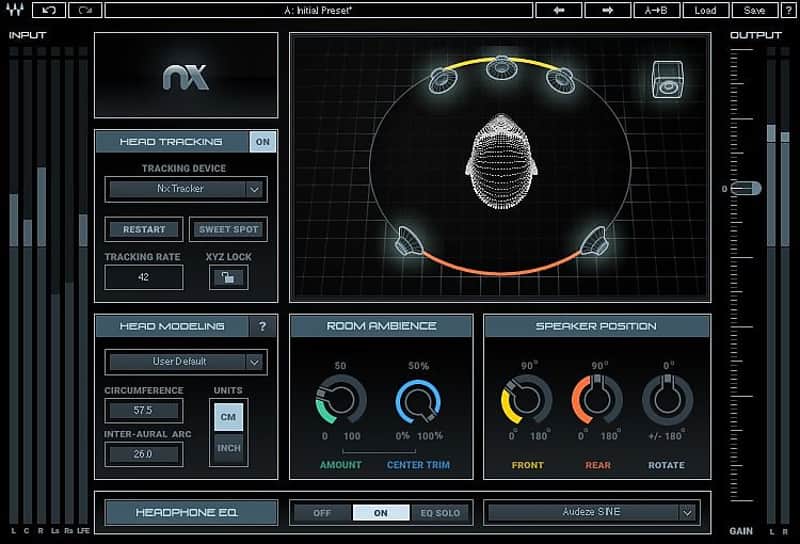
Nx allows you to accurately judge mix depth, balance, and panning - all over headphones. Want to create great mixes but don’t have an acoustically perfect room? Need to mix on the road? This plugin recreates the acoustics of a high-end studio inside your headphones, so you can make great mixing decisions anytime, anywhere.
Powered by Waves’ groundbreaking Nx technology, Nx Virtual Mix Room is a virtual monitoring plugin that delivers, on headphones, the same three-dimensional depth and panoramic stereo image you would be hearing from speakers in an acoustically treated room.
Nx lets you mix and monitor with greater confidence, giving you a better representation of how your headphone mixes will translate to speakers. Insert the plugin on your master buss, and hear all the elements of your mix accurately laid out in space, just as you would in the sweet spot of a great-sounding professional mix room.
Want to mix for 7.1, 5.1 or 5.0 surround on your regular stereo headphones? Nx lets you do exactly that – a true revolution in the world of surround mixing.
Best of all, Nx does all this without coloring your sound. What you hear is your mix, exactly the way you want it to sound – only now you have a more accurate way to monitor it on headphones.
Nx Virtual Mix Room now comes with a Headphone EQ calibration feature, allowing you to select a correction EQ curve for specific headphone models. Based on precision headphone measurement data provided by www.headphone.com, the Nx EQ curves are designed to balance out any extreme features in the frequency response, correcting them toward a common frequency balance and providing a more transparent starting point for monitoring and mixing.
Use Waves Nx with real-time head tracking – taking advantage of your computer’s camera or the Nx Head Tracker – and enjoy the enhanced realism of being in the Virtual Mix Room, anywhere and everywhere you go.
Features:
Compatibility
Mac:
CPU
Memory
Operating System
Screen Resolution
Support for Visually Impaired Users
Windows:
CPU
Memory
Operating System
Screen Resolution
In general, Nx will support any webcam that works on your system. If you can Skype with it, you can do head tracking with it. Note that MacBook Pros with built-in PCI-based cameras cause CPU to peak in Pro Tools. This has nothing to do with the Nx plugin or head tracking application; it is a system bug of PCI cameras and Pro Tools on MacBook Pro. To avoid this issue, use an external USB camera.
Note to Mac users:
Following the August 2016 update of the Nx plugin, old Mac computers with built-in iSight cameras may experience deterioration in tracking performance. Until we fix this issue, it is advised to use an external USB camera instead of the built-in iSight camera, or, in case you do not have an Nx Head Tracker, do not update the plugin yet.
Installation Instructions
What it is:
The acoustics of a pro-grade mix room - inside your headphones.
How we use it:
Insert the plugin on the master buss, and hear all the elements of your mix accurately laid out in a virtual space.
Why it's cool:
Nx allows you to accurately judge mix depth, balance, and panning - all over headphones. Want to create great mixes but don’t have an acoustically perfect room? Need to mix on the road? This plugin recreates the acoustics of a high-end studio inside your headphones, so you can make great mixing decisions anytime, anywhere.
Powered by Waves’ groundbreaking Nx technology, Nx Virtual Mix Room is a virtual monitoring plugin that delivers, on headphones, the same three-dimensional depth and panoramic stereo image you would be hearing from speakers in an acoustically treated room.
Nx lets you mix and monitor with greater confidence, giving you a better representation of how your headphone mixes will translate to speakers. Insert the plugin on your master buss, and hear all the elements of your mix accurately laid out in space, just as you would in the sweet spot of a great-sounding professional mix room.
Want to mix for 7.1, 5.1 or 5.0 surround on your regular stereo headphones? Nx lets you do exactly that – a true revolution in the world of surround mixing.
Best of all, Nx does all this without coloring your sound. What you hear is your mix, exactly the way you want it to sound – only now you have a more accurate way to monitor it on headphones.
Nx Virtual Mix Room now comes with a Headphone EQ calibration feature, allowing you to select a correction EQ curve for specific headphone models. Based on precision headphone measurement data provided by www.headphone.com, the Nx EQ curves are designed to balance out any extreme features in the frequency response, correcting them toward a common frequency balance and providing a more transparent starting point for monitoring and mixing.
Use Waves Nx with real-time head tracking – taking advantage of your computer’s camera or the Nx Head Tracker – and enjoy the enhanced realism of being in the Virtual Mix Room, anywhere and everywhere you go.
Features:
- Get the ideal acoustics of a top mix room – inside your headphones
- Accurately judge mix depth, balance and panning over headphones
- Use Nx to improve headphone monitoring while recording
- Use the plugin with the Nx Head Tracker for enhanced realism
- Transparent sound that preserves your original tone
- Mix for 7.1, 5.1 and 5.0 surround on your stereo headphones
- Personalize the plugin to your individual head measurements
- EQ calibration available for select headphone models.
Compatibility
Mac:
CPU
- Intel Core i5 / i7 / Xeon
Memory
- 8 GB RAM
- 8 GB free disk space on the system drive
Operating System
- 10.10.5 - 10.12.6
Screen Resolution
- Minimum: 1024x768
- Recommended: 1280x1024 / 1600x1024
- USB displays are not supported as the primary display.
Support for Visually Impaired Users
- Mac OS Sierra 10.12.4
- VoiceOver Utility enabled
- Pro Tools 12.7
- Logic 10.3.1
Windows:
CPU
- Intel Core i3 / i5 / i7 / Xeon / AMD Quad-Core
Memory
- 4 GB RAM
- 8 GB free disk space on the system drive
Operating System
- Windows 7 with SP1 64 bit
- Windows 8.1 64 bit
- Windows 10 64 bit
Screen Resolution
- Minimum: 1024x768
- Recommended: 1280x1024 / 1600x1024
In general, Nx will support any webcam that works on your system. If you can Skype with it, you can do head tracking with it. Note that MacBook Pros with built-in PCI-based cameras cause CPU to peak in Pro Tools. This has nothing to do with the Nx plugin or head tracking application; it is a system bug of PCI cameras and Pro Tools on MacBook Pro. To avoid this issue, use an external USB camera.
Note to Mac users:
Following the August 2016 update of the Nx plugin, old Mac computers with built-in iSight cameras may experience deterioration in tracking performance. Until we fix this issue, it is advised to use an external USB camera instead of the built-in iSight camera, or, in case you do not have an Nx Head Tracker, do not update the plugin yet.
Installation Instructions
- Create an account: https://www.waves.com/create-account (if you have an account, skip this step)
- Register the serial number we emailed: https://www.waves.com/account/register
- Download and install Waves Central for Mac | Windows.
- If you already have Waves Central installed, skip to step 4. - Launch Waves Central.
- Windows: via the desktop shortcut or Start Menu > All Programs > Waves.
- Mac: Applications > Waves Central. - Log into Waves Central using your Waves account information.
- Click on Easy Install & Activate.
- Select the products you wish to install & activate on this computer.
- Click on the Install & Activate button.