XLN Audio XO
XLN Audio XO
This listing has ended
See similar gear from other Reverb sellers

Our users rate Reverb
A revolutionary new way to explore drum samples and make beats. XO is a fast, fun and inspiring new instrument that will have you making awesome beats in no time.
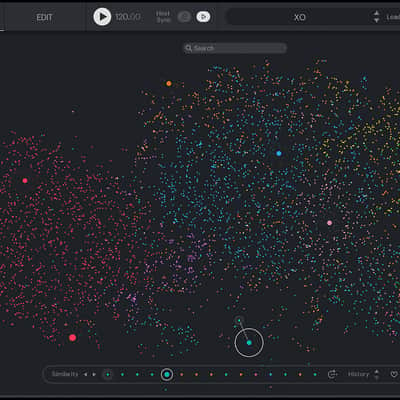
XO collects all your one-shot drum sounds and sorts them by similarity, in the XO Space.
XO allows you to seamlessly explore your samples, regardless of where or how they are stored. XO’s playful workflow (boosted by more than 8000 curated factory samples and a long list of inspiring presets) will have you making awesome beats in no time.
Everything you need to know about XO by XLN Audio
XO by XLN Audio is a revolutionary new beat making and drum sample exploration tool. XO collects all your one-shot drum sounds and sorts them by similarity, in the XO Space.
XO allows you to explore your samples smoothly and seamlessly, regardless of where or how you store them. Even if your sound libraries are scattered all over your computer and external drives, your files have vague file names or your libraries are full of duplicates, XO collects and sorts them all for you. XO also integrates smoothly with samples and libraries from cloud-based sampling services such as Splice, Noiiz, Beatport, Looperman and Loopmasters.
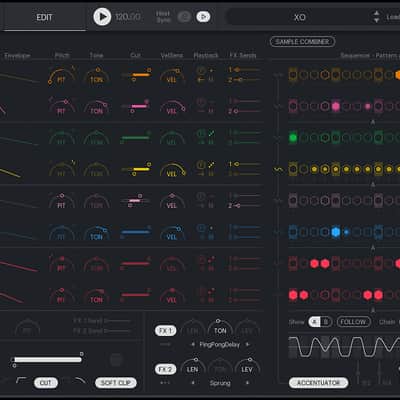
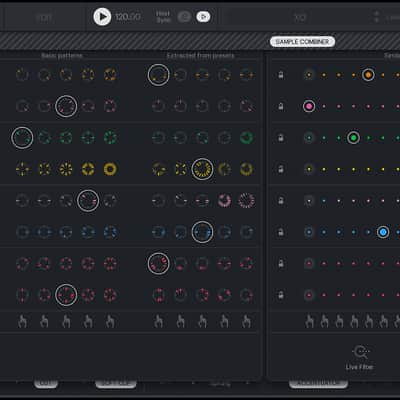
XO’s interface focuses on playfulness and workflow. Quickly make and tweak your beat with XO’s playful and intuitive sequencer. Use the Accentuator to add dynamics and life to your beat. Dial in the perfect drum beat with one of the Groove Templates. The Nudge function adds raw urgency or funky sluggishness to your drum patterns and MIDI. Use essential modifiers and effects like reverb, delay, pitch, filter, distortion or tone to add character to your beats.
XO comes ready for action with more than 8000 curated factory samples and a vast list of inspiring presets.
Discover XO’s Playground Mode where you quickly explore endless variations to beats and sounds. Playground Mode is an infinite source for “happy accidents” - a fast way for beat makers to find new angles, inspiration and strike creative gold. Step through different patterns or sounds, or hit the randomize button and let chance hit you with something new and exciting.
Quickly find that perfect snare, the kick with the right oomph, your dream hi-hat or the ultimate set of cymbals.
The many search filters built into XO helps you find what you’re looking for even faster. XO’s powerful Live Filter Mode allows you to use the strength in XO’s random sample suggestions, but narrow the scope to your preference. For example, type in "808", “Trap” or “Hip hop” and only randomize samples that match that criteria.
Drag and drop audio and MIDI into your workflow with ease when you are done exploring and tweaking.
XO is a fast, fun and inspiring new instrument that will have you making awesome beats in no time.
Compatibility
PC: Windows 7, 8, 10 (64 bit)
Mac: macOS 10.9 or later (64 bit)
- 2 GB RAM. 4GB or more recommended.
- High-speed Internet connection (during installation only)
Supported Formats
- VST, AU, AAX (64 bit)
- Standalone (Windows and macOS)
Supported Hosts
While XLN Audio actively tests XO on systems listed below, the instrument should run on any host supporting 64-bit VST, AU, or AAX plugins:
- Pro Tools 11 or later - www.avid.com
- Cubase 8 or later - www.steinberg.net
- Live 8 or later - www.ableton.com
- Cakewalk by Bandlab - www.bandlab.com
- Logic Pro 9 or later - www.apple.com
- Reaper 4 or later - www.reaper.fm
Manufacturer: www.xlnaudio.com
Installation Instructions
XLN ONLINE INSTALLER
The XLN Online Installer is a one click solution to download, install and authorize your XLN products. It also lets you add demos and trials of products you don't own.
Download the installation package, extract all files and run the installation program. After you have completed the installation process once, the XLN Online Installer will be installed on your system and you can safely remove the downloaded package. The next time you need to update existing products or install new ones, simply run the XLN Online Installer from your Launch Pad / Applications folder or Start Menu.
Note: Use your computer's standard, built-in extraction tool. For Windows just right click and select "Extract All...". Using a 3rd party extraction tool such as Win RAR has been known to cause issues.
XLN ONLINE INSTALLER Mac: https://www.xlnaudio.com/api/download/96
XLN ONLINE INSTALLER Windows: https://www.xlnaudio.com/api/download/95
Product Keys unlock products in your account. If you are logged in to the XLN Audio web site, you can register Product Keys on the 'Register Product' page in 'My Account'. There is no need to register products bought in the XLN webshop, they are immediately added to your account.
Registration: https://www.xlnaudio.com/account/products/register
Product Keys come in two different formats:
- R-1001-10-123456-ABCD
- R-ADAD-123456-ABC-DEF
Note: Products keys are single use only, once a key has been registered you will not need to use it again. We help keep track of all your products and licenses for you.
https://www.xlnaudio.com/install
| Brand | |
|---|---|
| Model |
|
| Categories |
Product safety information may be available here.