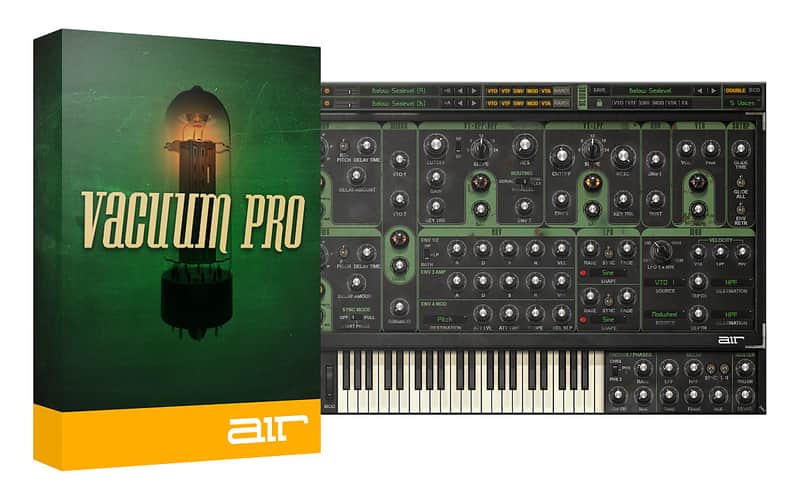

AIR Music Technology Vacuum Pro Polyphonic Analog Tube Synthesizer
This gear has sold
See similar gear from other Reverb sellers

Our users rate Reverb
What it is:
A polyphonic analog synth featuring six virtual vacuum tube circuits to sculpt everything from basses to sound effects.
How we use it:
From basses, leads, pads, or even sound effects, Vacuum Pro can fill each and every whole in a track with musical, tube-y goodness.
Why it's cool:
The 8 Smart Knob view makes it easy to dial in an ideal synth sound without getting caught up in all the knobs that contribute to Vacuum's advanced synthesis algorithms. Analog Just Got Warmer
Vacuum Pro is a polyphonic analog synthesizer with vacuum tube circuit modeling that perfectly captures the crunchy, warm sound of the analog era. With four analog oscillators, multiple filters and envelopes, and built-in audio effects, Vacuum Pro lets you dive deep into subtractive synthesis to recreate those sought-after analog sounds from the 70s and 80s. Tweak the switches, knobs, and dials to program anything from basses, leads, pads, or unique sound effects. For even more warmth, Vacuum Pro has six virtual vacuum tube circuits that add crunch and grit at every stage of the signal path. Analog just got a whole lot warmer.
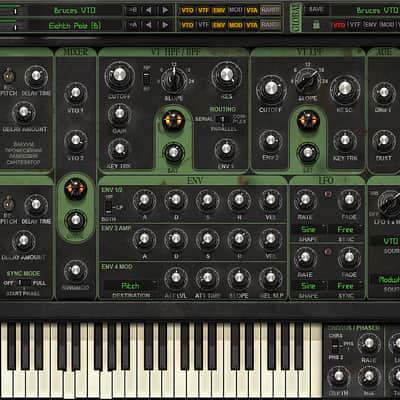
Vintage VibesVacuum Pro is a powerful combination of two separate synthesizer parts that can be stacked, split, and layered to produce big, wide, and fat analog sounds. Each Vacuum Pro part starts with two wide-range, vacuum tube oscillators that can be synched, detuned, and set to various octave levels. Plus, Quad Detune controls per oscillator make it easy to quickly dial in lush sounds. For an even bigger sound, the built-in Doubling effect instantly widens and thickens up your patch.
Shape your sound with two vacuum tube filters that include a traditional low-pass filter and a selectable high-pass/band-pass filter. Vacuum Pro also has four envelope generators, matrix-assignable modulation, and a tempo sync’d LFO. The mixer offers a drive circuit and a tone-warping ring modulator. For authentic analog behavior, the Age controls let you manipulate the drift of and add dust to your sounds.
Programming PowerhouseVacuum Pro comes complete with 350+ tweakable patches created by acclaimed sound designers Richard Devine and Mark Ovenden. You can load these patches separately into each Vacuum Pro part to combine and experiment with multi-timbral sounds. For instant sound inspiration, Vacuum Pro features Smart Sound Randomization, which randomly generates new settings for either part or both. Define which modules you want to lock at their current settings, which will be randomized, and then let Smart Sound dial in a patch for you.
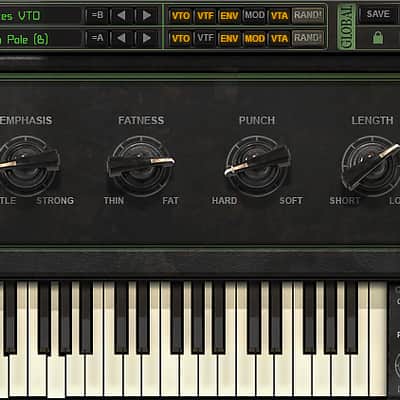
Global ControlVacuum Pro’s Smart page condenses all the individual parameter controls into eight macro knobs that enable you to quickly shape the sound of your patch without extensive tweaking. Macro knobs such as Punch, Emphasis, and Complexity add an intuitive workflow for perfecting your programming. Switch back and forth between the micro and macro modes to quickly edit or create your own custom sounds.
Extra EffectsIn addition to its authentic analog sound, Vacuum Pro includes a host of creative tools that are characteristic of classic analog synthesizers. An onboard arpeggiator, which can be tempo sync’d to your DAW, offers a quick way to build melodic runs and short sequences. A built-in chorus/phaser and delay effects give life and motion to your Vacuum Pro patches. Onscreen pitch bend and modulation wheels add extra expression to any performance, and all parameters are MIDI-mappable for performance ease and automated control.
- A four-oscillator polyphonic analog synthesizer with vacuum tube circuit modeling
- Super-wide, fat, and organic analog sound captures the character of classic synthesizers
- Two individual synthesizer parts for huge, stacked sounds
- 350+ tweakable patches programmed by legendary sound designers
- Smart Sound Randomizer dials in settings to user-defined parameters
- 8 Smart Knobs for easy programming and macro control over key parameters
- Economy mode reduces the load on the host processor with minimal impact on the sound
- 64-bit plugin: VST, AU, RTAS, and AAX formats
Compatibility
- System Requirements
- VST (32 bit and 64 bit) qualified for:
- Ableton Live, Cubase, Arsenal
- AU (64 bit only) qualified for:
- Logic Pro X
- AAX qualified for:
- ProTools 11.x (64 bit)
- RTAS qualified for:
- 32-bit ProTools
- PC: Windows 10, 8 or Windows 7 Service Pack 1; Minimum Dual Core 2GHz (Intel Core i5 or i7 Recommended)
- Mac: Mac OS X 10.8.5-10.12; Core Duo Processor (Core i5 or i7 Recommended)
- Minimum RAM 4GB (8GB or more recommended)
- 1GB free hard drive space (Download and Installation)
- Internet Access (Download and Authorization)
- VST (32 bit and 64 bit) qualified for:
- *Notes
- No physical iLok key required - an iLok account is required, however.
Installation Instructions
- Open the install file emailed to you by Reverb SYNC.
- Double-click the Setup app.
- Allow your computer time to verify (this may take a few minutes).
- Follow the on-screen installation prompts.
- After installation, open your DAW.
- Vacuum Pro will open an authentication window.
- Click "Activate" and input the serial number emailed to you by Reverb SYNC.
- If you have an iLok account, input the email associated with your account and skip to step 11.
- If you don't have an iLok account, click "Why?" and click the "Create new iLok.com account" link.
- After creating an iLok account, input your iLok account email.
- Choose whether to store your license on your computer or iLok.
- You're good to go!
General Instructions:
- We auto-detect your computer operating system, so just click the download button above.
- Find the downloaded plugin (it's in your computer's download folder, or wherever you've chosen to save it) and double click the installer.
- A plugin installer window will open. Simply go through the installation process.
- We will also send you an email with a link to re-download in case you need it.
- If Ableton Live is closed, open it and skip to #5.
- If Ableton Live is already open, go to Preferences.
- Go to Files & Folder.
- Click "Rescan plugins".
- Find the plugin in the Ableton plugins folder in the sidebar.
- Drag-and-drop the plugin onto your track at the bottom of the screen.
- Open Logic Pro X. Newly installed plugins should be detected automatically every time Logic is opened.
- If you've downloaded an effect or utility plugin, these can be used on an insert for any track in the mixer.
- Create a software instrument track if you downloaded a virtual instrument plugin.
- Under Default Patch, go to AU Instruments and choose the plugin you just installed.
- Open Pro Tools. Newly installed plugins should be detected automatically every time Pro Tools is opened.
- If you've downloaded an effect or utility plugin, these can be used on an insert for many types of tracks (Audio, Aux, Instrument, Master Fader...)
- If you’ve downloaded a software instrument, create a new Instrument track.
- Navigate to the Mixer and locate the newly created Instrument track.
- Select the desired instrument plugin by clicking on any of the Inserts on the Instrument track.
- Go to the Reverb SYNC Software and plugin Collection.
- Choose your desired plugin.
- Reverb will auto-detect your platform, so simply click the download button.
- Continue the installation process by following the prompt.
- Hover your mouse over the smart control button.
- Click Show Inspector icon.
- Click on plugins and choose your desired plugin.
| Brand | |
|---|---|
| Model |
|
| Categories |
Product safety information may be available here.