Softube Mutronics Mutator Plug-in
Price€204.91
Instant Download
This gear has sold
See similar gear from other Reverb sellers
Listed:over a month ago
Views:553
Saves:6
Offers:4

Chicago, IL, United States
Our users rate Reverb
Creative filtering for the sonic explorer.
What it is:
Versatile filtering module for guitars, vocals, keyboards, drums, and more.
How we use it:
Craft synth-like filter sweeps, trippy stereo effects, and more.
Why it's cool:
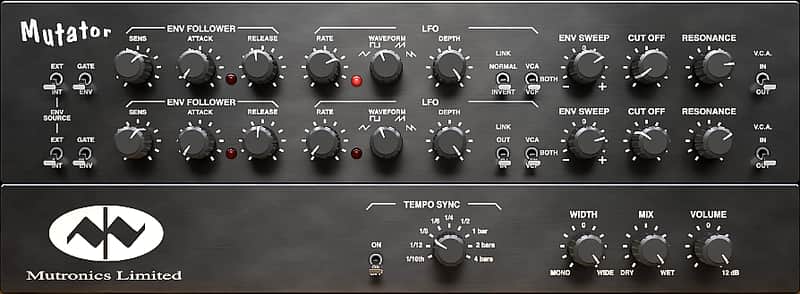
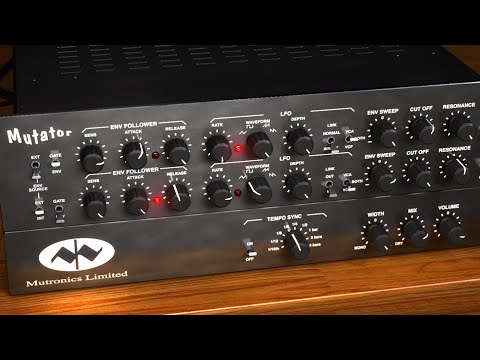
Softube revitalizes a studio rarity from the early '90s. Mutronics Mutator creates mind boggling filter sweep effects on any sound source—guitars, vocals, keyboards, drums, etc. Mutator is essentially a super sweet stereo analog filter and an envelope follower, based on technology developed for analog synthesis in the 1960s. It's fair to say that The Mutator is more of a creative tool than purely a mix tool.
Mutronics Mutator was an instant success when it came out in the early 1990's, and had an enormous impact of the sound from that decade. The Mutator can clearly be heard on records by artists such as Radiohead, Beck, Daft Punk, The Chemical Brothers, Nine Inch Nails, Massive Attack and many more.
But the Mutator was short lived. Production ceased abruptly when a vital component was discontinued by the component manufacturer. The original has since then only been available at auction sites, often at prices much higher than the original purchase price. Softube has worked closely with Mutronics to ensure that the plug-in captures every delicate detail of the original hardware.
What is the Mutator?
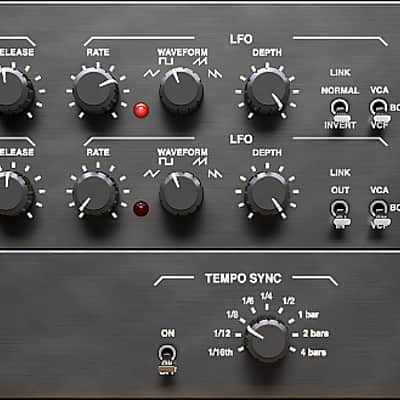
Mutator has an analog voltage controlled filter (VCF) for each of its two channels, which can create synth-like filter sweeps on any sound source that is fed into the unit. The filter can be controlled from a number of sources, for example the envelope follower, which sweeps the filter in proportion to the amplitude of the sound source. In Gate mode, the filter is either on or off, and the filter can also be controlled by the on-board LFOs. These have four waveforms, which create filter sweeps in our out of time with the music.
Another very cool option is to use the external sidechain input, to have an external sound source control the filter movements. For example, insert the Mutator on a pad track and have the filter move in sync with a drum loop. You can also link or unlink the two channels for trippy stereo effects, use the Width control to extend the stereo field and use the Mix knob to blend in the original sound source with the mutated sound.
To further understand what the Mutator does, we recommend that you check out the product video!
Features
Compatibility
Mac
Installation Instructions
What it is:
Versatile filtering module for guitars, vocals, keyboards, drums, and more.
How we use it:
Craft synth-like filter sweeps, trippy stereo effects, and more.
Why it's cool:
Softube revitalizes a studio rarity from the early '90s. Mutronics Mutator creates mind boggling filter sweep effects on any sound source—guitars, vocals, keyboards, drums, etc. Mutator is essentially a super sweet stereo analog filter and an envelope follower, based on technology developed for analog synthesis in the 1960s. It's fair to say that The Mutator is more of a creative tool than purely a mix tool.
Mutronics Mutator was an instant success when it came out in the early 1990's, and had an enormous impact of the sound from that decade. The Mutator can clearly be heard on records by artists such as Radiohead, Beck, Daft Punk, The Chemical Brothers, Nine Inch Nails, Massive Attack and many more.
But the Mutator was short lived. Production ceased abruptly when a vital component was discontinued by the component manufacturer. The original has since then only been available at auction sites, often at prices much higher than the original purchase price. Softube has worked closely with Mutronics to ensure that the plug-in captures every delicate detail of the original hardware.
What is the Mutator?
Mutator has an analog voltage controlled filter (VCF) for each of its two channels, which can create synth-like filter sweeps on any sound source that is fed into the unit. The filter can be controlled from a number of sources, for example the envelope follower, which sweeps the filter in proportion to the amplitude of the sound source. In Gate mode, the filter is either on or off, and the filter can also be controlled by the on-board LFOs. These have four waveforms, which create filter sweeps in our out of time with the music.
Another very cool option is to use the external sidechain input, to have an external sound source control the filter movements. For example, insert the Mutator on a pad track and have the filter move in sync with a drum loop. You can also link or unlink the two channels for trippy stereo effects, use the Width control to extend the stereo field and use the Mix knob to blend in the original sound source with the mutated sound.
To further understand what the Mutator does, we recommend that you check out the product video!
Features
- Mind boggling filter effects
- Control filter sweeps by the sound source's amplitude, from the LFOs or from an external sound source
- Used on many seminal records from the 1990s
- Based on technology developed for analog synthesis from the 1960s
- Each and every component carefully modeled
- Extremely analog behavior of frequencies, phase, distortion, etc
Compatibility
Mac
- Intel Core Duo or newer
- OS X 10.7 or newer
- Screen resolution larger than 1280 x 800
- Any VST, VST3, AU or AAX (Pro Tools 10.3.7, 11.0.2 or higher) compatible host application
- iLok USB key (except for Console 1 and Mix Bundle) and the latest iLok License Manager
- Broadband internet access for downloading installer and register licenses
- Windows 8 or newer, Windows 7 (latest SP, 32-/64-bit)
- Screen resolution larger than 1280 x 800
- Any VST, VST3, or AAX (Pro Tools 10.3.7, 11.0.2 or higher) compatible host application
- iLok USB key (except for Console 1 and Mix Bundle) and the latest iLok License Manager
- Broadband internet access for downloading installer and register licenses
Installation Instructions
Create a Softube/Gobbler account here: https://www.softube.com/index.php?id=myaccount
Download and install the Gobbler App
- Open the Gobbler App and sign in using your Softube/Gobbler account
- In the Gobbler App, click "Install All" to install all Softube products you have a license for - use the license key emailed to you by Reverb SYNC.
- If you have new licenses, keep the Gobbler App running when starting your DAW. The first time you run a plug-in, you will get a prompt for activation. Please follow the step by step instructions. General Instructions:
- We auto-detect your computer operating system, so just click the download button above.
- Find the downloaded plugin (it's in your computer's download folder, or wherever you've chosen to save it) and double click the installer.
- A plugin installer window will open. Simply go through the installation process.
- We will also send you an email with a link to re-download in case you need it.
- If Ableton Live is closed, open it and skip to #5.
- If Ableton Live is already open, go to Preferences.
- Go to Files & Folder.
- Click "Rescan plugins".
- Find the plugin in the Ableton plugins folder in the sidebar.
- Drag-and-drop the plugin onto your track at the bottom of the screen.
- Open Logic Pro X. Newly installed plugins should be detected automatically every time Logic is opened.
- If you've downloaded an effect or utility plugin, these can be used on an insert for any track in the mixer.
- Create a software instrument track if you downloaded a virtual instrument plugin.
- Under Default Patch, go to AU Instruments and choose the plugin you just installed.
- Open Pro Tools. Newly installed plugins should be detected automatically every time Pro Tools is opened.
- If you've downloaded an effect or utility plugin, these can be used on an insert for many types of tracks (Audio, Aux, Instrument, Master Fader...)
- If you’ve downloaded a software instrument, create a new Instrument track.
- Navigate to the Mixer and locate the newly created Instrument track.
- Select the desired instrument plugin by clicking on any of the Inserts on the Instrument track.
- Go to the Reverb SYNC Software and plugin Collection.
- Choose your desired plugin.
- Reverb will auto-detect your platform, so simply click the download button.
- Continue the installation process by following the prompt.
- Hover your mouse over the smart control button.
- Click Show Inspector icon.
- Click on plugins and choose your desired plugin.