Sinevibes Singularity
This listing has ended
See similar gear from other Reverb sellers

Our users rate Reverb
What it is:
A triple processor equipped delay effect.
How we use it:
Put Singularity on a return track and blend in detuned, stereo panned delays to subtly add movement and weirdness to the tracks.
Why it's cool:
With the three effectors following the delay line, Singularity can echo with the best of them - from distorted granular synthesis to simple slap.
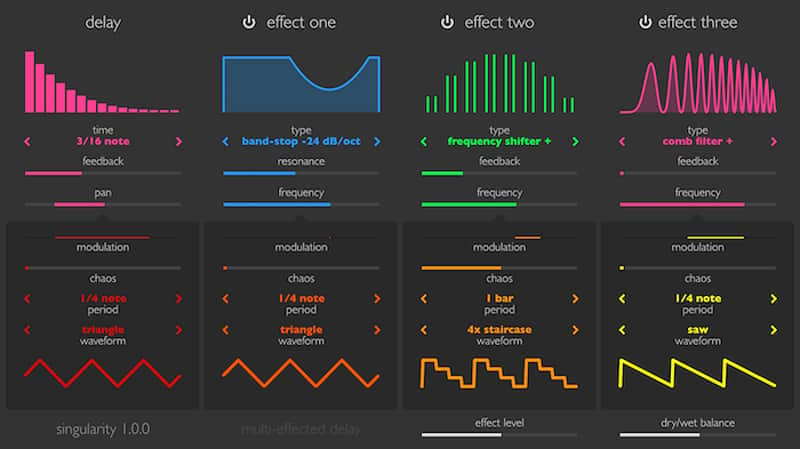
Singularity is a delay effect unlike any other. It starts with a tempo-synchronised feedback delay line capable of true stereo panning, and its tail is then sent into three extremely capable effect units connected in series. Each of these processors includes a rich selection of different algorithms: from filters, phasers and choruses to digital- and analog-style distortion, frequency shifter and granulator. In addition to all this, Singularity has four modulation generators for parameter animation – all of which lets you create extremely sophisticated, out-of-this-world delay, echo and even reverb effects.
As always with Sinevibes plugins, Singularity’s user interface is built using high-contrast, colour-coded elements with lively animations and efficient rendering. Delay, effects and modulators feature interactive graphics which let you understand what’s going on just after a quick glance. Together with thoroughly calibrated parameters with realtime smoothing, Singularity is a bliss to operate in any environment – and in any mood.
Specifications- Feedback delay line with tempo-synchronised time and true stereo panning.
- Three independent effect processors with a total of 22 different algorithms and variations: low-pass, high-pass, band-pass and band-stop filters, 8-stage and 16-stage phaser, barber-pole phaser, decimator, analog drive, circuit-bent filter, frequency shifter, comb filter, 1-voice and 3-voice chorus, granulator.
- Four modulation generators each with 8 waveforms and adjustable periodic chaos.
- Advanced transport sync algorithm with support for tempo and time signature automation.
Singularity works with Logic, GarageBand, Live, MainStage, ReNoise, Reaper, Studio One, Digital Performer, Tracktion and other software that supports Audio Unit effect plugins. It comes in 32/64 bit format for Intel Macs running OS X 10.6 or later, and supports Retina screen resolution.
Compatibility
System Requirements
- Singularity works with Logic, GarageBand, Live, MainStage, ReNoise, Reaper, Studio One, Digital Performer, Tracktion and other software that supports Audio Unit effect plugins.
- It comes in 32/64 bit format for Intel Macs running OS X 10.6 or later, and supports Retina screen resolution.
Installation Instructions
General Instructions:
- We auto-detect your computer operating system, so just click the download button above.
- Find the downloaded plugin (it's in your computer's download folder, or wherever you've chosen to save it) and double click the installer.
- A plugin installer window will open. Simply go through the installation process.
- We will also send you an email with a link to re-download in case you need it.
- If Ableton Live is closed, open it and skip to #5.
- If Ableton Live is already open, go to Preferences.
- Go to Files & Folder.
- Click "Rescan plugins".
- Find the plugin in the Ableton plugins folder in the sidebar.
- Drag-and-drop the plugin onto your track at the bottom of the screen.
- Open Logic Pro X. Newly installed plugins should be detected automatically every time Logic is opened.
- If you've downloaded an effect or utility plugin, these can be used on an insert for any track in the mixer.
- Create a software instrument track if you downloaded a virtual instrument plugin.
- Under Default Patch, go to AU Instruments and choose the plugin you just installed.
- Go to the Reverb SYNC Software and plugin Collection.
- Choose your desired plugin.
- Reverb will auto-detect your platform, so simply click the download button.
- Continue the installation process by following the prompt.
- Hover your mouse over the smart control button.
- Click Show Inspector icon.
- Click on plugins and choose your desired plugin.
What's new?
Update 1.0.4: New delay interpolation algorithm with higher audio quality and no feedback buildup. Re-calibrated reverb presets for longer tail times. Removed drawing animations in effect and modulator graphics. Fixed unnecessary memory usage when drawing graphics. Added new factory presets.